




How to Find Events
Attendee Guide
3 min read
Help articles may not be fully accurate — they can lag behind the app due to frequent updates and automated translation. If in doubt, please contact support.
On this page
This article lists every way to discover events on EventMann, from a quick look at what is on to a precise search. You do not need an account for any of it. The main list is behind All Events in the top bar.
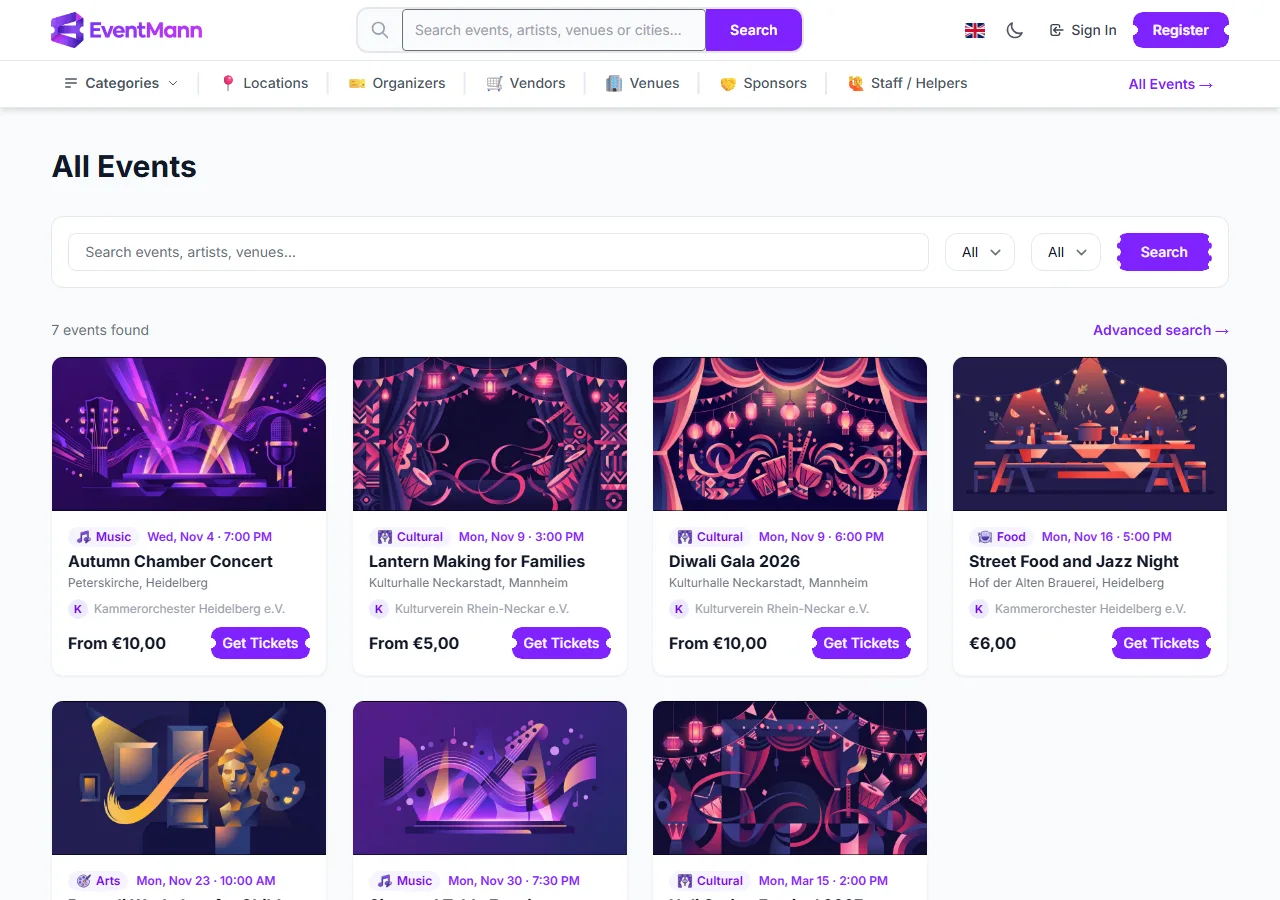
Ways to look for something
- The Events page — every event that is on sale, soonest first, twelve to a page. Type a word in the search box ① (it matches the event name, city and venue), choose a Category ② or pick a date window in the Date list ③: Today, This Weekend, This Week or This Month. The filters work together.
- Search — the larger finder at
/search, with city, price, free, online and date-range filters and sorting. See Search. - Locations — the Locations link in the top bar opens a map and lists of popular cities and countries. Open a city to see the events there. A city or country page only exists when it has at least one event.
- For You — suggestions built around your bookings and preferences, trending events and, if you allow location access, events near you. See For You.
- Organizers — the page of an organizer you like lists everything they have coming up. Follow them from there (see Following).
- Saved events — events you bookmarked earlier are in My Saved Events.
Which events are listed
- Only events that are live, public and not yet over appear in the lists. A draft, a paused or private event does not, although anyone who has the direct link can still open a private one.
- The Events page, the home page, Locations and the organizer and vendor directories show the events in the country your connection appears to be in. If nothing is listed for your country, you see everything. Search is not limited this way, and a link to any event always opens.
Good to know
- You only need to sign in to book when the organizer has made sign-in a requirement for that event. The button on the event page tells you.
- If Select Tickets is missing or greyed out on an event page, sales have not opened yet, have closed, or every ticket type is sold out. The page says which.
- A members-only or volunteer-only ticket type is shown as a locked row for everyone else. See Event Details.
Troubleshooting
- I know an event exists but cannot find it — it may be a draft, paused, private or over. Try Search, or ask the organizer for the link. Its date may also fall outside the date window you chose; clear the filters first.
- Events from another country are missing — the lists are narrowed to your country. Use Search, the Locations page or a direct link.
- For You looks generic — it improves as you book, follow organizers and set preferences.
- Events near me shows nothing — allow your browser to share your location on the For You page, and check that events are listed in your city.