




Contracts
Vendor Guide
2 min read
Help articles may not be fully accurate — they can lag behind the app due to frequent updates and automated translation. If in doubt, please contact support.
On this page
- 1. The list
- 2. The statuses
- 3. How contracts reach you
- 4. Good to know
- 5. Troubleshooting
- 6. Related
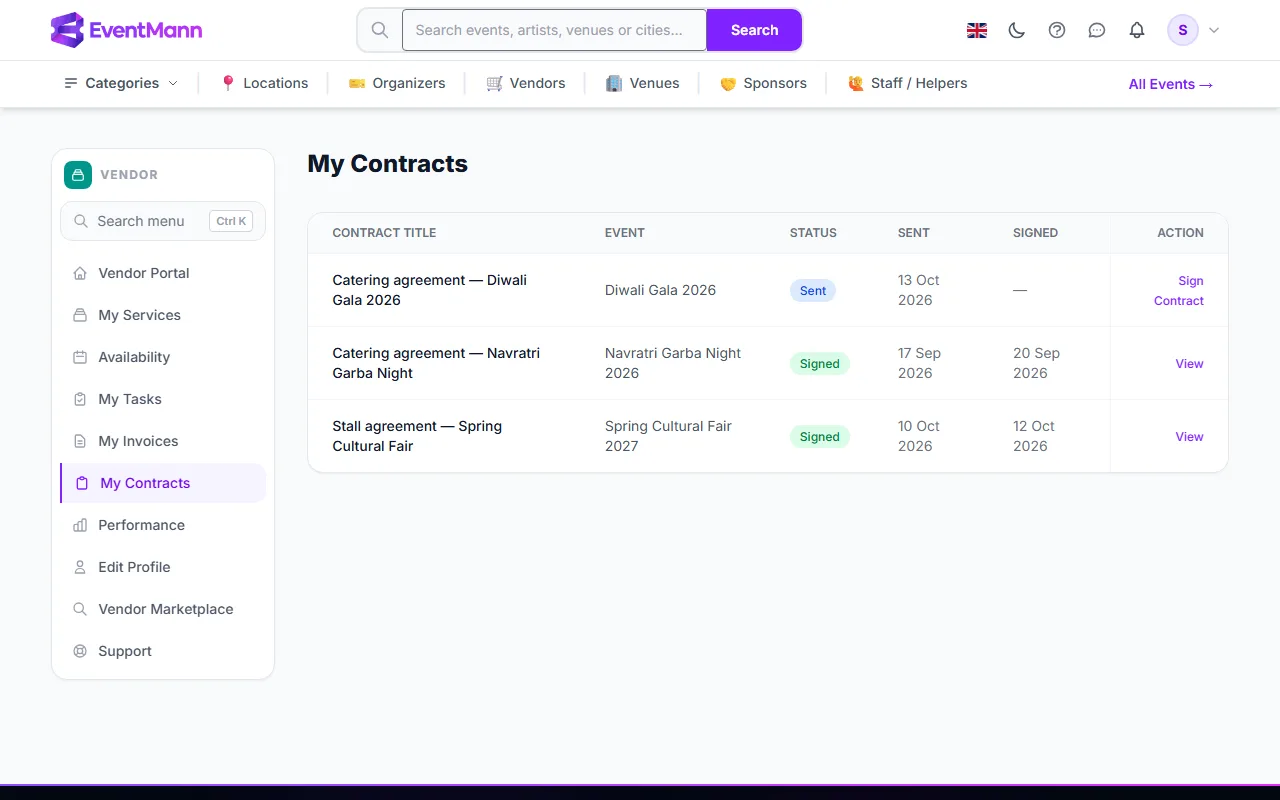
A contract is a written agreement the organizer sends you for one of your assignments — scope, fee, timing, cancellation and so on. My Contracts (sidebar → My Contracts) lists every contract you have been sent, newest first.
The list
| Column | Meaning |
|---|---|
| Contract Title | The title the organizer gave it. |
| Event | The event it belongs to. |
| Status ① | See the table below. |
| Sent / Signed | The dates it was sent and signed. |
| Action | Sign Contract ② while it waits for you, otherwise View ③. |
The statuses
| Status | What it means |
|---|---|
| Sent | Waiting for your signature. The organizer creates contracts as Sent — there is no draft you could see. |
| Signed | You signed. The organizer cannot cancel a signed contract. |
| Expired | The organizer set an expiry date and it passed before you signed. It can no longer be signed. |
| Cancelled | The organizer withdrew it before you signed. |
How contracts reach you
- The organizer writes the contract on the event’s Manage → Vendors page: a title, the full text and optionally an expiry date.
- It appears in My Contracts and under Pending Contracts on your dashboard. You are not notified by email or bell, so look at the dashboard counter after you accept an assignment.
- Open it and sign — see Signing Contracts.
Good to know
- The text of a contract is whatever the organizer wrote. EventMann provides no template and no legal review, and is not a party to the contract.
- The signature is a drawing plus the time and your IP address. The organizer sees all three on their side.
- There is no countersignature by the organizer and no PDF download of a contract. Copy the text if you need your own record.
- The expiry day is inclusive: you can still sign all day on the last date.
- A contract whose expiry date has passed shows Expired in the list and on its page, and no longer counts as pending on the dashboard.
Troubleshooting
- I see no contract but expected one. The organizer may not have issued it yet.
- It says expired. Ask the organizer to issue a new one with a later date.
- I need to change a clause. There is no negotiation in the portal. Agree the change with the organizer and ask for a new contract.