




Understanding Sponsorship Tiers
Sponsor Guide
3 min read
Help articles may not be fully accurate — they can lag behind the app due to frequent updates and automated translation. If in doubt, please contact support.
On this page
- 1. What a tier is
- 2. What to read on a package
- 3. Good to know
- 4. Troubleshooting
- 5. Related
Every sponsorship package carries a tier — Bronze, Silver, Gold, Platinum or Custom — and a set of benefits. This article explains what the tier means on an event page (Browse Packages, then an event) and what you should read instead of the name when you compare packages.
What a tier is
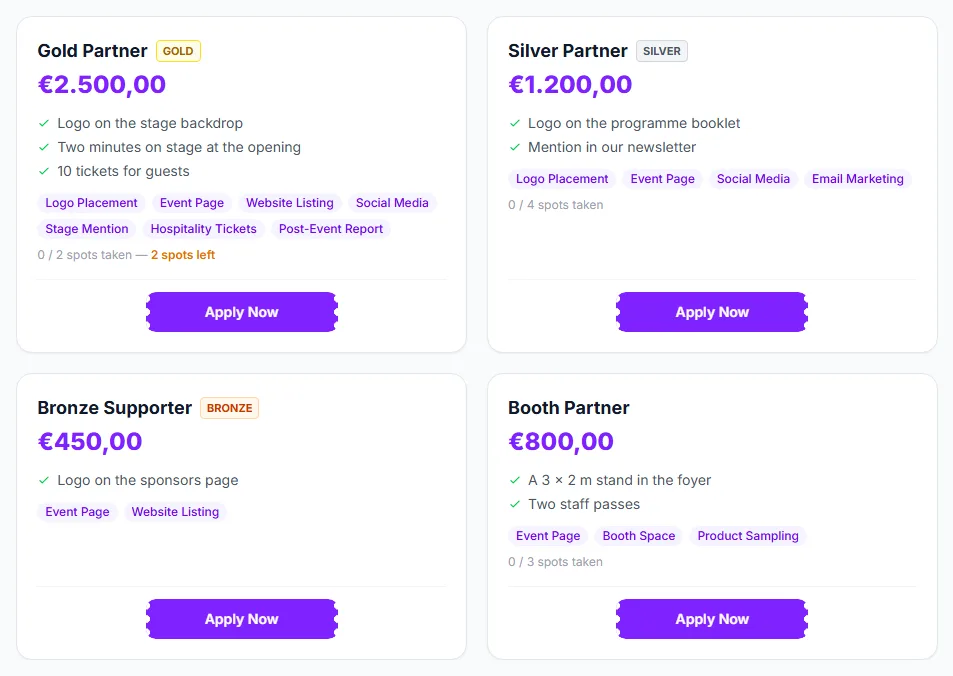
- A label and a colour. The badge next to the package name shows the tier: Gold ①, Silver ② and Bronze ③ in the picture below. Packages are listed Platinum first, then Gold, Silver, Bronze, then packages without a badge.
- Nothing else is fixed. There is no rule that ties “Gold” to a set of perks or a price. Each organizer decides what their Gold package contains, so a Gold package on one event can look nothing like a Gold package on another.
- Custom is the default when the organizer picks no tier. It shows no badge and sorts last — it is not a step below Bronze. The Booth Partner package ④ in the picture is an example; booth packages and one-off offers are typically untiered.
What to read on a package
- The benefit bullets — plain sentences the organizer wrote, for example “Logo on the stage backdrop”. This is where bespoke offers are described.
- The placement chips — items from EventMann’s standard list. Because the list is the same on every event, two packages from two organizers can be compared item for item. The list has five groups: Brand visibility (Logo Placement, Event Page, Website Listing, Social Media, Email Blast, Email Marketing, Banner Ad, Stage Mention), On-site presence (Booth Space, Product Sampling, Branded Zone), Access & hospitality (Hospitality Tickets, VIP Access), Programme (Speaking Slot, Workshop Session) and Reporting (Post-Event Report).
- The spots line — some packages are capped (for example two Gold sponsors). It reads x / y spots taken.
- The price — set per package by the organizer, not derived from the tier.
Good to know
- A chip is a promise the organizer made on the page, and the organizer tracks its delivery. Agree the details in the message thread after you apply, and watch the progress in Sponsorship Deliverables.
- “Post-Event Report” means a report from the organizer. It is not an EventMann feature; the figures EventMann shows you are described in Event Analytics.
- Only Approved and Active sponsorships take a spot, so a package can show spots left while applications are still waiting.
- Pick a package by what it contains and what it costs. Two packages with the same tier name on different events are separate offers.
Troubleshooting
- A Gold package looks weaker than a Silver one elsewhere — expected. Compare the bullets and chips, not the name.
- A package has no chips — the organizer only wrote free-text benefits. Read the bullets, or ask in a message once you have applied.
- The package you want is full — try another package of the same event, or ask the organizer whether a spot may open up.