




Event Refunds
Organizer Guide
3 min read
Help articles may not be fully accurate — they can lag behind the app due to frequent updates and automated translation. If in doubt, please contact support.
On this page
- 1. What you can do here
- 2. How to issue a refund
- 3. The three methods
- 4. Good to know
- 5. Troubleshooting
- 6. Related
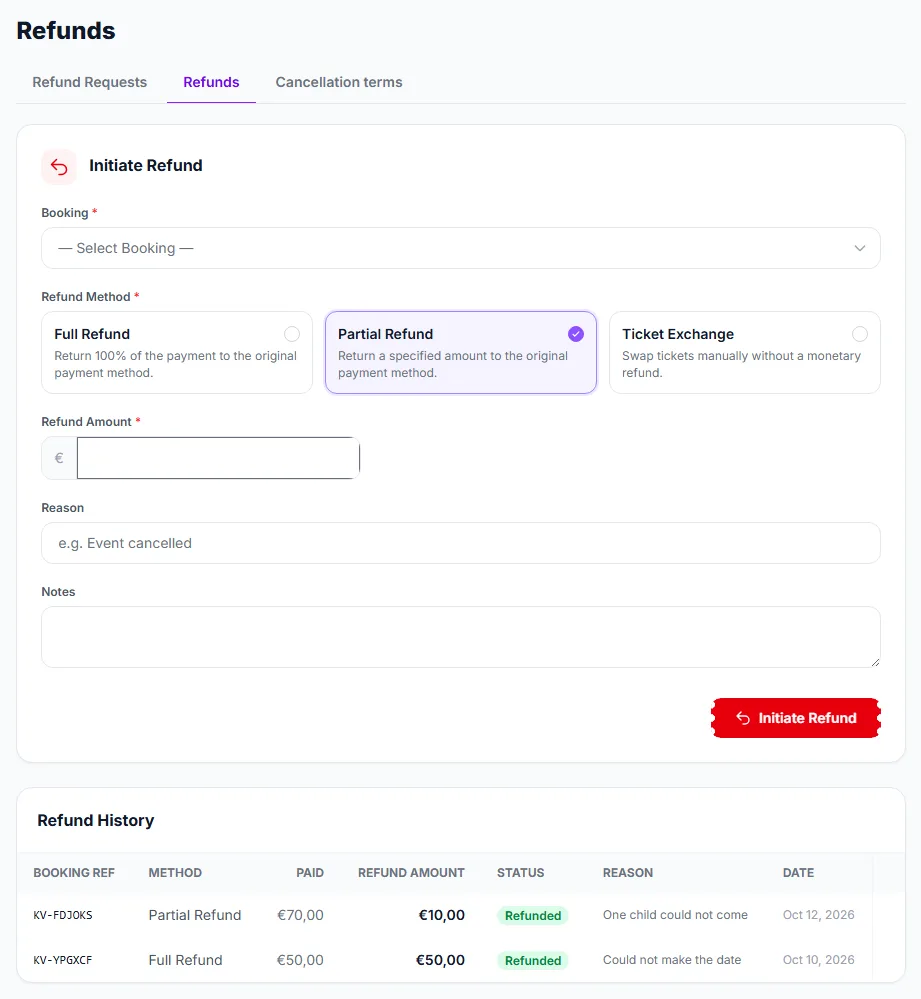
The Refunds page is where you send money back to an attendee yourself, through Stripe, without waiting for them to ask. It also keeps the history of every refund on the event. Find it under Attendees → Refunds, on the middle tab of the strip (Refund Requests, Refunds, Cancellation terms).
What you can do here
- Initiate a refund against any paid, confirmed order — in full, in part, or record a ticket exchange.
- Read the refund history — every refund transaction for the event with its method, amount, status, reason and date.
- Mark processed on a refund that is still pending.
Requests that attendees send in have their own queue: Refund Requests. Cancelling an order from its page also refunds it; see Order Detail & Timeline.
How to issue a refund
- Choose the Booking ①. Only paid, confirmed orders with something left to refund are listed.
- Choose the Refund Method ②: Full Refund, Partial Refund or Ticket Exchange.
- For a partial refund, type the Refund Amount ③. When you pick an order, the field is pre-filled with what your cancellation terms return for it; choose Full Refund to refund everything.
- Add a Reason (for example “Event cancelled”) and, if you like, internal Notes.
- Click Initiate Refund ④. The refund is sent to Stripe immediately; there is no second confirmation.
The three methods
- Full Refund — returns everything that has not been refunded yet to the buyer’s original payment method. When it completes, the tickets are cancelled and the places go back on sale. Any discount code used on the order is given back, so it can be used again.
- Partial Refund — returns the amount you type. The order stays Confirmed, the tickets stay valid and nothing is released.
- Ticket Exchange — no money moves. It is a note that you settled the matter by swapping tickets by hand, kept in the history.
Good to know
- You can never refund more than the order total minus what was already refunded. Only one refund can be in progress per order at a time.
- Some payment methods take days to complete. The places are released when the refund really completes, not when you click.
- The buyer is emailed when a refund completes, whether you started it here or approved their request.
- A refund that fails at Stripe is recorded as failed, with the reason in its notes, rather than left pending. Try again after fixing the cause.
- The refund returns the platform commission on that part of the sale too, so a refunded sale costs you no commission.
- Mark processed appears on refunds that are still pending; it cannot be used on one that was rejected.
- Cash, comp and other orders paid outside EventMann are not listed: there is nothing to send back through Stripe. Cancel them from the order page and return the money yourself.
- You need the permission to manage refunds.
Troubleshooting
- The order is not in the list — it is free, was not paid through Stripe, is not Confirmed, or is already refunded in full.
- “Nothing left to refund” — the order has already been refunded up to its total, here, from a request or automatically.
- Seat still shows as sold after a partial refund — expected: only a full refund releases the places.
- The refund is refused for lack of balance — older orders (paid before 17 September 2026) are refunded from your own Stripe balance. See the banner in Order Detail & Timeline.