




Memberships
Organizer Guide
5 min read
Help articles may not be fully accurate — they can lag behind the app due to frequent updates and automated translation. If in doubt, please contact support.
On this page
A membership is a paid pass you sell to your own audience for a fixed term, separate from event tickets: a season pass, a supporter tier, a family card. Members can get early booking, member prices, members-only tickets and free tickets. Everything is managed in one place, Grow → Membership in the organizer sidebar, and people buy from the Membership section of your public organizer page.
What you can do here
- Create plans with a price, a term and benefits — see Membership Plans.
- See and manage your members, hand out member IDs and import an existing roster — see Members and member IDs and Import an existing roster.
- Offer discount coupons — see Membership coupons.
- Decide what members get on your events — see Member benefits on your events.
A tour of the page
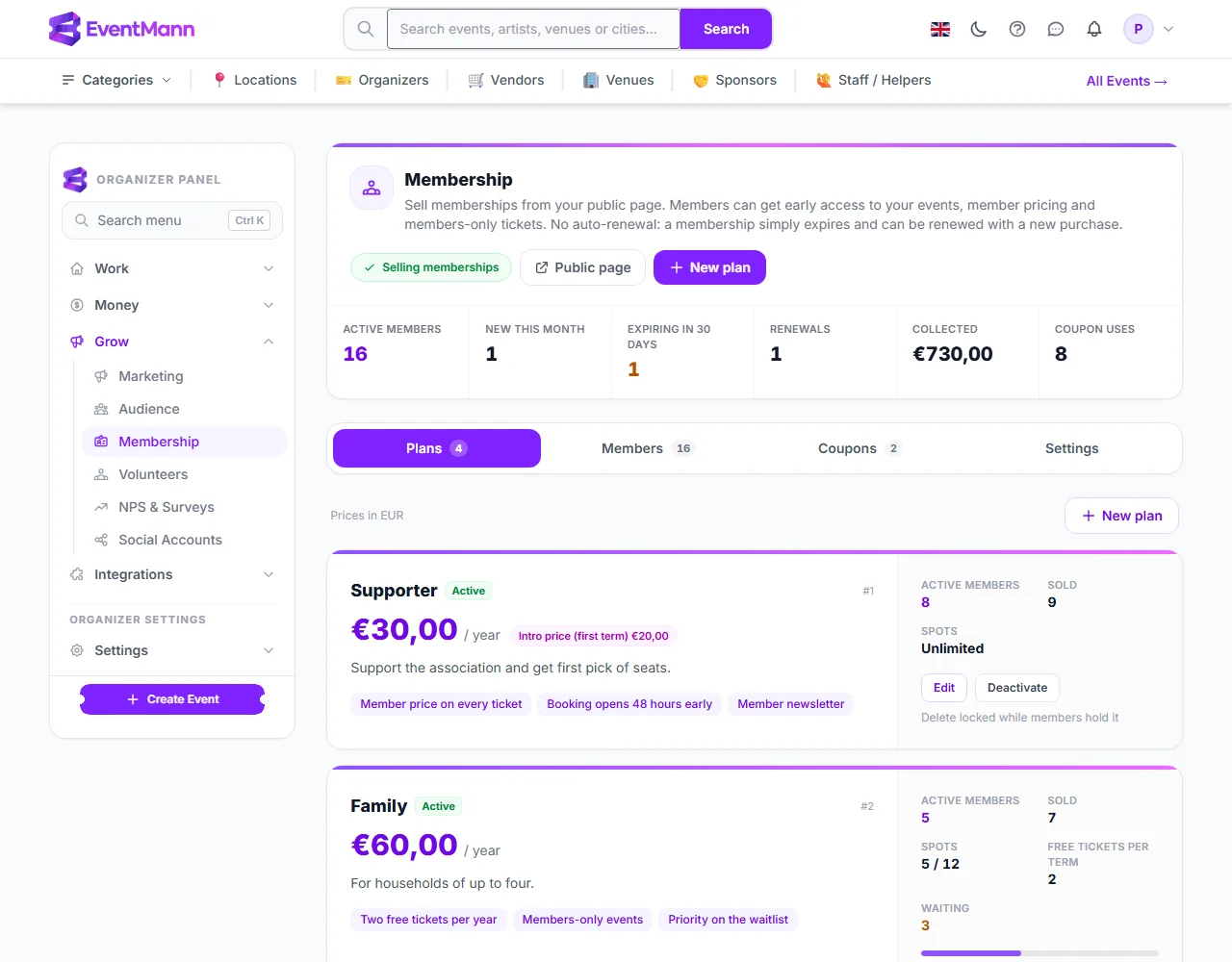
- The status pill Selling memberships ① means your plans are visible and can be bought. If it is missing, an amber box names the reason and links to the fix (see below).
- The figures strip ② is worked out each time you open the page: Active members (people, not rows), New this month, Expiring in 30 days, Renewals (purchases by someone who already held a membership with you), Collected (what members paid, not counting memberships you refunded and ended) and Coupon uses.
- The tabs Plans ③, Members ④, Coupons ⑤ and Settings hold the four areas of work; the number beside each tab is a count.
- Each plan is a card ⑥ with its price, benefits, members and spots. Use New plan at the top to add another, and Public page to look at your shop window.
What members see
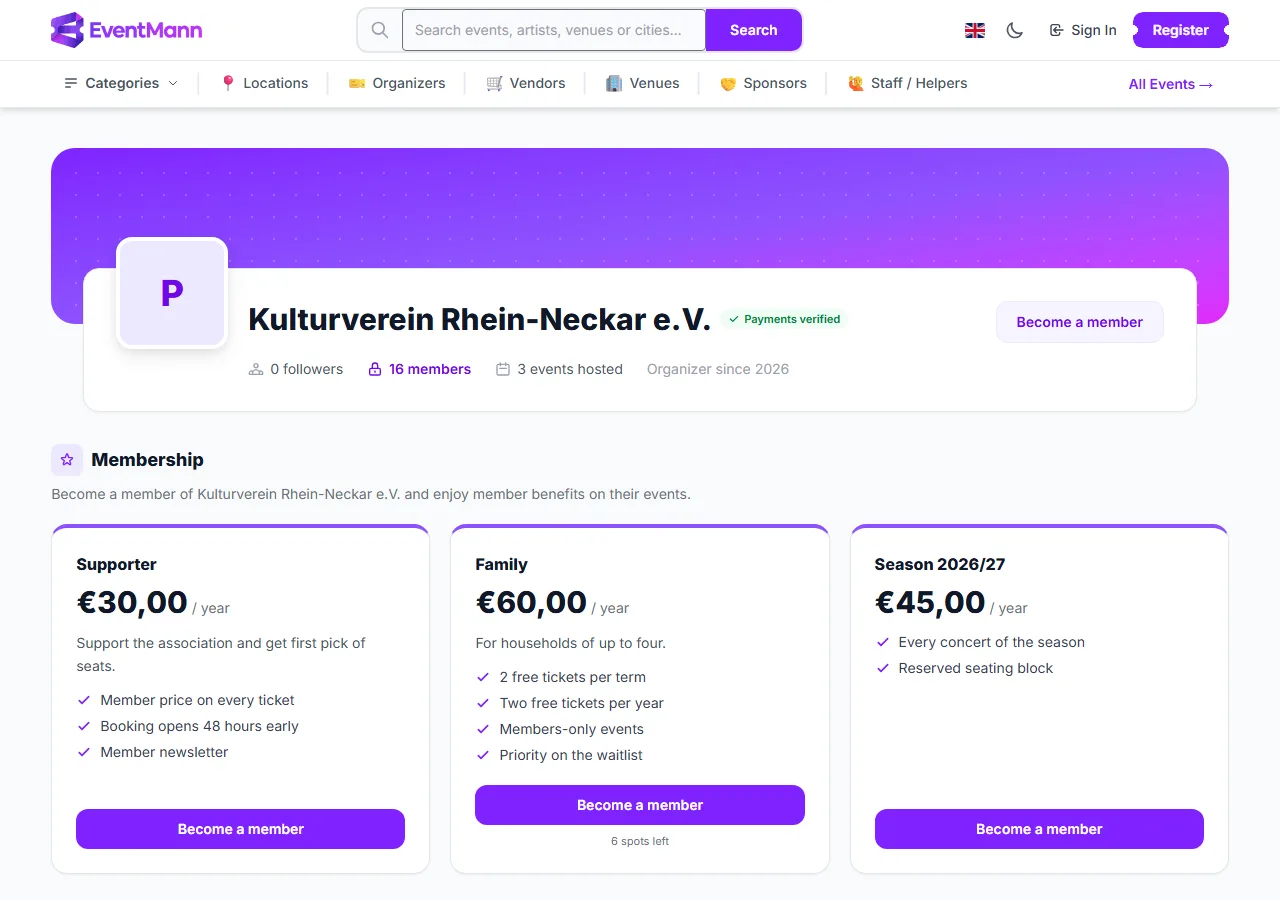
- On your public organizer page the Membership section shows one card ① per plan that can be bought — with its price, its benefits and a Become a member button — and, for a plan with a member limit, how many spots are left ②.
- If you switched on Public member count, the page also shows how many members you have.
How billing works
- A membership runs for a fixed term — a month, a year, or a season you set — and then ends. There is no automatic renewal: nothing is charged again, and it is not a subscription. The member renews by buying again; an early renewal starts when the current term ends, so no days are lost.
- Members get a renewal email 14 days and again 7 days before the term ends (each sent once, and not to someone who has already renewed), and one email after it has lapsed. A membership stays active for 7 days after its end date.
- The price is what the buyer pays, VAT included. You set your own VAT rate on the plan, and the invoice shows the tax inside that price rather than adding it.
- Every paid membership gets an invoice in your invoice sequence, whether or not ticket invoicing is on (Invoices).
Stripe, refunds and withdrawal
- Selling memberships uses the same Stripe setup as paid tickets: an active connected account that can take card payments (Setting Up Stripe Connect). You are the seller, the charge is on your account, and a refund comes out of your Stripe balance.
- The member can cancel within 14 days of buying and gets the full price back, whether or not they used any benefit. This is stated on the checkout page before they pay.
- You can end any membership yourself with Refund & end on the Members tab; the member is refunded in full.
Good to know
- A membership can be bought as a gift. It sits on the buyer’s account until the recipient claims it with a link, and the term starts at the claim.
- When a plan has a member limit and is full, people can join a waitlist and are emailed when a spot frees up.
- Each membership has a public member card link that shows whether it is currently valid — useful at the door of a members-only event.
- Your Members audience in email campaigns includes everyone with an active membership, even people who never bought a ticket from you.
- Members manage their side under My Memberships; see the attendee article.
Troubleshooting
- The page says memberships are not on sale. The amber box gives one of five reasons: Stripe is not connected; your account cannot take charges yet; it lacks the card-payments capability; it was created under an older fee model and must be reconnected; or card payments are switched off platform-wide. Plans stay hidden on your public page until it is fixed.
- A member says the member price did not apply. A member price only ever lowers a ticket’s price. If a flash sale or discount was already cheaper, that price wins.
- I want it to renew automatically. Memberships are fixed-term by design, so the member renews themselves after the 14- and 7-day reminders.