




Event revenue and event expenses
Organizer Guide
3 min read
Help articles may not be fully accurate — they can lag behind the app due to frequent updates and automated translation. If in doubt, please contact support.
On this page
Every event has its own small finance section under Finance in the event’s Manage menu, with two tabs: Expenses & Income, the event’s profit and loss, and Event revenue, where the event’s sales money went. Use them to see whether one event paid for itself. For the whole organization, see the Finance Overview.
Expenses & Income: the event’s profit and loss
- Open the event and choose Finance → Expenses & Income.
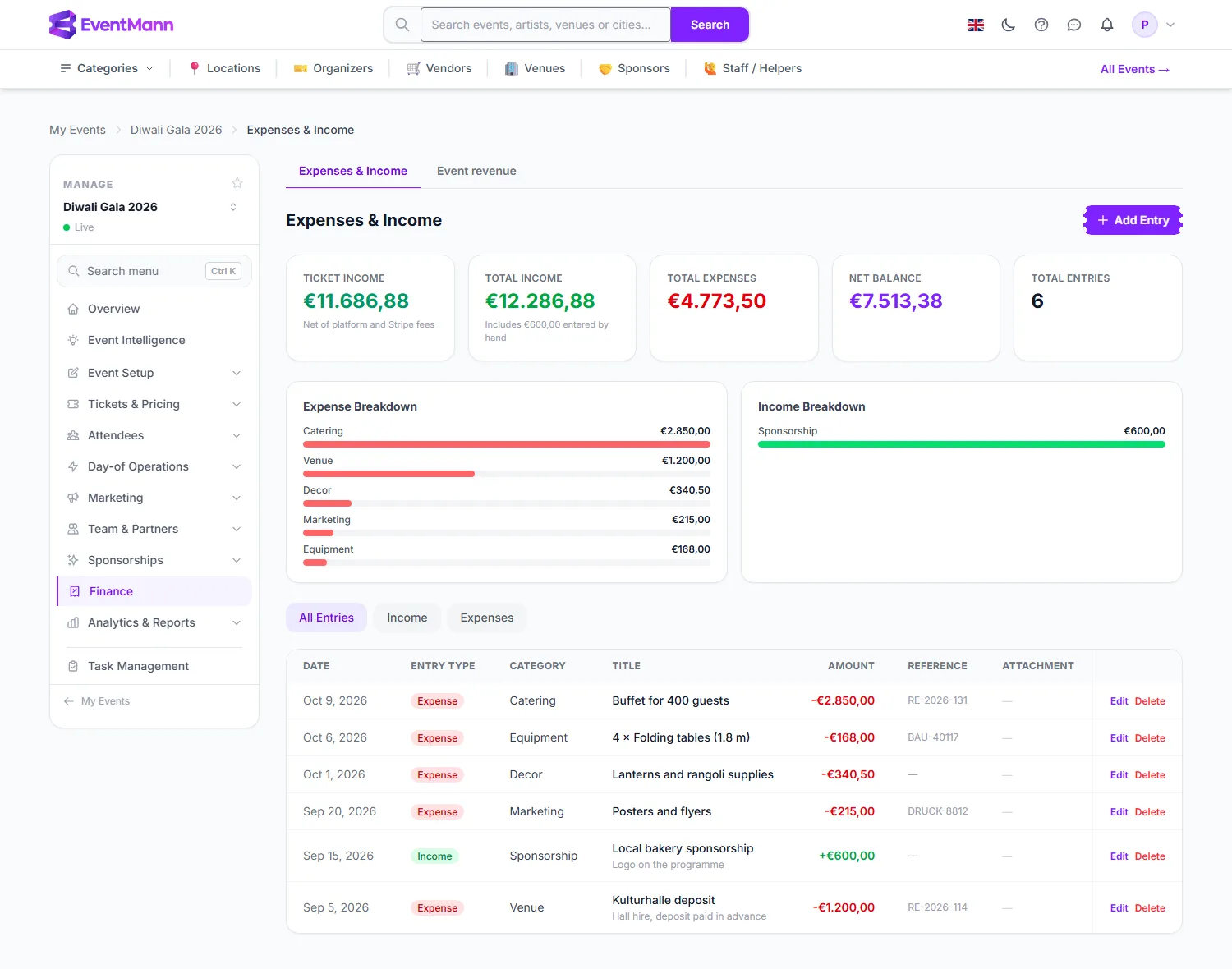
- Ticket Income ① is what the event actually earned from ticket sales: net of refunds, the platform fee and Stripe’s fee. It is added for you; you do not type it in.
- Net Balance ② is ticket income plus income you entered, minus all expenses.
- The Expense Breakdown ③ bars show where the money went by category.
- Click Add Entry ④ to record a cost or income for this event. A window asks for the type, category, title, amount, currency, date and optional reference, description, notes and receipt.
- Every row has Edit and Delete. Stock bought for the event shows up as an ordinary row ⑤, such as “4 × Folding tables”.
Event revenue: where the sales money went
- Choose Finance → Event revenue.
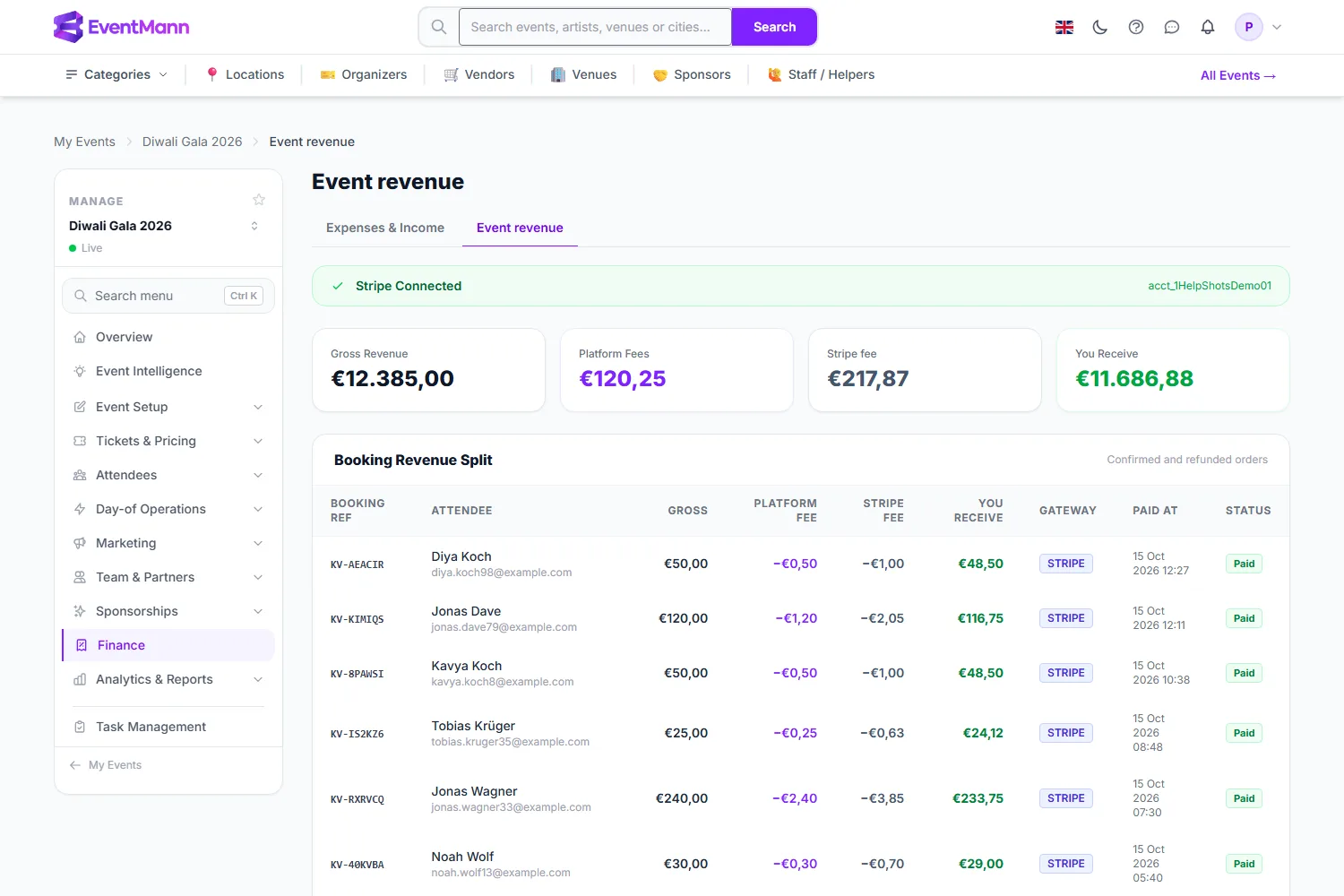
- Gross Revenue ① is what buyers paid for confirmed and refunded orders.
- Platform Fees is EventMann’s share; the Stripe fee ② is Stripe’s cost to you.
- You Receive ③ is the event’s total after refunds and both fees.
- The Booking Revenue Split table ④ lists each order with its buyer, gross amount, platform fee, Stripe fee, what you receive, the gateway, the paid date and its status. Refunded orders are included so the list explains the totals.
Good to know
- Both pages read the same figures, so the ticket income on the Expenses & Income tab equals You Receive here.
- The table shows each order as it was paid: its platform fee, Stripe’s fee as Stripe reported it (a dash while Stripe has not reported it yet, or for an order not paid by card) and what is left. The four totals at the top also subtract refunds and return the commission on refunded orders, so with refunds the rows add up to more than You Receive.
- Rows in another currency than the event are listed in an amber note instead of being added to the totals.
- Payouts are not shown per event. Stripe pays your account, not an event; see Payouts for the history.
- Costs that belong to no particular event live under Expenses; give them a linked event and they appear here as well.
- Who can open these tabs: Expenses & Income needs permission to edit the event; Event revenue needs the payouts permission, which the built-in Finance role has (see What a finance team member can see).
Troubleshooting
- Income looks doubled. You entered the ticket sales as income by hand. Delete that entry; ticket income is already included.
- Ticket Income is lower than I expected. It is net of refunds, EventMann’s fee and Stripe’s fee. Compare with the Gross Revenue card on Event revenue.
- The Stripe fee shows a dash on some orders. Stripe has not reported the fee for that order yet, or the order was not paid by card, for example cash or a free ticket.
Related
- Expenses
- Understanding Fees & Pricing
- Finance Overview
- Volunteers (inventory purchases)