




Sponsorship Deliverables
Sponsor Guide
4 min read
Help articles may not be fully accurate — they can lag behind the app due to frequent updates and automated translation. If in doubt, please contact support.
On this page
A deliverable is one item of work attached to your sponsorship — supplying your logo, signing the agreement, paying, a social media post, a stage mention. The organizer creates them and ticks most of them off; two tick themselves when you do your part. As a sponsor you follow the progress. This article explains where the progress appears, how it is counted, and what you can and cannot do with it.
Where you see deliverables
- My Sponsorships — the Deliverables column shows a progress bar and a count such as 4/6 for each sponsorship. A dash means the organizer has not created any yet.
- Sponsor Portal (dashboard) — each row in the recent list carries the same bar and count ①②, and the Deliverables Done card shows the overall percentage across all of your sponsorships.
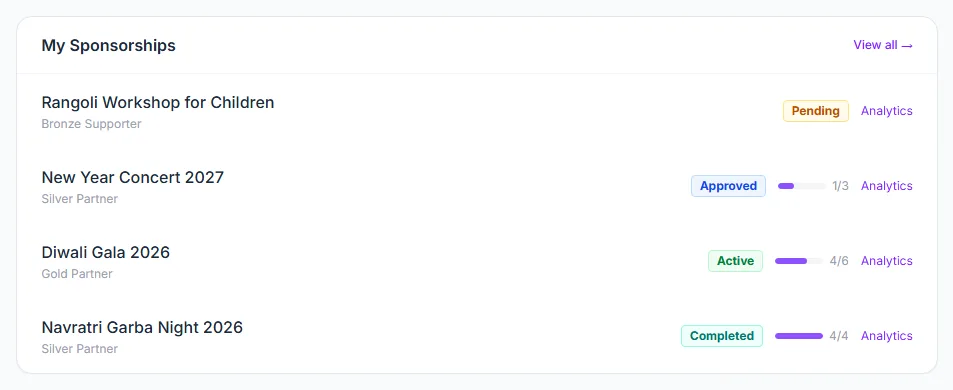
How deliverables work
- Three are created when your application is approved: Logo Upload, Signed Agreement and Payment. All three are marked required.
- The organizer can add more. Each one has a title, an optional description and due date, a type (Logo Upload, Banner Upload, Signed Agreement, Payment, Social Post, Stage Mention, Email Blast or Other) and a flag for whether it is required.
- Two tick themselves. A Logo Upload deliverable is completed the moment you upload your logo on My Sponsorships — or at approval, if your application already carried one. A Payment deliverable is completed when the sponsorship is paid: when Stripe reports the invoice paid, or when the organizer records a payment you made to them directly.
- The organizer ticks the rest. Every other deliverable is pending until the organizer marks it completed — a banner, a signed agreement or a stage mention happens outside EventMann, so nothing can tick it for them.
- Closing the sponsorship. The organizer can mark a sponsorship Completed only when every required deliverable is done. Optional deliverables do not block it.
What you can and cannot do
- You can see how far the work has progressed, as a count and a bar.
- You cannot tick a deliverable yourself, and the portal does not list their titles or due dates. For the details, use Message Organizer and ask — see Communicating with Organizers.
- Your own part is usually small: upload your logo (My Sponsorships), pay (Paying for a Sponsorship) and send whatever the organizer asks for, such as banner artwork.
Good to know
- The percentage on the dashboard is completed deliverables divided by all deliverables, across all of your sponsorships. It shows 100% while there are none at all, so a fresh account does not look behind.
- Only the Logo Upload and Payment types tick themselves. A deliverable the organizer gave another type — say a logo request filed as Other, or Banner Upload — still waits for their tick.
- An automatic tick never undoes anything: replacing your logo later leaves the line completed, and a line the organizer already ticked keeps their name and date.
- A pending application has no deliverables yet; they appear on approval.
- The deliverables belong to the organizer’s agreement with you. EventMann does not verify that a stage mention or a post actually happened — it only records the organizer’s tick.
Troubleshooting
- The column shows a dash — no deliverables exist yet. Wait for approval, or ask the organizer.
- The bar did not move after I paid or uploaded my logo — a payment made outside Stripe (a bank transfer to the organizer) counts once the organizer records it, and a matching deliverable may have been created with a different type. Message the organizer.
- The sponsorship is still Active after the event — a required deliverable is probably still open. The organizer can tell you which.