




Revenue Shares
Organizer Guide
3 min read
Help articles may not be fully accurate — they can lag behind the app due to frequent updates and automated translation. If in doubt, please contact support.
On this page
- 1. What you can do here
- 2. How to add a share
- 3. Settings explained
- 4. Good to know
- 5. Troubleshooting
- 6. Related
Revenue shares are a note to yourself about how an event’s money is meant to be divided — with a venue, a catering partner, a co-organizer. Open them from Money → Finance → Revenue Shares. Read this first: nothing here moves money. EventMann does not withhold these amounts from what you receive, does not pay the recipients and does not use them in any report. They are a list for your own planning; you settle with the other party yourself, outside EventMann.
What you can do here
- Pick an event and add a share to it.
- Read the shares you have noted for that event, in the order you added them.
- Delete a share.
How to add a share
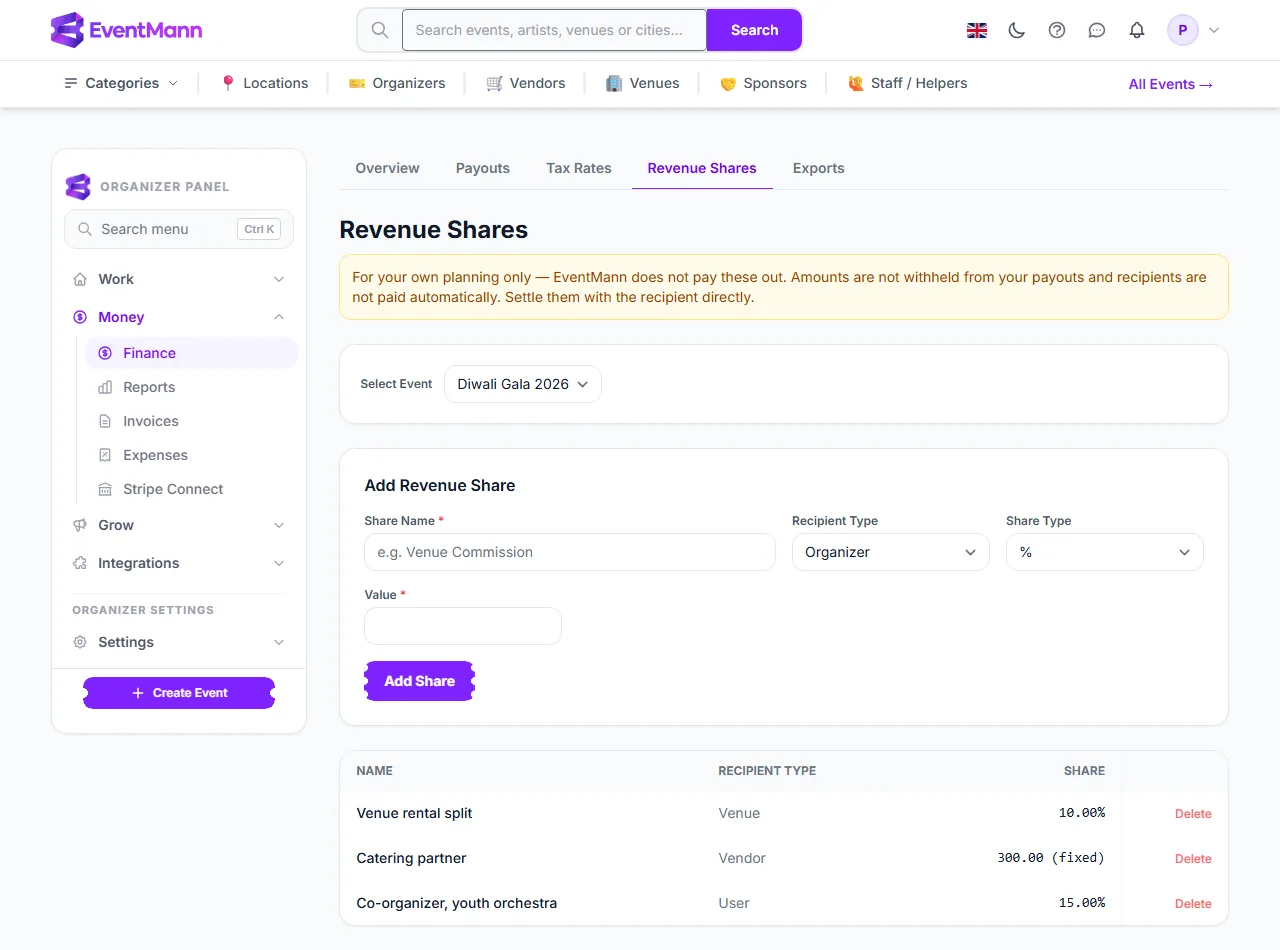
- Open Money → Finance → Revenue Shares. The yellow notice ① repeats that the amounts are for your own planning.
- Choose the event in Select Event ②. Shares belong to one event; the list changes when you pick another.
- Type a Share Name ③, for example “Venue rental split”, and choose a Recipient Type (Organizer, Venue, Vendor or User).
- Choose the Share Type ④ — % or Fixed Amount — and enter the Value.
- Click Add Share ⑤. It appears in the list below, as a percentage or as a fixed amount.
Settings explained
- Share Name — free text for you; attendees never see it.
- Recipient Type — only a label. The form does not link the share to a real account.
- Share Type and Value — a percentage or a fixed amount. Nothing stops your shares adding up to more than 100%, so check the total yourself.
Good to know
- Your full takings arrive in your own Stripe account (minus EventMann’s fee and Stripe’s fee). To pay a partner you transfer the money yourself, and you can record it under Expenses so it shows in the event’s profit and loss.
- There is no edit button. To change a share, delete it and add it again.
- Shares are not copied when you duplicate an event.
- Only events you own are listed. Only the organizer account can open this page.
Troubleshooting
- My co-organizer says they were not paid. Expected: this page records an agreement and pays no one.
- The event I need is not in the list. Only events you own appear.
- I deleted a share by mistake. There is no undo; add it again.