




Member Benefits
Help articles may not be fully accurate — they can lag behind the app due to frequent updates and automated translation. If in doubt, please contact support.
On this page
A membership with an organizer can give you better prices, free tickets, access to tickets other people cannot buy and a head start on sales. Which of these you get depends on the plan and on what the organizer set for each event. This article shows where each benefit appears and how it is applied. All of them apply automatically at checkout when you are signed in with the account that holds the membership.
Where benefits show up
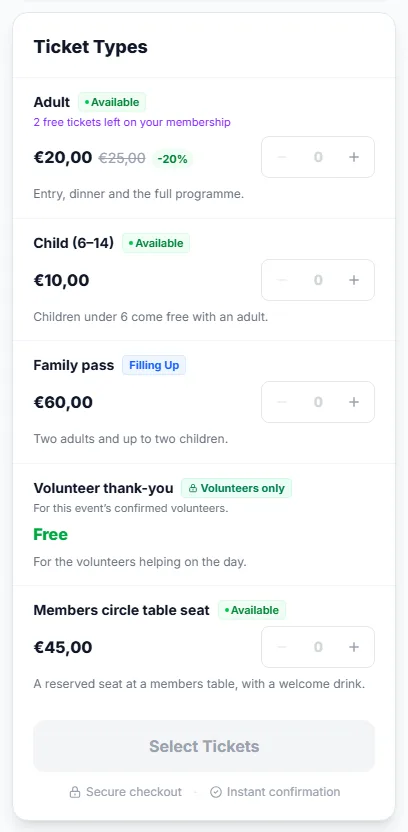
- Member price — a ticket type can carry a lower price for members. The panel shows your price with the normal price struck through and the discount, for example €20,00 beside €25,00. Everybody else sees the normal price and a line such as Members pay €20,00 — become a member. The member price can only lower what you pay: if a flash sale or other price is lower than the member price, you pay that.
- Free tickets ① — if your plan includes a free-ticket allowance and the ticket type counts toward it, the panel says 2 free tickets left on your membership. At checkout the allowance appears as a Member allowance line that takes the price of those tickets off. Where several tickets qualify, the most expensive ones are covered first.
- Members-only tickets ③ — some ticket types, or a whole event, are only for members. Everyone sees them as a locked row, which says Available to members of … — become a member. You can buy them while your membership is active. A members-only event shows a banner, This event is for members of …, so that members can find it.
- Early access — the organizer can let members book a number of hours before the public sale starts. While sales are not open for you yet, the panel shows when they open to everyone and, if you are a member, As a member you can book from …. Other visitors see Members of … can book from … — become a member. Once your window opens, the panel works like any other.
How the free-ticket allowance works
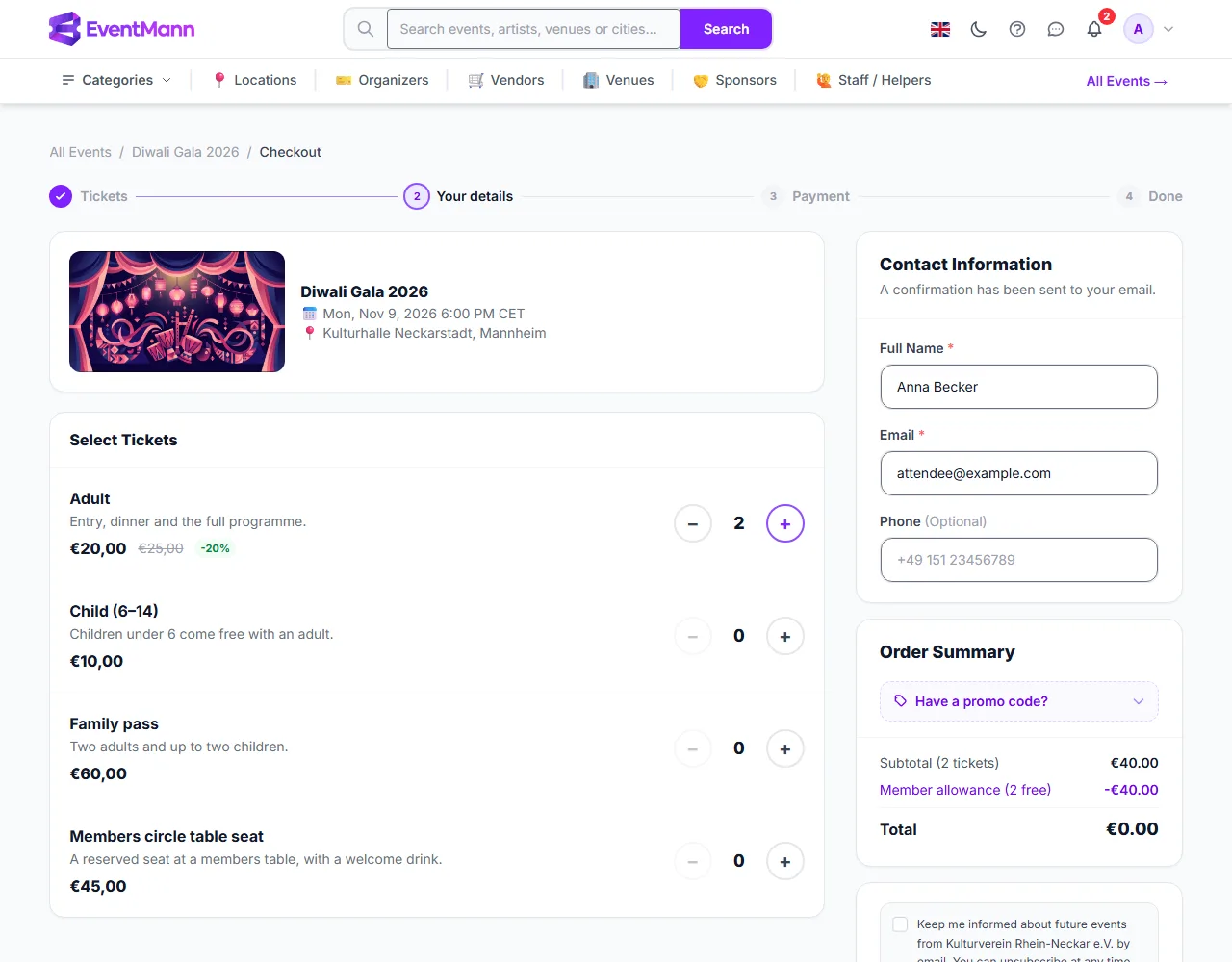
On the checkout page the member price ① is already in the price, the Member allowance line ② takes the covered tickets off and the Total ③ shows what is left to pay.
- It counts per membership term. A plan with 2 free tickets covers 2 tickets in that term, not 2 per order.
- It only applies to ticket types the organizer marked as counting toward the allowance, and not to tickets inside a bundle.
- It is worked out from your real orders: tickets of orders that are confirmed, approved or still pending count against it. If you cancel an order, the tickets come back to your allowance. There is no separate counter that can get out of step.
- It is applied before a promo code, so the code only discounts what is left to pay.
- When the allowance covers the whole order, the total is €0,00 and checkout reads Complete Booking; there is no payment page.
Member early access in practice
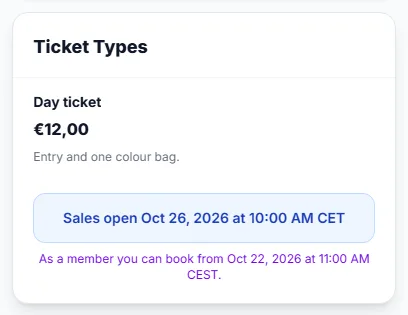
- Open the event page. Before your window opens, the panel names the day and time when you can start, and when sales open to everyone.
- From that moment the panel shows the ticket types and the booking button; check out as described in How to Buy Tickets.
Volunteer-only tickets
Some events offer a thank-you ticket, free or cheap, for the people who help on the day. It shows as Volunteers only with the text For this event’s confirmed volunteers. Everybody sees the row, but only people who are confirmed volunteers for that event can buy it, and only one each unless the organizer allows more. If you are not a volunteer, you cannot select it, and it never counts toward the event’s displayed price. See My Volunteering.
Good to know
- Benefits apply for as long as the membership is active, plus 7 days of grace after the end date. After that you pay the normal prices.
- An early renewal stacks, so you are never without benefits while you renew in time.
- Waitlists respect members-only rules: someone who is not a member cannot be admitted to a members-only ticket.
- A gift membership works for the person who claims it from the day they claim it, not for the buyer.
Troubleshooting
- I do not see the member price — you are signed out, you are signed in with another account, your membership ended, or the ticket type has no member price.
- The free ticket was not applied — the allowance is used up for this term, or the ticket type does not count toward it.
- I cannot select a members-only ticket — your membership is not active on this account. Check My Memberships.
- My early access time has passed but I cannot book — sales may be closed, sold out or limited per person; the page says which.