




Invoices
Vendor Guide
3 min read
Help articles may not be fully accurate — they can lag behind the app due to frequent updates and automated translation. If in doubt, please contact support.
On this page
- 1. What you can do here
- 2. The life of an invoice
- 3. Rules
- 4. Good to know
- 5. Troubleshooting
- 6. Related
My Invoices (sidebar → My Invoices) is where you send an invoice to an organizer for an assignment and follow what happens to it. This article explains the list and the life of an invoice; How to Submit an Invoice covers the form.
What you can do here
- Press Create Invoice ① to see Select Event ②: the confirmed assignments you can still invoice. Click one to open the form.
- Read the table: Invoice #, Event, Status ③, Total, Due Date.
- Open an invoice with View ④, and download it as a PDF from its page.
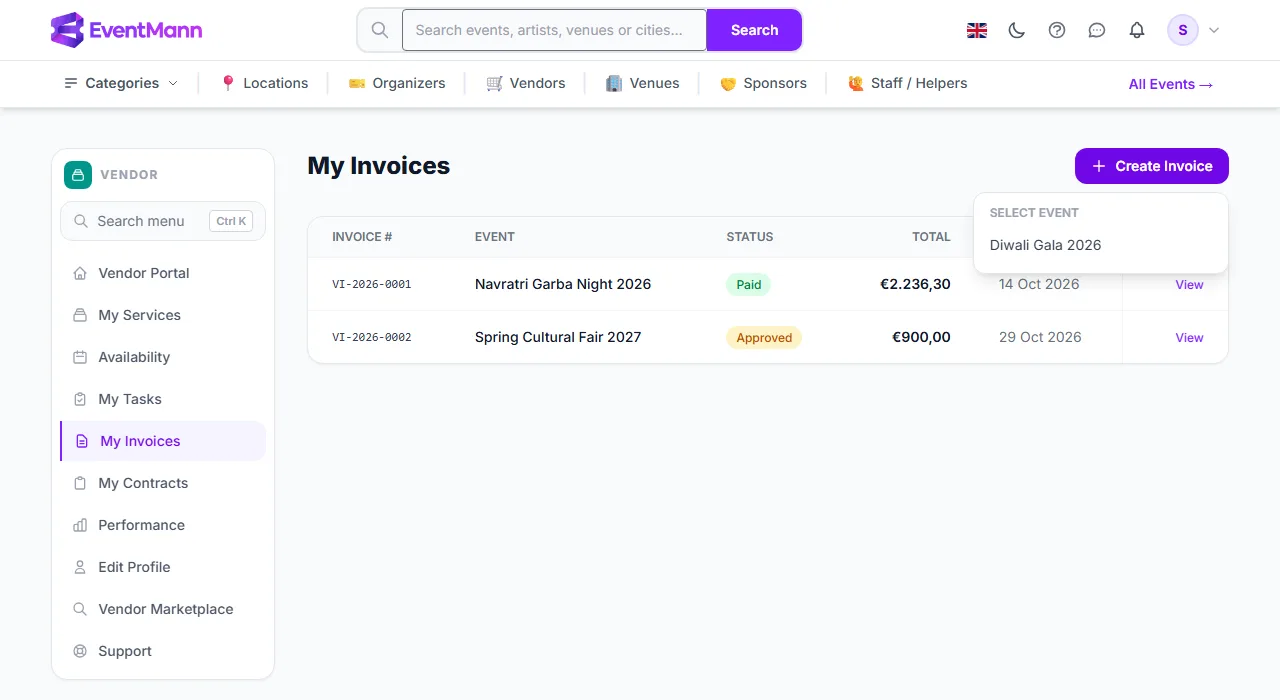
The life of an invoice
| Status | What it means | Who moves it |
|---|---|---|
| Submitted | You sent it. It is final — you cannot edit or withdraw it. | You |
| Approved | The organizer accepted it for payment. | The organizer |
| Paid | The organizer marked it as paid. The paid date is shown. | The organizer |
The organizer sees each invoice on the event’s Manage → Vendors page and moves it with an Approve and then a Mark paid button. They need the vendor-invoice permission to do so.
Rules
- You can invoice only an assignment you have confirmed.
- One invoice per assignment. While a Submitted, Approved or Paid invoice exists for it, the event is not offered under Select Event.
- When the organizer entered an agreed fee, your subtotal before tax may not exceed it.
- Invoice numbers are assigned by EventMann in the form
VI-2026-0001.
Good to know
- EventMann does not pay you. Paid means the organizer clicked the button; the money moves by your own arrangement. If you have not received it, ask the organizer.
- You are not notified when an invoice is approved or paid. Check this page, or the Open Invoices counter on the dashboard (submitted and approved ones).
- There is no reject or dispute button. If a figure is wrong, contact the organizer.
- The PDF shows your company name from your vendor profile as the sender, with the address, email, phone, tax ID and registration number you saved there; the recipient is the organizer’s public name (their company name, when they set one). When you have saved bank details in Edit Profile, the PDF also carries a Payment details block with the account holder, IBAN, BIC and bank name, and asks the organizer to quote the invoice number as the payment reference. See Vendor Profile.
- The organizer sees the same bank details next to your invoices on their vendor page, so they know where to pay. They are never shown on your public profile.
Troubleshooting
- Create Invoice is missing. You have no confirmed assignment without an invoice yet.
- “An invoice for this assignment has already been submitted.” Each assignment gets one.
- The total is not what we agreed. The amount is the sum of your lines plus the tax rate you typed; the cap only limits the subtotal.