




Responding to Event Requests
Vendor Guide
2 min read
Help articles may not be fully accurate — they can lag behind the app due to frequent updates and automated translation. If in doubt, please contact support.
On this page
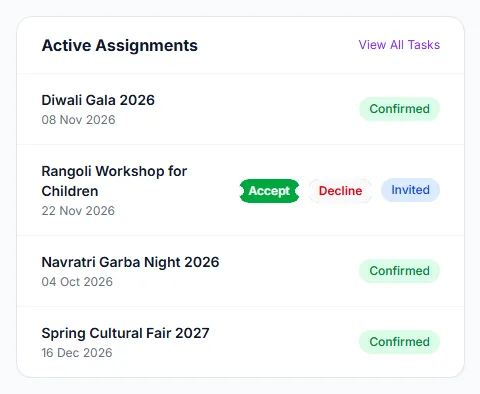
An event request is an organizer inviting you to work their event. It arrives as an Invited assignment on your dashboard (sidebar → Vendor Portal, panel Active Assignments). There is no pitch or shortlist stage first: the organizer picks you from the approved vendors and assigns you directly. Everything else — contracts, tasks, invoices — hangs off this assignment.
How you are told
- A bell notification “New event assignment” and an email (setting Vendor updates) when the organizer assigns you.
- The email carries what the portal does not: the event with date, time and venue, the service the organizer attached, the agreed fee if they entered one, and their notes. The dashboard only shows the event title, its date and the status, so keep the email.
Respond to an invitation
- Open the Vendor Portal and find the event under Active Assignments. The badge says Invited.
- Check the date and, from the email, the fee and notes.
- Click Accept ① to take the job, or Decline ② to turn it down. The buttons exist only while the assignment is Invited.
- The badge changes to Confirmed ③ or Declined. The organizer is told your answer (bell and email).
What a confirmed assignment unlocks
- The organizer can issue you contracts and give you tasks.
- You can send an invoice. Invoicing is only possible on a Confirmed assignment.
- The assignment counts towards Total Events on Performance and the organizer can rate you.
Good to know
- An organizer can also mark an invitation Confirmed or Declined on their side. Check the badge before you assume nothing has happened.
- You cannot take back a decline. An assignment you declined stays on file, and the platform will not let the organizer assign you to the same event a second time until they remove it — ask them to.
- Declining does not change your rating.
- Accepting does not agree a price by itself. The agreed fee is the cap your invoice must stay under; any other terms belong in a contract.
Troubleshooting
- I got no email. Look at the dashboard, and check Vendor updates in your notification preferences.
- The buttons are gone. The organizer already confirmed or declined for you, or you have answered once.
- I accepted the wrong event. Contact the organizer; only they can remove the assignment.