




Understanding Your Pay
Help articles may not be fully accurate — they can lag behind the app due to frequent updates and automated translation. If in doubt, please contact support.
On this page
This article explains how your pay is worked out, who does what, and — just as important — what EventMann does not do. The page that shows the result is Payments.
Who pays you
The organizer. EventMann provides the shift records and a payroll worksheet for the organizer; it does not hold or send staff pay. When a period is marked Paid it means the organizer says they have paid you — by bank transfer, cash or however you agreed with them.
How pay is calculated
- Hours. From your Check In and Check Out on each shift (see Check-in & Check-out), capped at the shift length plus two hours.
- Rate. The hourly rate the organizer set for you on this event. Without a rate you are treated as an unpaid helper and are left out of payroll.
- Overtime. When the organizer generates payroll they choose a threshold and a multiplier. The defaults are 8 hours per shift and 1.5×. Hours up to the threshold are paid at your rate; the hours above it at rate × multiplier.
- Bonus and deductions. While a period is Open the organizer can add a bonus or a deduction to your row, with a note.
- Total. Base pay + overtime pay + bonus − deductions.
Example: a 9-hour shift at 14.00 per hour with the default overtime is 8 × 14.00 = 112.00, plus 1 × 21.00 = 21.00 — total 133.00.
In the picture, the hours are in the Hours Worked column ①, the result in Total Pay ②, the state of the run under Status ③ and the totals underneath ④.
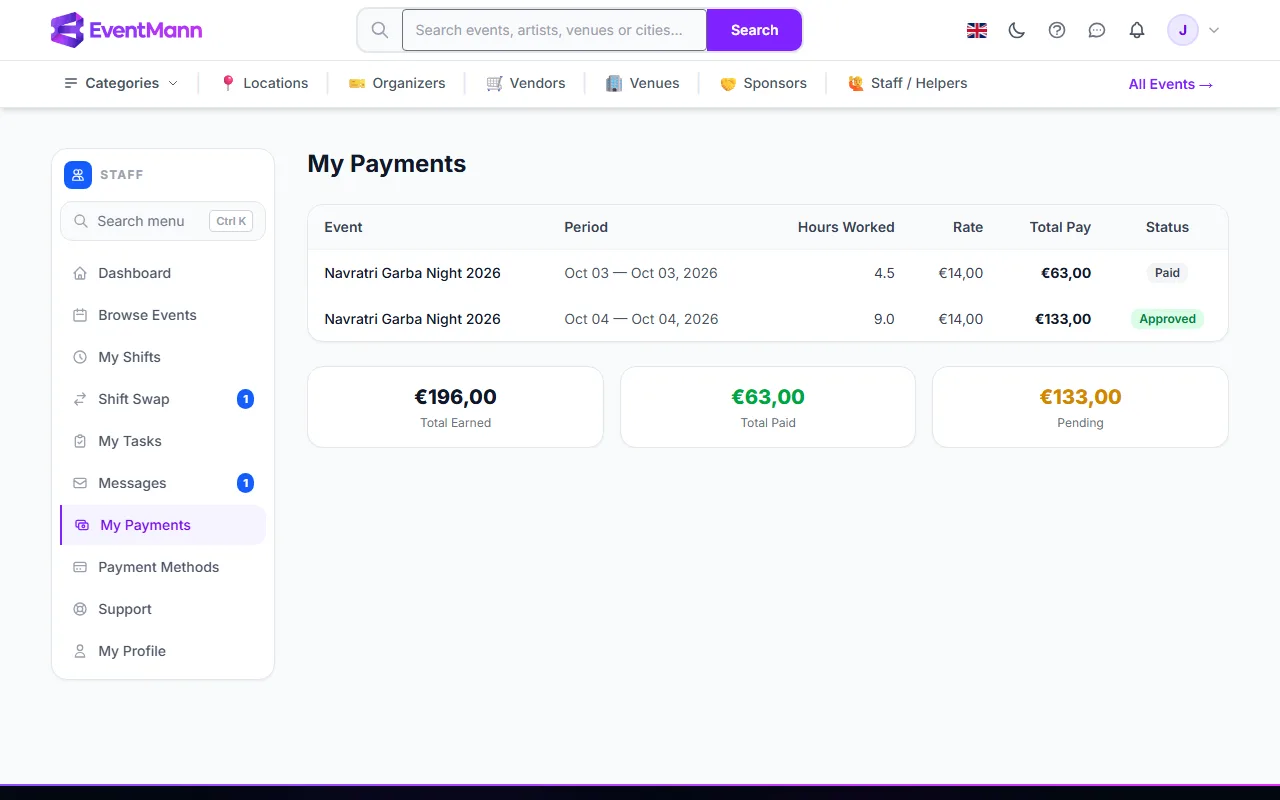
The life of a payroll period
| Status | What it means |
|---|---|
| Open | The organizer created the run from completed shifts. They can still add bonus or deductions. |
| Locked | No more edits. |
| Approved | The organizer signed the run off. |
| Paid | The organizer marked the run as paid. |
The organizer can also export the run as a spreadsheet. There is no payslip download for staff.
Good to know
- Only shifts with a check-out and hours greater than zero are paid.
- A payroll run covers a date range the organizer chooses. A shift outside that range waits for the next run.
- Taxes, social security and invoices are between you and the organizer. EventMann does not withhold anything or issue pay slips.
- Agree your rate before the event, ideally in writing in Messages.
Troubleshooting
- My total is lower than expected. Compare Hours Worked with your shift (the cap), and ask the organizer about deductions.
- Nothing is on My Payments after the event. Payroll has not been run, or you had no rate. Ask the organizer.
- It says Paid but I have not been paid. Paid is the organizer’s mark. Contact the organizer; EventMann cannot see a transfer.