




Venue Pricing
Help articles may not be fully accurate — they can lag behind the app due to frequent updates and automated translation. If in doubt, please contact support.
On this page
Prices on EventMann venues are simple and are agreed in two steps: you publish prices for services and packages, an organizer builds a request from them, and you confirm or change the total and set a deposit when you approve. This article explains where each price comes from, how a request total is calculated and what EventMann does — and does not do — with the money.
Where prices live
- Services — each has a Base Price and a Pricing Type: Flat Rate (one price), Per Person and Per Hour (price of one unit, multiplied by the quantity the organizer enters) or Custom / Quote (no fixed price; you quote in the request).
- Packages — a bundle of services with a single Package Price that you set.
- There is no separate “hire price” field on a venue. To charge for the room itself, create a service such as Hall hire (full day) and, if you like, put it in your packages. See Venue Services & Packages.
How a request total is calculated
- The organizer picks, on the request form, zero or one package and any number of single services with a quantity.
- The total is the package price plus, for each ticked service, its base price × quantity. A custom-quote service with a base price of 0 adds nothing yet.
- That figure is stored on the request and shown to you under Pricing Summary ① in the request’s detail.
The calculation counts what was requested; it does not look at the dates, the number of guests or taxes.
Set the final price and the deposit
- Open the request: My Venues → the venue → Booking Requests → View Details.
- Read Request Info ② and the Requested Services ③ — the organizer’s message, dates, expected guests and the services they ticked.
- In the Actions panel, edit Total Price ④ if the agreed price differs from the calculated one — for example to add a quote or a discount. It is pre-filled with the calculated total.
- Enter a Deposit Amount ⑤ if you want one. Leave it empty for none. It is an amount, not a percentage.
- Write a Response Message for the organizer with the practical details.
- Click Approve Request ⑥.
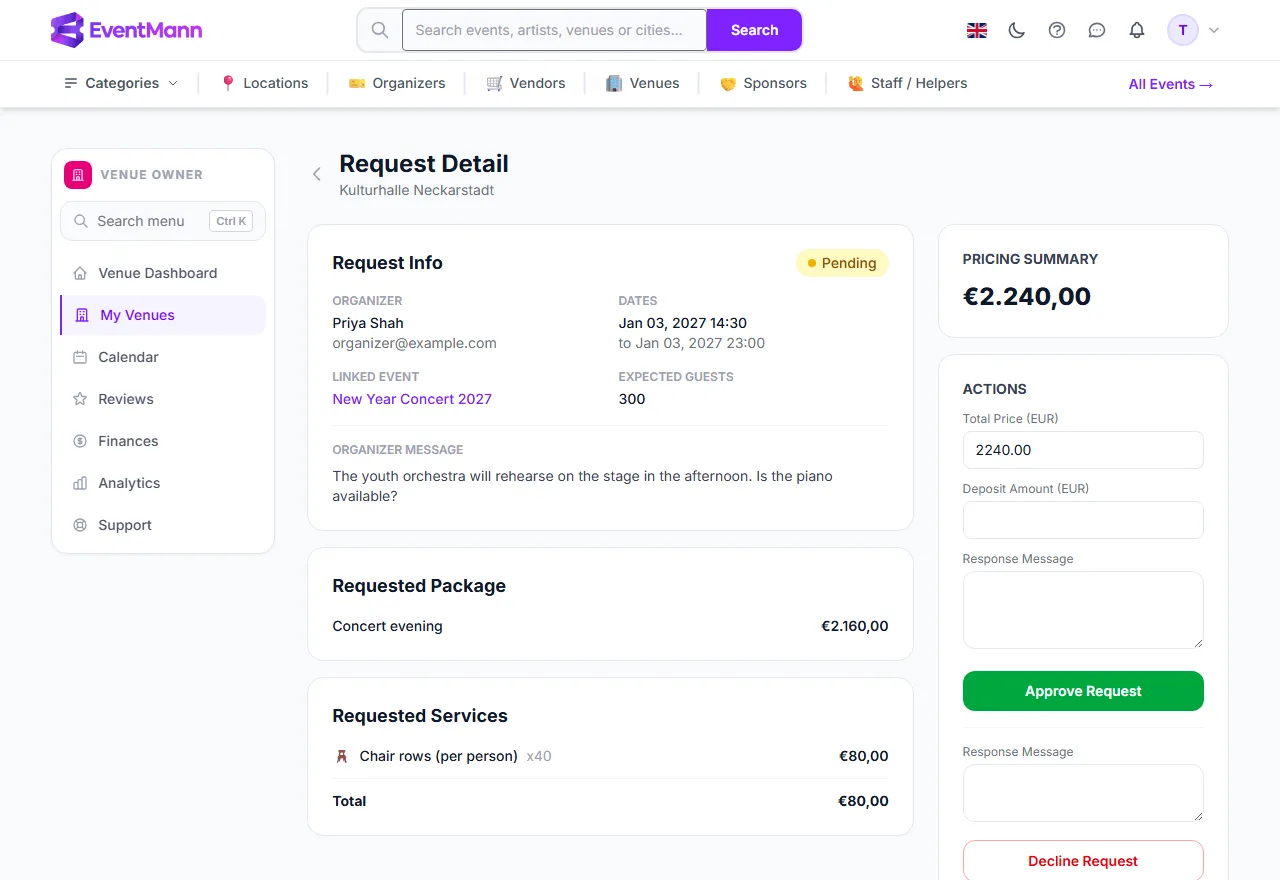
To decline instead, write the reason in the message box above Decline Request and click it; the reason is included in the email the organizer gets. See Handling Booking Requests.
What EventMann does with the money
- Nothing. EventMann does not charge the organizer for the hire, does not hold the deposit and does not send invoices. You collect the deposit and the balance yourself, in the way you agreed in the response message.
- When the deposit arrives, open the request and click Mark deposit received; you can undo it with Mark deposit unpaid. This only records the fact: it feeds the Deposits Received figure on Finances.
- The organizer sees the total price and your response message in their own My Venue Requests list. The deposit amount is not shown there, so name it in your response message.
Good to know
- Prices have no currency of their own and are not converted. Amounts are displayed in the currency of whoever is looking — euro for a venue owner. The form labels name your own account’s currency. Say in your response which currency you mean.
- Taxes such as VAT are not calculated. If your prices include or exclude tax, say so in the description of the service or in your response.
- Changing a service price later does not alter requests that already carry a total.
- If the organizer asked for a package, the request detail shows it under Requested Package with its share of the total, above the single services.
Troubleshooting
- The total looks too low — a custom-quote service has a base price of 0. Add your quote to Total Price before you approve.
- The Total Price field is missing — only a pending request can be approved. An approved request shows the price and the deposit as plain text.
- The deposit is not in Finances — it counts only after you mark it received.