




Pending Bookings
Help articles may not be fully accurate — they can lag behind the app due to frequent updates and automated translation. If in doubt, please contact support.
Most orders confirm within seconds. When an order is not confirmed yet, My Tickets and your dashboard show it as Pending or with a Complete payment button. Nothing has gone wrong: one more step has to happen first. This article covers the situations you can be in and what each one needs from you.
1. The organizer is reviewing your order
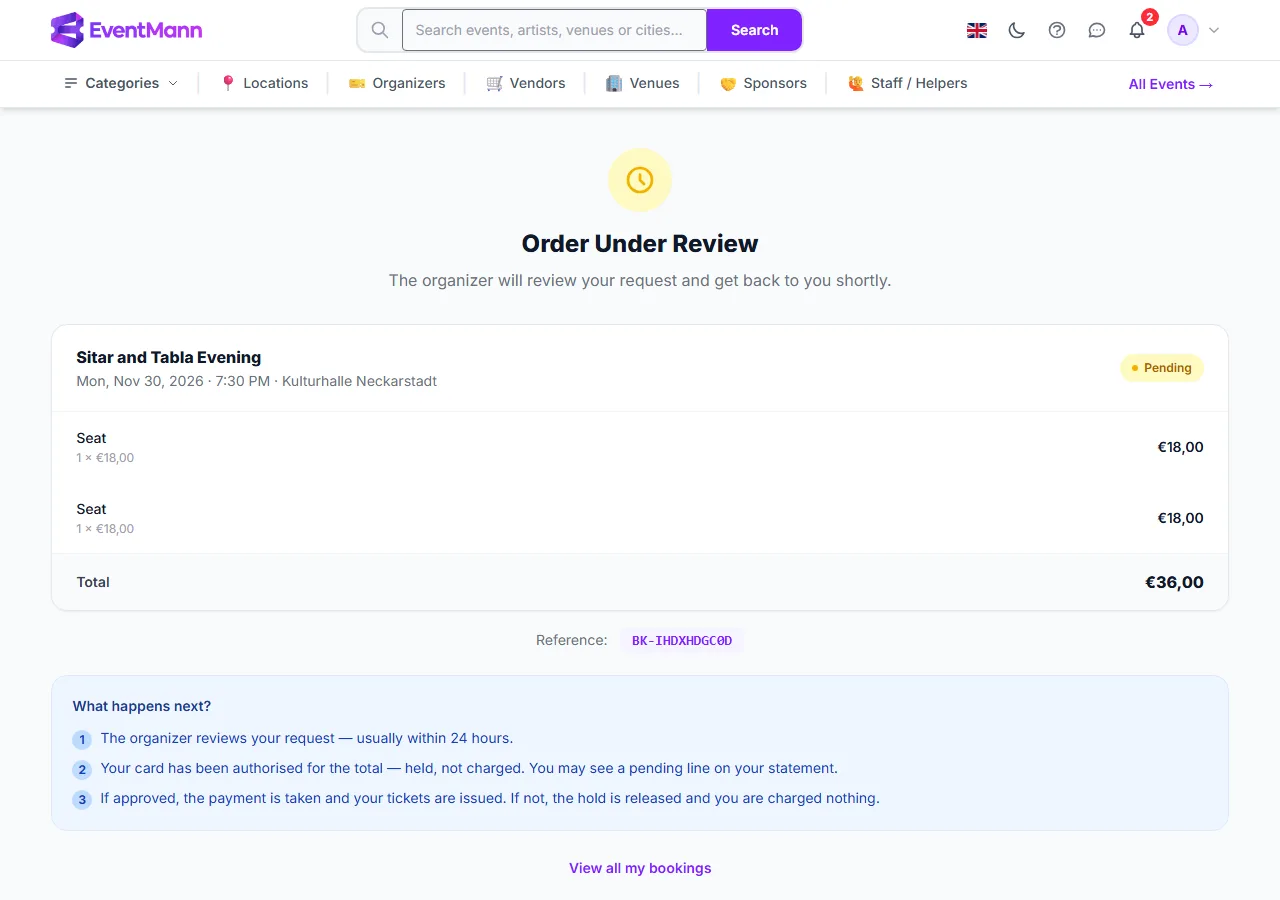
Some events approve every order. After checkout you land on the Order Under Review page ①.
- On the payment page the button reads Authorise instead of Pay. Your card is authorised, not charged: the amount is held, and you may see a pending line on your statement.
- Under What happens next? ② the page lists the steps. The organizer reviews the request, usually within a day. If they approve, the payment is taken and your tickets are issued. If they decline, or do not reply in time, the hold is released and you are charged nothing.
- You get an email for each outcome. Nothing is needed from you while you wait. You can write to the organizer from My Tickets once the order is approved (see How to Contact the Organizer).
- The seats are counted for you while your card is held, so two people cannot both be approved for the last place.
Some older orders on approval events work differently: the organizer approves first and you then get an email with a payment link and a limited time, often 30 minutes, to pay. If you miss it, the approval lapses and the tickets go back on sale.
2. Your payment is still being confirmed
Bank debits and some other methods take a while to clear. The page says Your payment is being processed. You will receive a confirmation once complete. The order stays pending, and the tickets are issued, and emailed, when the money is confirmed. Do not pay a second time.
3. Your payment did not go through
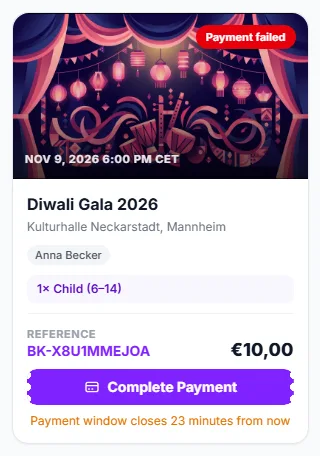
- Find the order in My Tickets. It carries a Complete payment button ① and a note with the time left ②.
- Press it and try again, or choose a different payment method. The payment page tells you Nothing has been charged and your tickets are still reserved.
- If the time ran out, the card says the payment window has expired. Start the order again from the event page.
4. You are on a waitlist
When an event is sold out and the organizer has switched the waitlist on, a sold-out ticket type offers Join Waitlist. You need to be signed in; a guest is asked to sign in first. Joining works like placing an order: you choose how many tickets of each type you need, and they are booked together when you are admitted.

- Press Join Waitlist on the sold-out ticket. The form opens with that ticket already at 1.
- Set the number of each ticket with the steppers ① ② — for example 2 adults and 2 children. A child ticket can only be added beside an adult ticket in the same entry, as at checkout.
- Check the Contact name ③ and, if you like, add a phone number ④. The email is your account’s; that is where the organizer’s answer and any payment link go. Names for each ticket are filled in after you are admitted, on the booking page.
- Press Join the waitlist ⑤.
Your waitlist entries are listed under My Waitlists at the bottom of My Tickets, with the tickets you asked for and a Leave waitlist button.
- Unless the organizer has chosen automatic admission, the organizer decides who is let in as places free up. Your whole entry is admitted together, as one order — never part of it.
- When you are admitted, you are emailed. Free tickets are confirmed and sent at once. For paid tickets the email has a payment link and a deadline: the places are yours until then. The order also appears in My Tickets with a Complete payment button and the line Admitted from the waiting list — pay by and the time. Complete the payment before it passes, or they go to the next person.
- The form refuses an entry that is larger than one order may be, a child ticket without an adult, a second entry for a ticket you are already waiting for, and an entry when the organizer’s waiting list for that ticket is full. The message says which.
Good to know
- The yellow strip on your dashboard counts every order still waiting — pending, approved but not yet paid, or with a failed payment — and links to the Pending filter in My Tickets, which lists the same orders.
- A pending order has no tickets yet. They appear, with download buttons, once the order is confirmed.
- An order that never reaches payment does not exist as an order. If you leave checkout before paying, nothing is left behind.
Troubleshooting
- My order has been pending for days — the organizer probably has not reviewed it yet. Write to them from the order, or raise a support ticket if it has been unusually long.
- I paid but it still says pending — give your bank a few minutes, or a few days for a direct debit. Check My Tickets again before paying twice.
- I was approved but missed the payment window — the approval lapsed and the tickets were released. Order again.
- There is a hold on my card but no tickets — the order is waiting for approval; the hold is released if it is declined.