




Surveys, Polls & After-Event Emails
Help articles may not be fully accurate — they can lag behind the app due to frequent updates and automated translation. If in doubt, please contact support.
On this page
- 1. Where you find a survey
- 2. Answer a survey
- 3. Polls
- 4. After-event emails
- 5. Stop receiving them
- 6. Good to know
- 7. Troubleshooting
- 8. Related
After an event, organizers often ask for your opinion with a short survey or a one-question poll, and some send a thank-you email with photos, a feedback link and their next events. This article explains where you meet these, how to answer, and how to stop receiving them.
Where you find a survey
- On your dashboard — open surveys for events you booked appear under Your feedback is requested with a Fill in survey link, until you answer them (see My Dashboard).
- In an email and the bell — an invitation arrives some time after the event, with a button that opens the survey. If you do not answer, you get one reminder, a few days later, and never a second one.
- From a shared link — an organizer may post an open survey link for a group chat. Anyone who has it can answer, signed in or not.
Answer a survey
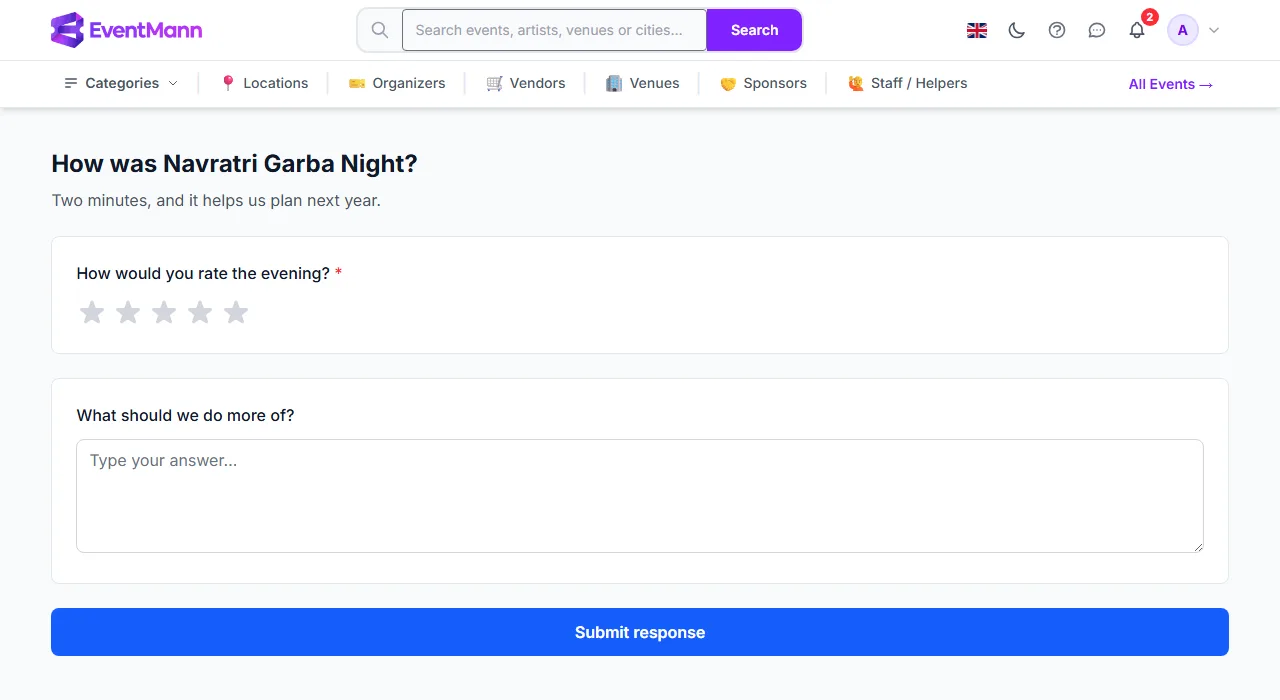
- Open the survey. Questions marked with a red star are required ①.
- Answer each question. Depending on what the organizer chose, you give a star rating, a score from 0 to 10, a face, a number on a scale, pick one or several options, or write text.
- Press Submit response ②. You get a message that your response was recorded.
- You can answer each survey once. Opening it again shows that you already responded.
- Your answers go to the organizer, who uses them to improve their events.
- If the organizer has closed the survey, the page says This survey has closed and is no longer accepting responses instead of showing questions.
Polls
A poll is a survey with one question, for example “Which date works best for the next workshop?” You choose an answer and submit. If the organizer switched it on, you then see how everyone voted (totals and averages only; written answers are never shown to other people).
After-event emails
An organizer can send a message after the event to everyone who booked, only to those who attended, or only to those who did not arrive. It may contain:
- a survey or poll — the answers appear as tappable options. Tapping one only opens the survey with that answer already selected; nothing is sent until you press Submit, so a mail program that opens links by itself cannot vote for you;
- links to photos or videos the organizer shares, and the organizer’s social profiles;
- up to three of the organizer’s next events.
The same message may also be available as a web page via a link the organizer can share, for example in a group chat.
Stop receiving them
- Every such email carries an unsubscribe link and the one-click unsubscribe option of your mail program. The page you reach first only shows a button; unsubscribing happens when you press it, so your mail program’s link check cannot unsubscribe you.
- If you have an account, you can switch Marketing off in Notification Preferences.
- Asking for feedback or showing upcoming events counts as advertising, so these emails respect your opt-out and the unsubscribe lists. Messages about your own orders, such as tickets and payment links, are not affected.
Good to know
- A survey sent to your email address opens through its personal link without signing in. Opening it from the dashboard needs a signed-in account that booked the event.
- Reviews (stars and a comment on the event page) are separate from surveys. See Event Details.
Troubleshooting
- The survey link does not open — the survey may be closed, or you are signed in with an account that did not book that event. Use the link from your email, or sign in with the account that bought the tickets.
- I answered but the dashboard still shows the survey — reload the page. A survey you answered disappears from the list.
- I clicked an answer in an email and nothing was recorded — that is intended: press Submit response on the page it opened.
- I get emails from an organizer I do not remember — use the unsubscribe link in the email.