




Vendor Profile
Vendor Guide
4 min read
Help articles may not be fully accurate — they can lag behind the app due to frequent updates and automated translation. If in doubt, please contact support.
On this page
- 1. Settings explained
- 2. Approval
- 3. Good to know
- 4. Troubleshooting
- 5. Related
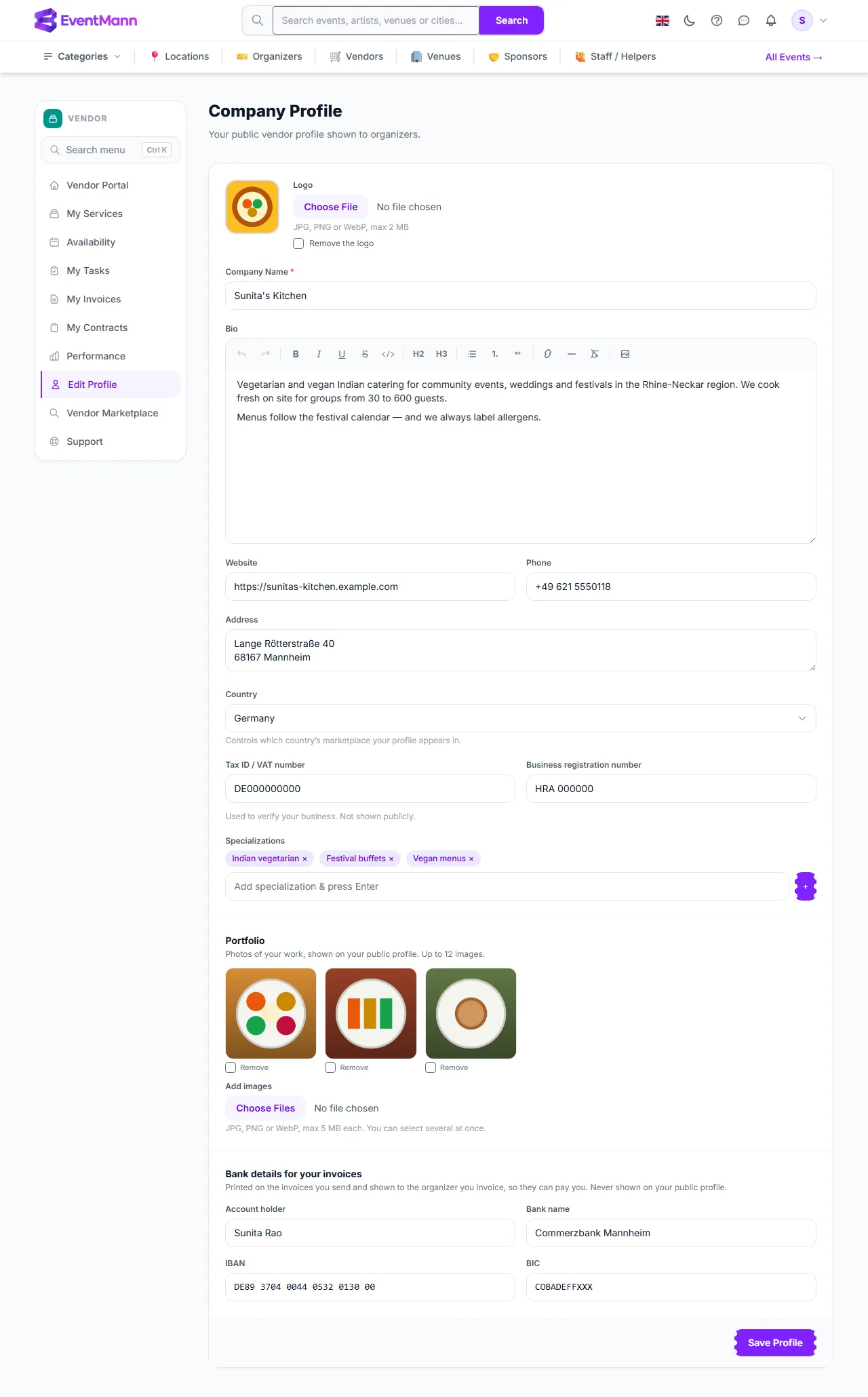
Edit Profile (sidebar → Edit Profile, or the button on the dashboard) holds your company details. It opens as Company Profile with the line “Your public vendor profile shown to organizers.” Most of it is public once an administrator approves you, so write it for the organizers who will read it.
Settings explained
| Field | What to enter | Public? |
|---|---|---|
| Logo ① | A JPG, PNG or WebP image of up to 2 MB. After choosing the file you can drag and zoom it into the square. Tick Remove the logo to go back to your initial. | Yes, in the marketplace and on your page |
| Company Name ② | Required. The name organizers see in lists and on your page. | Yes |
| Bio | A rich-text description: what you do, where, for how many guests. The editor has bold, italic, headings, lists, links and an image button. | Yes |
| Website ③ | A full address starting with https://. | Yes, as a Visit Website link |
| Phone | Digits, spaces and + - ( ) only. | Yes |
| Address | Where you are based, free text. | Yes |
| Country | Controls which country’s marketplace your profile appears in. | Used for listing |
| Tax ID / VAT number ④ and Business registration number | Used to verify your business. | No — “Not shown publicly.” |
| Specializations ⑤ | Short tags, one at a time: type and press Enter or +. Duplicates are removed. | Yes; searchable |
| Portfolio ⑥ | Photos of your work: JPG, PNG or WebP, up to 5 MB each and up to 12 in all. Choose several files at once under Add images; tick Remove under a photo to take it out. | Yes, as a gallery on your page |
| Bank details for your invoices ⑦ | Account holder, IBAN, BIC and Bank name. Spaces and lower case are fine; the IBAN is checked for its shape (two letters, two digits, then 11 to 30 letters or digits) and the BIC must have 8 or 11 characters. | No — printed on your invoices and shown to the organizer you invoice |
Press Save Profile ⑧ to store the changes.
Approval
- The first time you save, your profile is created as Pending and the administrators are told to review it. Until then a yellow notice Pending — Your account is pending admin approval. Complete your profile while you wait. shows on this page and on the dashboard.
- An administrator approves (or suspends) you. Only approved vendors are listed in the marketplace and can be assigned to events by organizers.
- Editing a profile later does not send it back to pending.
- If an administrator granted you the vendor role directly, your profile may already be approved; fill in the details anyway.
Good to know
- Your phone, website, address and your account name (the name on your login) appear under “Contact Info” on the public page. Do not enter anything you would not publish. Your email is not shown.
- Without a logo the public page shows your initial in a tile. Logos and portfolio photos are resized when you save, so a large photo straight from a camera is fine as long as it is under the size limit.
- The IBAN is stored encrypted. It appears on your invoice PDF and, once you have sent an invoice, next to it on the organizer’s vendor page — nowhere else. The shape check does not prove the IBAN is yours or correct: read it back on your first invoice.
- The profile is separate from Service Catalog: your profile says who you are, the catalogue says what you sell.
Troubleshooting
- “Phone number may contain only digits and + - ( ) characters.” Remove letters; only digits, spaces and
+ - ( )are accepted. - The website is rejected. Include
https://at the start. - “This does not look like an IBAN” or “A BIC has 8 or 11 letters and digits”. Copy the number from your bank statement; spaces are removed for you.
- “Your portfolio can hold at most 12 images.” Tick Remove under some photos in the same save, or upload fewer.
- The logo or a photo is refused. Only JPG, PNG and WebP are accepted (no SVG or GIF), up to 2 MB for the logo and 5 MB for each photo.
- I am not in the marketplace. Your profile is still pending, or the marketplace the visitor sees is a different country from the one you chose.