




Ratings & Reviews
Organizer Guide
3 min read
Help articles may not be fully accurate — they can lag behind the app due to frequent updates and automated translation. If in doubt, please contact support.
On this page
Public star ratings and written reviews attendees leave about your event, alongside your average score. Find them under Analytics & Reports → Feedback, on the Reviews tab (the Surveys tab next to it is what you asked; this is what they say unprompted). Anyone with view access to the event can read the page.
What you can do here
- Read every rating and review for the event with its stars and how long ago it was posted. The header shows how many there are and the average rating.
- Two lists, because attendees can leave feedback in two places: Event page ratings (stars, with an optional comment, from the event page) and Reviews page (a titled review from My Bookings, marked Verified attendee).
- Reply publicly — your reply appears directly under the review, visible to anyone who can see it.
- Hide or show — the Published / Hidden badge on each review is a button: click it to hide the review from public view or to publish it again.
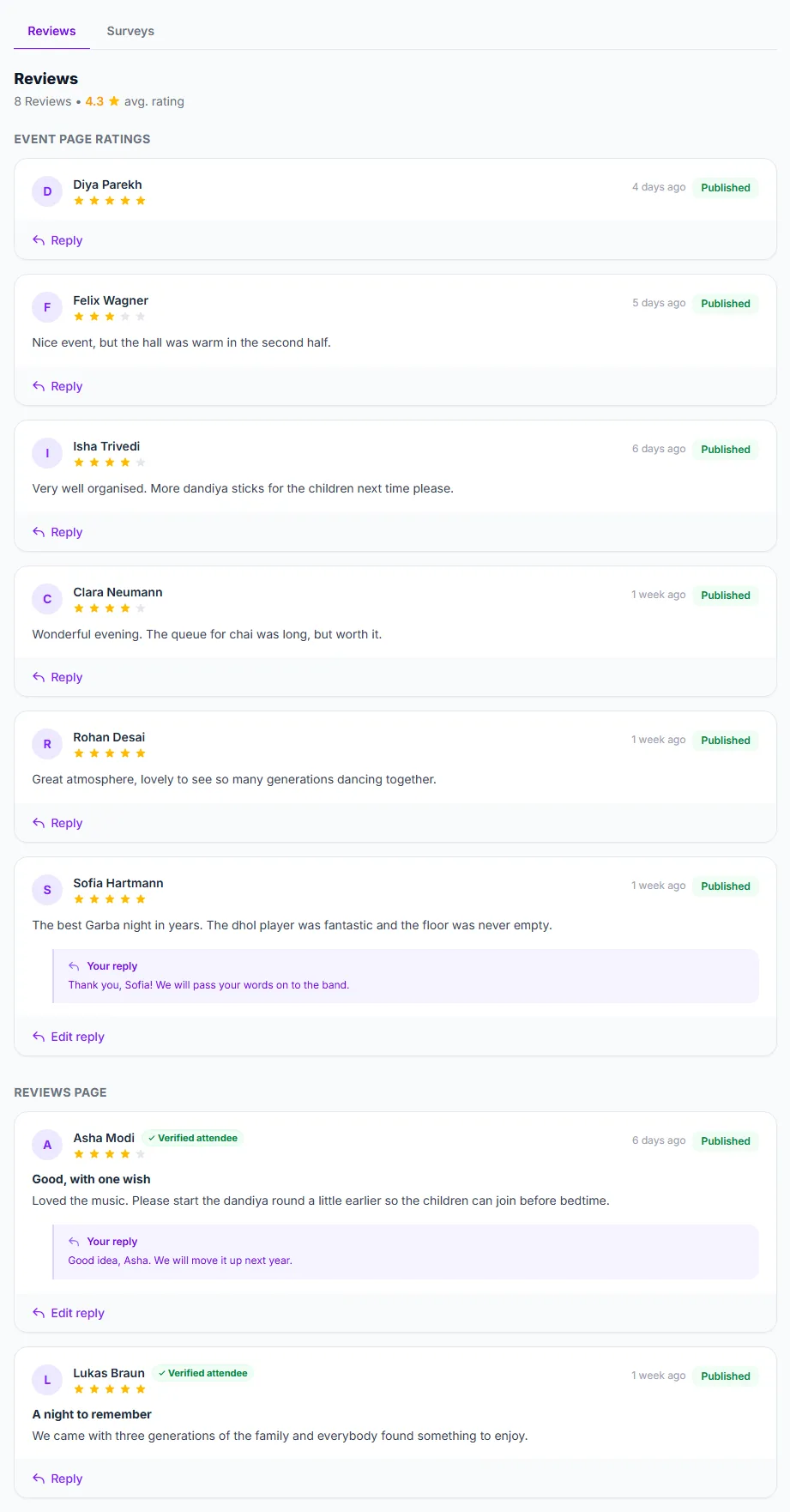
The section headings ① separate the two sources. Click Reply ② under a review to answer it, and click the Published badge ③ to hide it. The Reviews page ④ list works the same way.
How to reply to a review
- Click Reply under the review (it reads Edit reply if you already answered).
- Type your response (“Write a public reply to this review…”) and click Save Reply. A reply can be up to 1,000 characters on a rating and 2,000 on a review.
- Your reply is shown immediately beneath the attendee’s review; editing it later overwrites the same reply rather than adding a second one.
Good to know
- Hiding a review removes it from public view but keeps it here for you — hiding is reversible any time.
- Until the first review arrives the page says “No reviews yet”.
- A review can also be taken down by platform staff moderating abuse reports. That is a separate switch from yours — both your toggle and theirs have to say “show” for a review to be public, so re-publishing here will not bring back a review the platform hid, and it still counts toward “Reviews” here either way. Such a review carries a red Hidden by moderation badge.
- Replying and hiding need permission to edit the event; reading does not.
Troubleshooting
- Page shows no reviews at all — either nobody has rated the event yet, or every review has been hidden; hidden reviews still count toward “Reviews” here even though the public cannot see them.
- A review you published is still not showing on the event page — platform staff may have hidden it for a moderation reason. Toggling it here will not override that; check with support if you believe that was a mistake.