




Engagement Analytics
Sponsor Guide
3 min read
Help articles may not be fully accurate — they can lag behind the app due to frequent updates and automated translation. If in doubt, please contact support.
On this page
- 1. What is on this page
- 2. How to read it
- 3. Good to know
- 4. Troubleshooting
- 5. Related
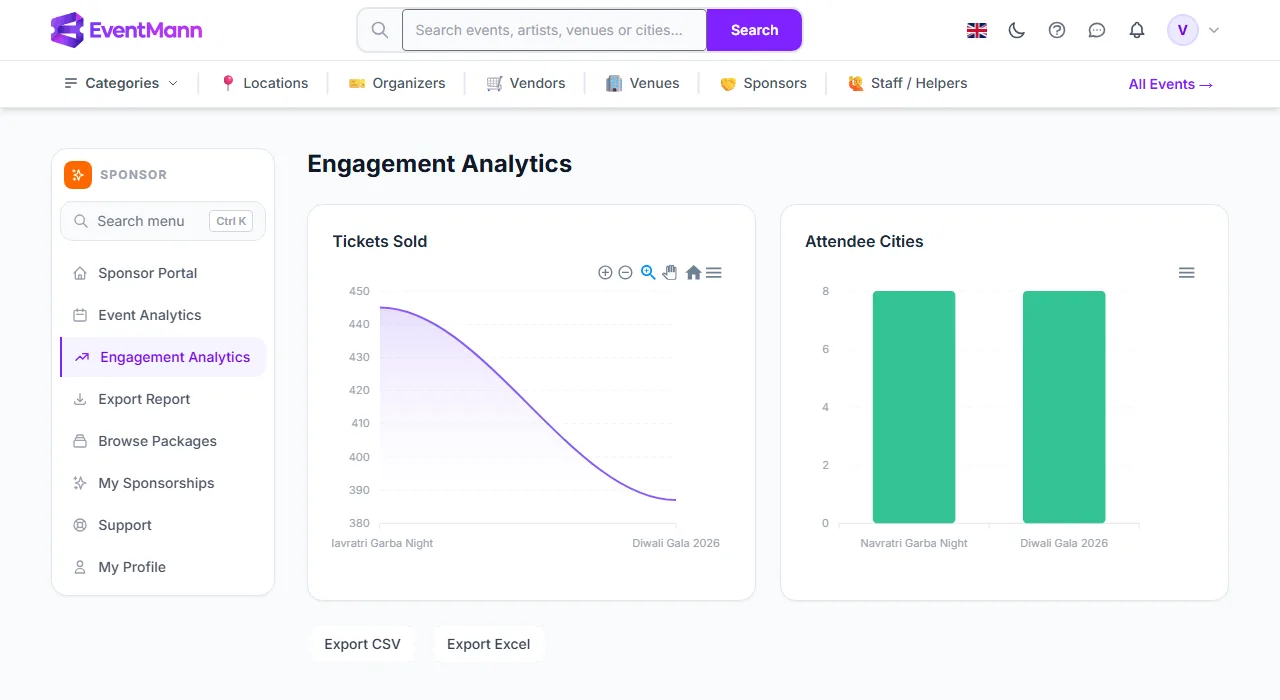
Engagement Analytics (sponsor sidebar) puts the same audience figures as Event Analytics into two charts, so you can read them at a glance. Despite the name, it does not measure engagement: EventMann does not track clicks, views, scans or any interaction with your branding. What it charts is real and countable — tickets sold and attendee cities for each sponsored event.
What is on this page
- Tickets Sold ① — an area chart with one point per sponsored event, labelled with the event title (shortened to 20 characters), valued at the number of tickets on confirmed orders.
- Attendee Cities ② — a bar chart of how many different cities buyers entered at checkout, per event.
- Export CSV / Export Excel ③ — two buttons under the charts that download the same table as Event Analytics.
How to read it
- Compare the height of each point or bar between events: a bigger audience in the first chart, a wider geographic spread in the second.
- Hover a point or bar for the exact value. The menu on the chart saves it as SVG, PNG or CSV.
- Use the table on Event Analytics when you also want the number of orders.
Good to know
- The charts show one value per event, in the order of your sponsorships. They are not a time series, even though the first one is drawn as an area.
- Only events where your sponsorship is Active or Completed appear. Before that, the page shows “Nothing to show yet” and explains that audience figures appear once a sponsorship is approved and paid, with a button to My Sponsorships.
- The numbers are live counts, not estimates, and there is no date filter.
- Earlier versions of these pages showed impressions and an engagement rate. Those were calculated from the number of orders and were not measurements, so they were removed. If you have an old report that mentions them, do not rely on it.
Troubleshooting
- “Nothing to show yet” — no sponsorship of yours is Active or Completed. A pending application, or one that is approved but unpaid, does not count yet.
- The cities chart is flat at zero — the event does not collect buyers’ addresses, so no city is recorded.
- The event labels are cut off — labels are shortened to 20 characters on this page. The full names are in the table on Event Analytics.