




Performance
Vendor Guide
2 min read
Help articles may not be fully accurate — they can lag behind the app due to frequent updates and automated translation. If in doubt, please contact support.
On this page
- 1. What each figure means
- 2. Good to know
- 3. Troubleshooting
- 4. Related
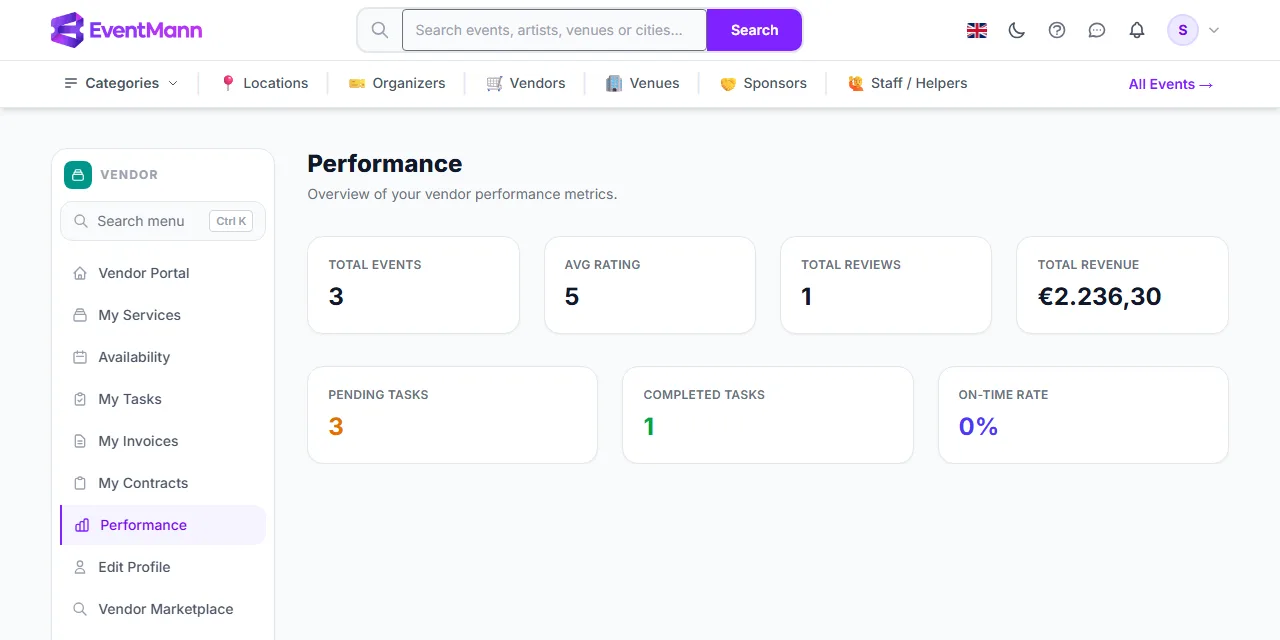
Performance (sidebar → Performance) shows seven figures about your work on the platform, with the line “Overview of your vendor performance metrics.” It is a snapshot of today: there is no date range, chart or export.
What each figure means
| Figure | How it is calculated |
|---|---|
| Total Events ① | The number of assignments you have confirmed, all time. |
| Avg Rating ② | The average of the organizers’ star ratings, to one decimal. 0 when there are none. See Understanding Your Ratings. |
| Total Reviews | How many reviews you have. |
| Total Revenue | The sum of the totals (tax included) of your invoices that the organizer has marked Paid, in the event’s currency. If you have been paid in more than one currency, there is one line per currency. |
| Pending Tasks | Tasks with the status Pending. Tasks you have started (In Progress) are not in this count. |
| Completed Tasks | Tasks with the status Completed. |
| On-Time Rate ③ | Tasks done on time divided by all tasks that are done or overdue, as a percentage. A task is on time when you completed it on or before its due date (or it has no due date); it is late when you completed it after the due date, or the date has passed and it is still open. It is 100% when there is nothing to count. |
Good to know
- The due date is inclusive: a task completed on its due day is on time. A task completed late stays late — completing an overdue task stops it counting as open, but it still counts as late.
- Revenue counts only invoices the organizer has marked Paid; approved or submitted invoices are not included. It is a record of what organizers marked as paid, not a bank statement.
- Organizers do not see this page. They see your public profile.
- Without a saved profile the page asks you to complete it and shows zeros.
Troubleshooting
- Total Events is lower than my invitations. Only confirmed assignments count; invited and declined ones do not.
- Revenue is 0 although I invoiced. No invoice has been marked Paid by the organizer yet.