




Public Profile
Organizer Guide
3 min read
Help articles may not be fully accurate — they can lag behind the app due to frequent updates and automated translation. If in doubt, please contact support.
On this page
- 1. What you can do here
- 2. Settings explained
- 3. Good to know
- 4. Troubleshooting
- 5. Related
Your public profile is the page that shows attendees who you are: your name or organization, a logo, a tagline, a bio, links, and all your upcoming events in one place. Edit it under Settings → Public Profile. The same name and logo appear as “Organized by” on every one of your event pages.
What you can do here
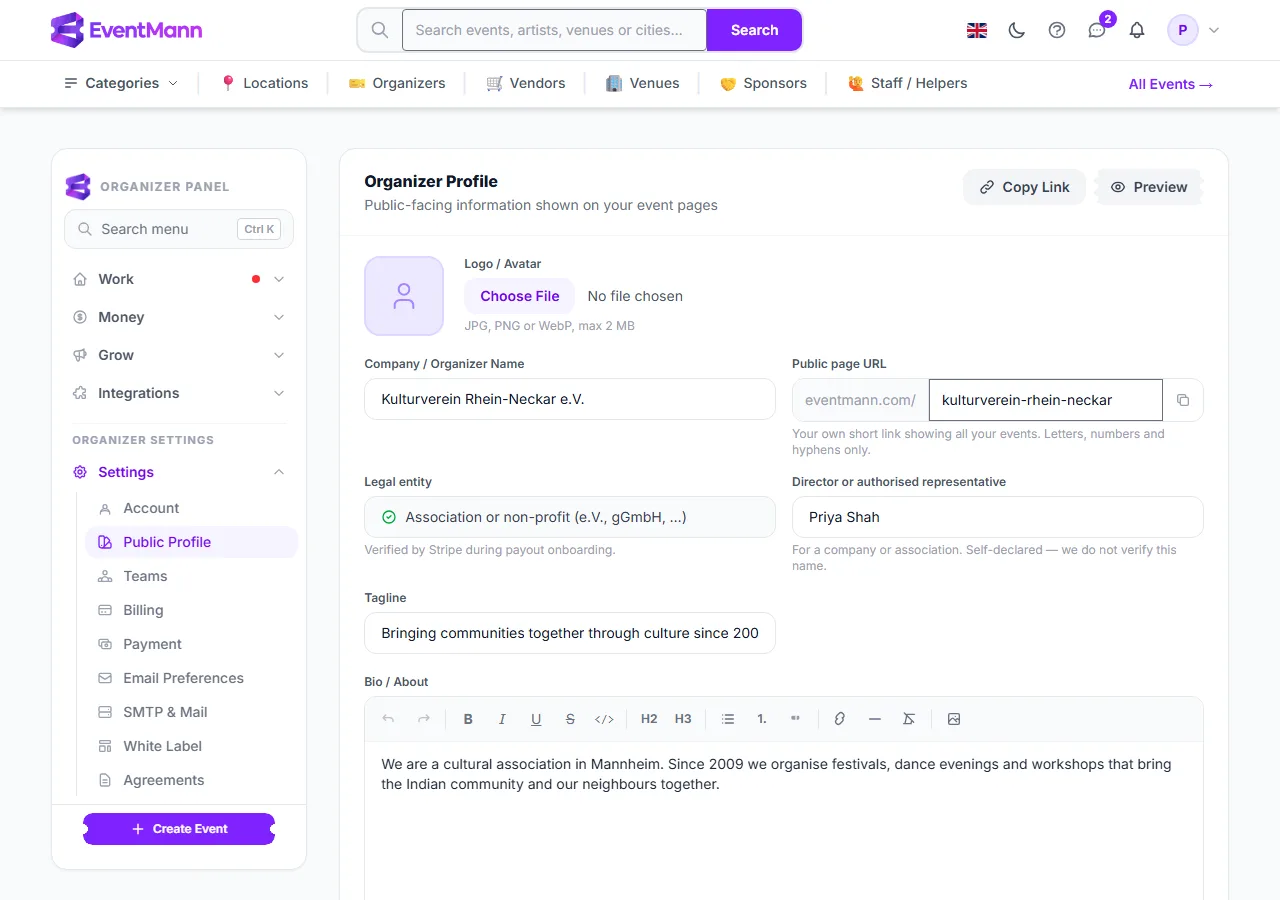
- Upload a Logo / Avatar (JPG, PNG or WebP, up to 2 MB). It is shrunk automatically, because it appears at avatar size on every page.
- Choose your Public page URL ① — the short link to your page, for example
eventmann.com/kulturverein-rhein-neckar. Use Copy Link at the top to copy it and Preview to see the page. - Enter your Company / Organizer Name ②. It is the name attendees see on events, tickets, emails and invoices. If you leave it blank, your personal account name is used instead.
- Check Legal entity ③. Once a Stripe account is connected this field shows what Stripe verified during onboarding (for example “Association or non-profit”) and cannot be edited; before that you may declare it yourself.
- Optionally enter the Director or authorised representative. For a company or association this is a self-declared name that we do not verify.
- Add a Tagline (up to 160 characters) and a Bio / About text with basic formatting, then your Website and social links (Facebook, X, Instagram).
- Click Save Profile ④.
Settings explained
- Public page URL — typed as anything; it is saved in lowercase with only letters, numbers and hyphens, 3 to 50 characters, starting and ending with a letter or number. A handful of reserved words are refused and every handle must be unique on the platform. Leave it blank for no personal URL.
- Bio — formatted text; unsafe HTML is stripped when you save.
- Contact form — your page offers a contact form instead of showing an email address; your own reply-time promise and the on/off switch live on your Enquiries page (the link on this screen takes you there). See Enquiries.
Good to know
- Your email address is never shown on a public page. Visitors write to you through the contact form and you answer from Enquiries.
- Changing the handle changes the link you may already have shared; the old one stops working.
- Your personal name, phone, timezone and password are on the Account page, not here. If you have switched on White Label, your own brand also shows on your event pages.
Troubleshooting
- “The handle has already been taken” — pick another; handles are unique across all organizers.
- The handle I typed was changed — capitals, spaces and special characters are removed on purpose.
- The logo will not upload — use JPG, PNG or WebP under 2 MB; SVG files are not accepted.
- I cannot change the legal entity — it is locked to what Stripe verified once your account is connected.