




Members and member IDs
Organizer Guide
4 min read
Help articles may not be fully accurate — they can lag behind the app due to frequent updates and automated translation. If in doubt, please contact support.
On this page
- 1. What you can do here
- 2. Read the list
- 3. End and refund a membership
- 4. Member IDs
- 5. Good to know
- 6. Troubleshooting
- 7. Related
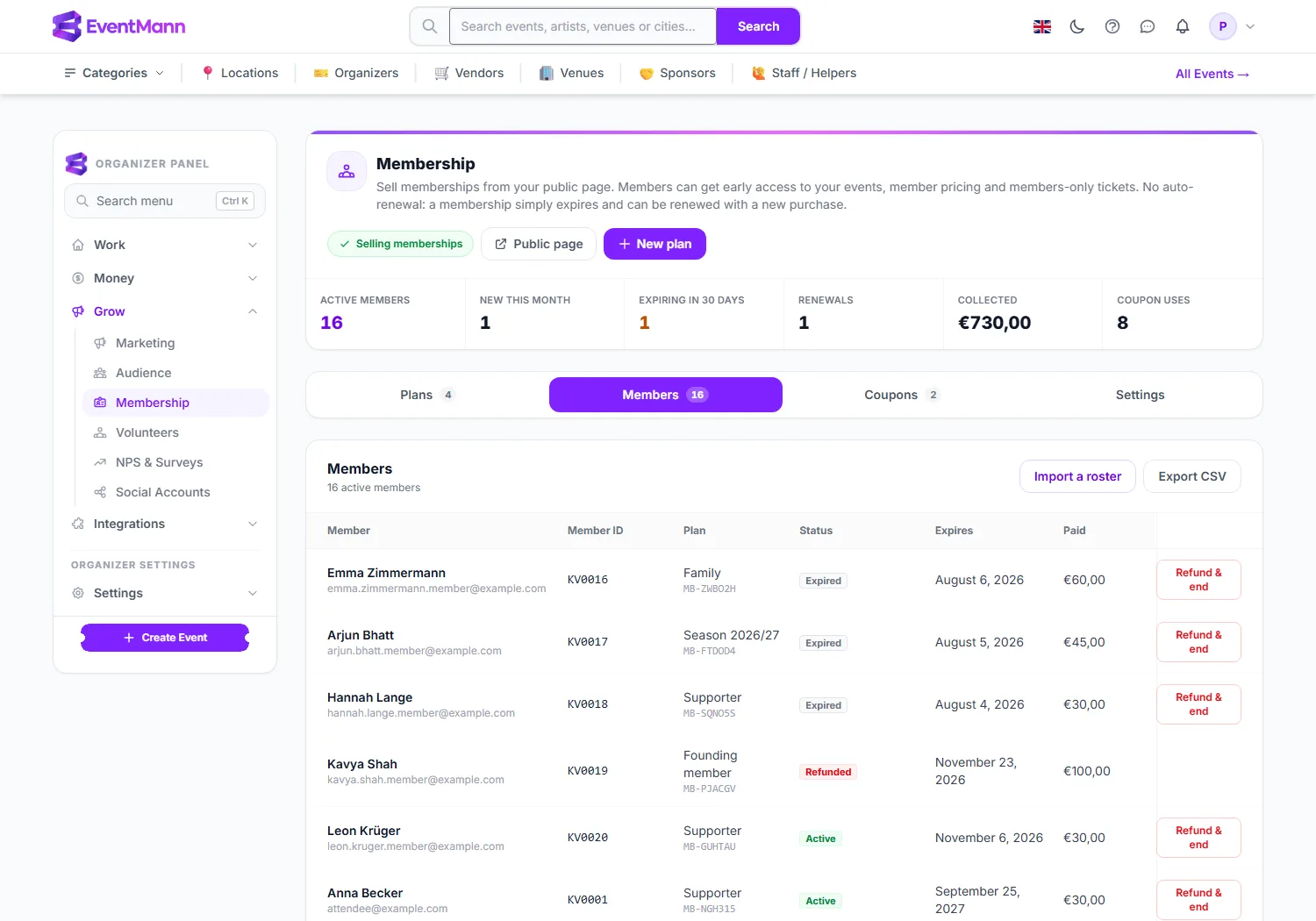
The Members tab under Grow → Membership is your roster: everyone who holds or has held a membership with you, with their plan, status and what they paid. Use it to look someone up, end a membership, or export the list. Member IDs and the import of an existing roster are set up on the Settings tab.
What you can do here
- Read the roster: name and email, Member ID, plan and reference, status, expiry date and what was paid (with the coupon, if one was used).
- Import people you already have with Import a roster ①.
- Download the list with Export CSV ②.
- End a membership and refund it with Refund & end.
Read the list
- The Member ID ③ is the number from your own sequence, for example KV0015. A small imported tag marks people you loaded from a roster.
- Active ④ means the membership is paid, not ended, and inside its term. It stays active for 7 days after its end date; after that it reads Expired.
- Refunded ⑤ marks a membership you ended with a refund.
- The list holds 25 people per page, newest first.
End and refund a membership
- Find the row and click Refund & end ⑥.
- Confirm. The whole purchase is refunded from your Stripe balance to the member, the benefits end at once, and the spot on a limited plan is offered to the waitlist.
- A membership with no payment behind it (imported or given free) simply ends with no refund.
If the refund cannot be made, the page says so and the membership stays as it was; check your Stripe balance and try again. This cannot be undone.
Member IDs
- Open the Settings tab.
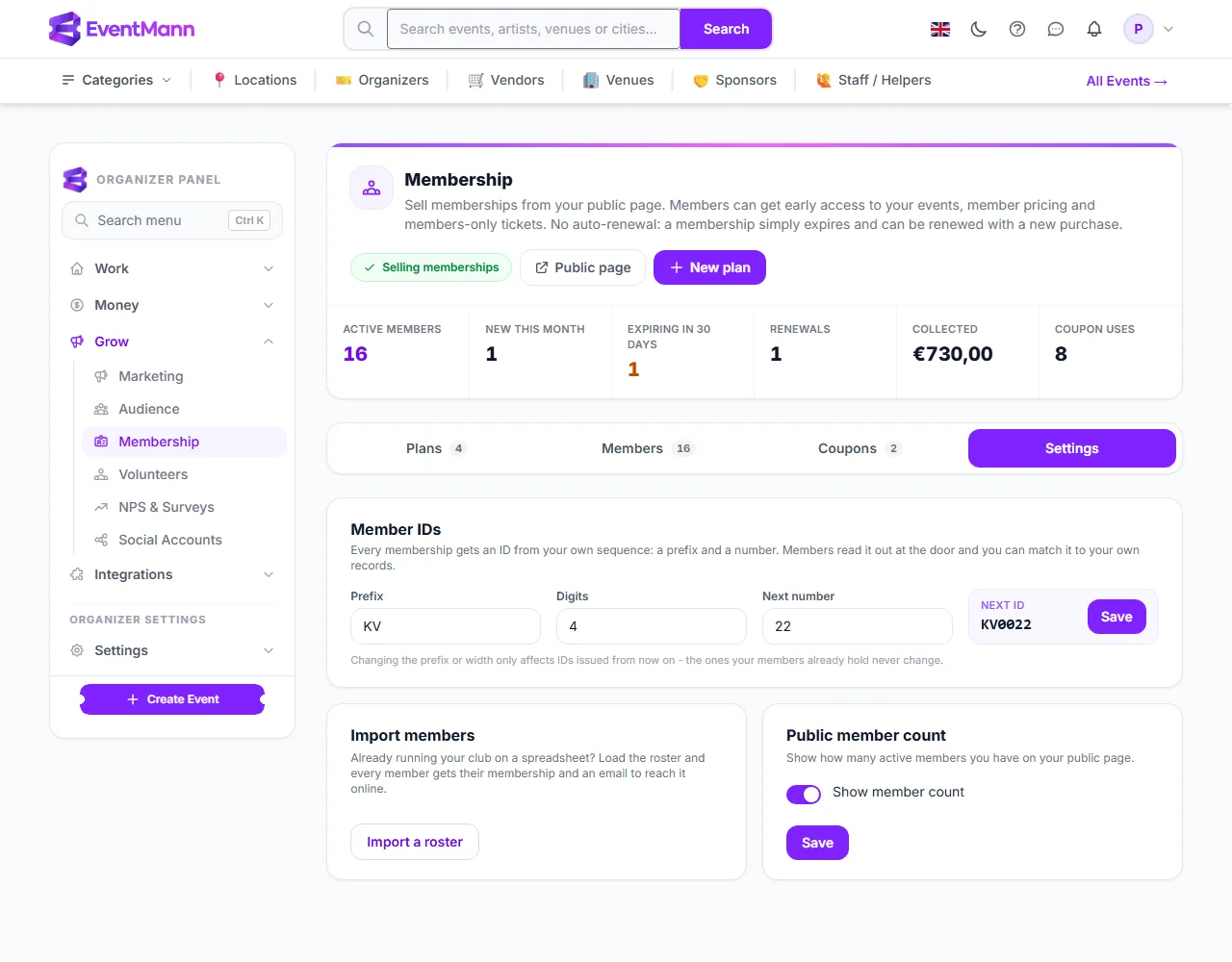
- In Member IDs, set a Prefix ① (up to 12 characters), the number of Digits ② and the Next number ③. The Next ID box ④ shows the result, for example KV0022.
- Click Save. Every membership you issue from now on takes the next number.
- Import a roster ⑤ opens the import page, and the Public member count ⑥ switch shows your member count on your public page.
Good to know
- Changing the prefix or width affects only IDs issued from now on. You can move the next number forward — to continue a roster that already reached 400 — but not back over IDs already issued.
- Memberships sold before you set up the sequence keep a blank ID; they are never renumbered, because a number someone already holds must not move.
- The exported CSV has Name, Email, Plan, Status (active, expired, revoked or gift_pending), Starts, Expires, Price, Currency and Reference. It has no member ID column.
- Members can also end their own membership within 14 days of buying, in full.
- A gift that is bought but not yet claimed sits under the buyer’s name with the status Not yet claimed and the recipient’s address. It has no expiry date yet, because the term starts when the recipient claims it, and it does not count as an active membership until then. In the CSV its status is gift_pending and its dates are empty.
- Renewal emails go out 14 and 7 days before expiry, once each, and never to someone who has already renewed.
Troubleshooting
- A member has no ID. They joined before you set up the sequence. There is no renumbering by design.
- The next number was refused. It is lower than a number already issued. Pick the suggested number or higher.
- Somebody renewed early and says they lost days. They have not: an early renewal starts when the current term ends.
- The refund failed. Stripe returns refunds from your balance; top it up or wait for sales to settle, then try again.