




Finance Overview
Help articles may not be fully accurate — they can lag behind the app due to frequent updates and automated translation. If in doubt, please contact support.
On this page
- 1. What you can do here
- 2. Read the cards
- 3. The reconciliation table
- 4. Good to know
- 5. Troubleshooting
- 6. Related
The Finance Overview is the money page for your whole organization: sales, refunds, fees and Stripe’s own costs across every event you run. Open it from Money → Finance in the sidebar. The other money pages sit in the tab strip along the top — Overview, Payouts, Tax Rates, Revenue Shares and Exports — while Invoices, Expenses and Stripe Connect are their own rows under Money. Only the organizer account (and platform admins) can open these pages; team members see a per-event version instead, described in What a finance team member can see.
What you can do here
- See what you have sold, what was refunded, what EventMann kept and what Stripe charged, in five cards.
- Compare every event side by side in the Reconciliation table.
- Watch the monthly revenue and refund-rate charts.
- Download the reconciliation as CSV or Excel.
Read the cards
- Use the tab strip ① to move between the money pages. Card payments are paid out by Stripe, so look under Payouts for what has reached your bank.
- Total Revenue ② — what buyers paid on confirmed and refunded orders, minus the money refunded.
- Platform Fees ③ — the commission (and any service fee) EventMann kept. When an order is refunded, the commission on it is returned, so a refunded sale adds nothing here.
- Stripe fee ④ — what Stripe charged your own Stripe account for processing these payments, as Stripe reported it.
- Net Revenue ⑤ — Total Revenue minus Platform Fees minus the Stripe fee. This is what is left for you.
- Pending Payout ⑥ — the total of payouts that EventMann itself recorded for you and has not marked paid. This is not your Stripe balance: Stripe’s payouts are listed on Payouts, and EventMann records no payout of its own for card sales, so this card is normally €0.
- Click CSV ⑦ (or Excel next to it) to download the per-event reconciliation shown further down the page.
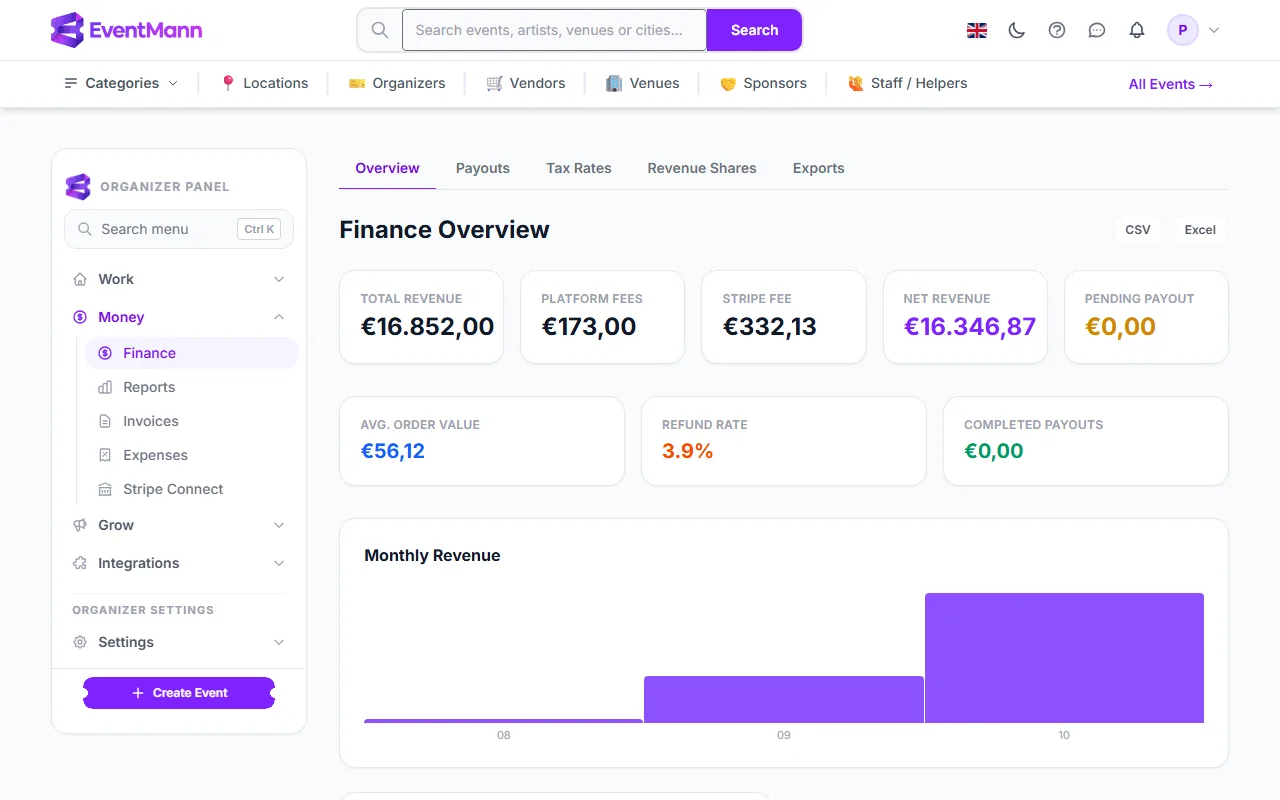
Below the cards, a second row shows Avg. Order Value, Refund Rate and Completed Payouts. Then come the Monthly Revenue chart (revenue by the month an order was paid, for the latest twelve months), the Refund Rate chart (the share of paid orders that were refunded, in full or in part) and, once EventMann has recorded payouts for you, a Payout Status chart.
The reconciliation table
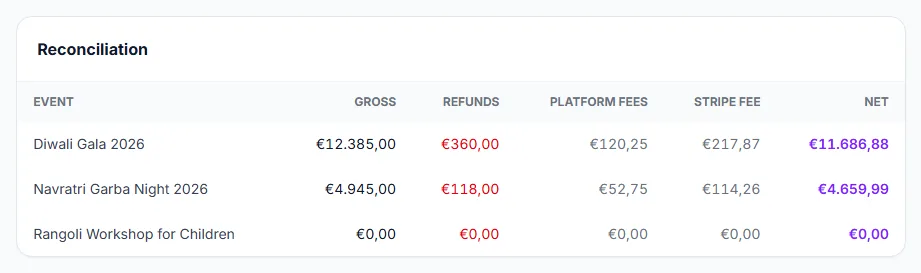
- Gross ① is everything buyers paid for that event.
- Refunds ② is what you gave back, including partial refunds.
- Platform fees ③ is the commission EventMann kept after refunds.
- Net ④ is Gross minus Refunds minus Platform fees minus the Stripe fee. Every row adds up the same way, so the table can be checked against your accounts.
The last panel, Recent Activity, lists your ten most recent confirmed orders, newest first, with the order reference, event, amount, platform fee, Stripe fee, net and date. A free order has no payment date, so it is placed by the day it was booked. A dash in the Stripe fee column means Stripe has not reported the fee for that order yet, or the order was not paid by card.
Good to know
- Orders that were never paid, or were cancelled before payment, are not counted. A partially refunded order stays confirmed, and its refund is subtracted from the totals, so nothing needs adjusting by hand.
- If you sell in more than one currency, the cards add the raw amounts under your account currency. Treat cross-currency totals as a rough guide.
- Ticket sales only. Money you record by hand (venue costs, sponsorship) lives under Expenses, and each event’s own profit and loss is on Event revenue and event expenses.
- For the rules behind the fees, see Understanding Fees & Pricing.
Troubleshooting
- Everything reads zero although I have sales. Your orders are probably still pending (awaiting payment or approval), or the event is free. Check Orders for the event.
- Pending Payout is €0 but Stripe is about to pay me. That card only counts payouts EventMann recorded. Open Payouts to see what Stripe has sent or scheduled.
- The Recent Activity rows do not add up to the cards. The rows show each order as it was paid; the cards subtract refunds and return the commission on refunded orders. The reconciliation table and each event’s revenue page use the same figures as the cards.