




How to Apply for Sponsorship
Sponsor Guide
4 min read
Help articles may not be fully accurate — they can lag behind the app due to frequent updates and automated translation. If in doubt, please contact support.
On this page
This covers the whole path from choosing a package to a live sponsorship: the application form, what the organizer does with it, and the places where it can stall. You apply from an event’s page under Browse Packages; the application then appears in My Sponsorships.
Apply for a package
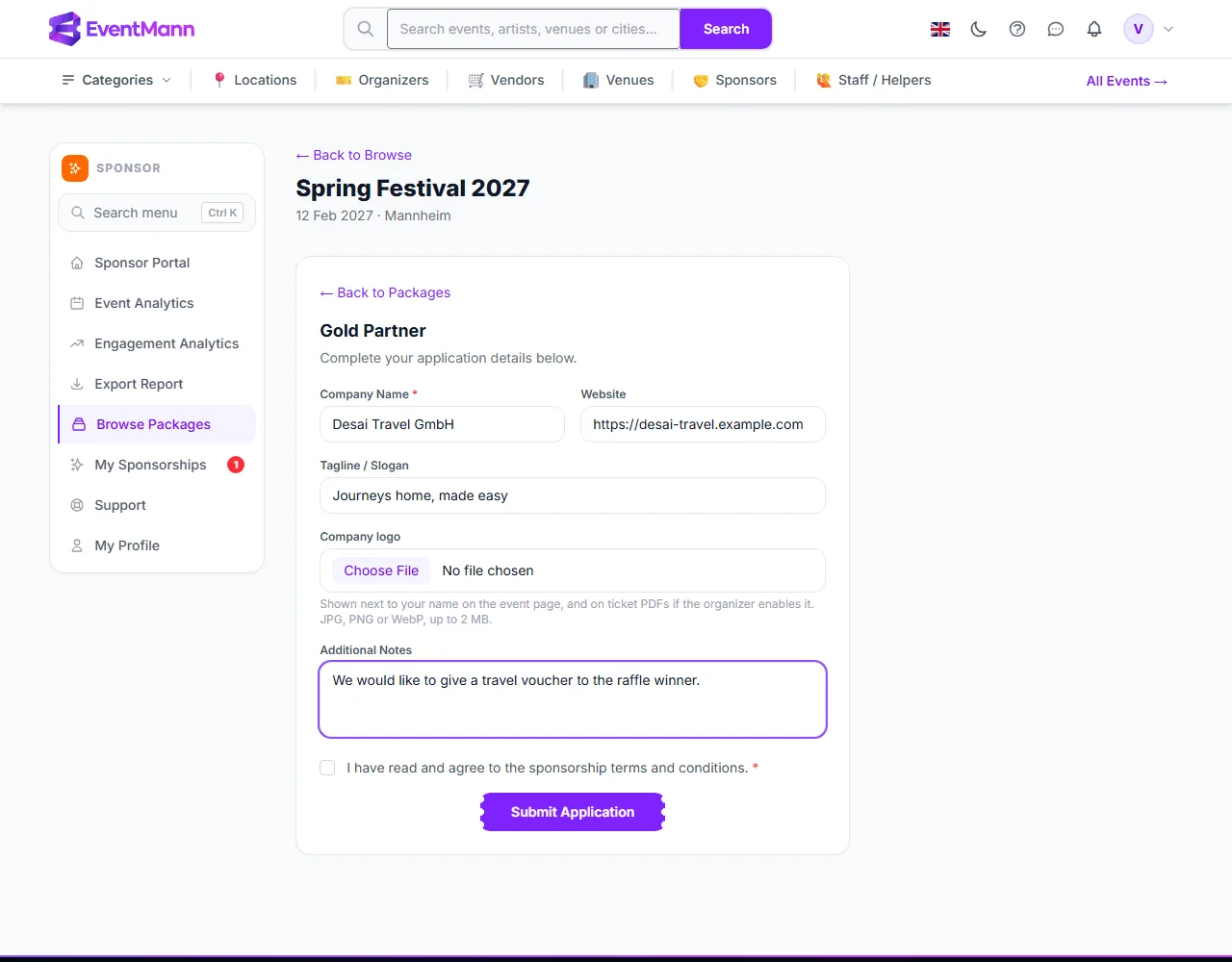
- Open Browse Packages, open the event and choose a package that is not full. Click Apply Now. The page switches to the application form without leaving the event.
- Enter your Company Name ① (required) and, if you like, your Website ② and a Tagline / Slogan. The form is pre-filled from your most recent application, or with your account name the first time.
- Choose a Company logo ③ if you have it ready — JPG, PNG or WebP, up to 2 MB. It is shown next to your name on the event page, and on ticket PDFs if the organizer switches that on. You can also add or replace it later in My Sponsorships.
- Use Additional Notes ④ to tell the organizer about your brand and goals (up to 2,000 characters).
- Tick the agreement ⑤ — “I have read and agree to the sponsorship terms and conditions”. It is required; the form shows a message under the field if you forget it or leave the company name empty.
- Click Submit Application ⑥. You land on My Sponsorships with the confirmation “Your sponsorship application has been submitted.” and the status Pending.
What happens next
- The organizer is told. They get a notification in the bell, and an email if their Sponsorship applications preference is on.
- They approve or reject. A rejection can carry a reason; you see it in My Sponsorships and in the banner on the event page.
- If approved, the status becomes Approved and you have 14 days to pay. You get a notification (and an email if your Sponsorship messages preference is on) with the amount, the due date and how to pay. See Paying for a Sponsorship.
- When the payment is recorded the sponsorship becomes Active, your logo and name can appear where the organizer placed them, and the analytics pages open.
- After the event the organizer marks it Completed once every required deliverable is done.
One application per event
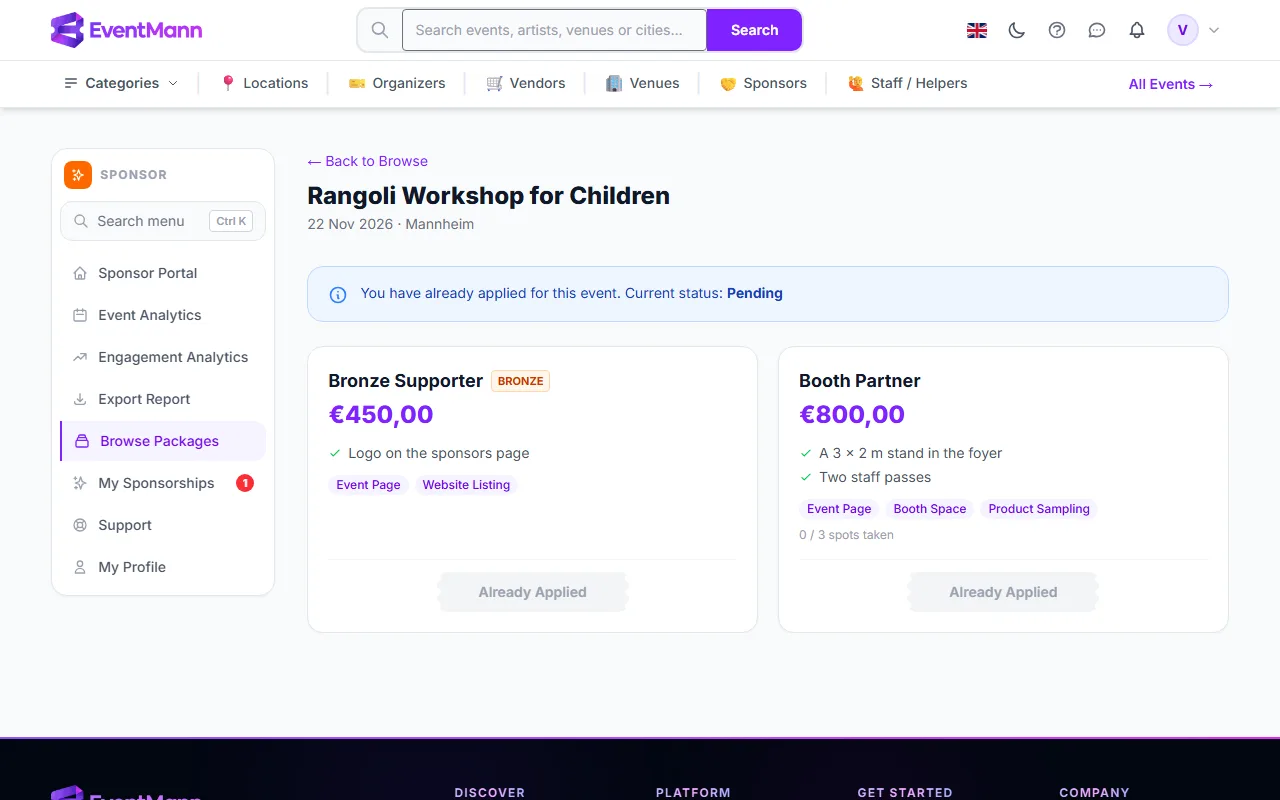
You can have one application per event. While it exists, a blue note at the top of the event page shows its current status ① and every package button reads Already Applied ②.
Good to know
- The price is fixed when you apply. The package price at that moment is saved on your application. If the organizer edits the package afterwards, your invoice still uses the price you agreed.
- The organizer receives your company name and your notes in the notification email and finds you in their sponsor list. EventMann does not publish your application anywhere.
- An organizer can also record a sponsor they already have without that sponsor ever applying. Those sponsorships are not tied to a sponsor account and do not appear in the sponsor portal.
- A Pending application has no deadline. If the organizer is slow, send a message from My Sponsorships.
Troubleshooting
- “Already Applied” and you want a different package — withdraw the pending application first (see My Sponsorships), then apply again. A withdrawn application can be re-submitted; the logo you uploaded is kept.
- Your application was rejected or expired and the buttons stay disabled — only a withdrawn application can be replaced. Message the organizer to discuss it.
- “This package is full.” — every spot is taken by an approved or active sponsor. Choose another package.
- The submit button seems to do nothing — check for the red message under Company Name or the agreement checkbox.
- The logo is refused — it must be an image of type JPG, PNG or WebP and at most 2 MB. SVG files are not accepted.