




Membership coupons
Organizer Guide
3 min read
Help articles may not be fully accurate — they can lag behind the app due to frequent updates and automated translation. If in doubt, please contact support.
On this page
A coupon is a code members enter at the membership checkout to get a discount. Create them on the Coupons tab under Grow → Membership. They apply to memberships only; discount codes for tickets are separate (see Discount Codes).
What you can do here
- Create a code that takes a percentage or a fixed amount off, for one plan or for all of them.
- Limit how often it can be used in total and per member, and give it an end date.
- Edit, switch off or delete a coupon, and see how often it has been used.
The coupon list
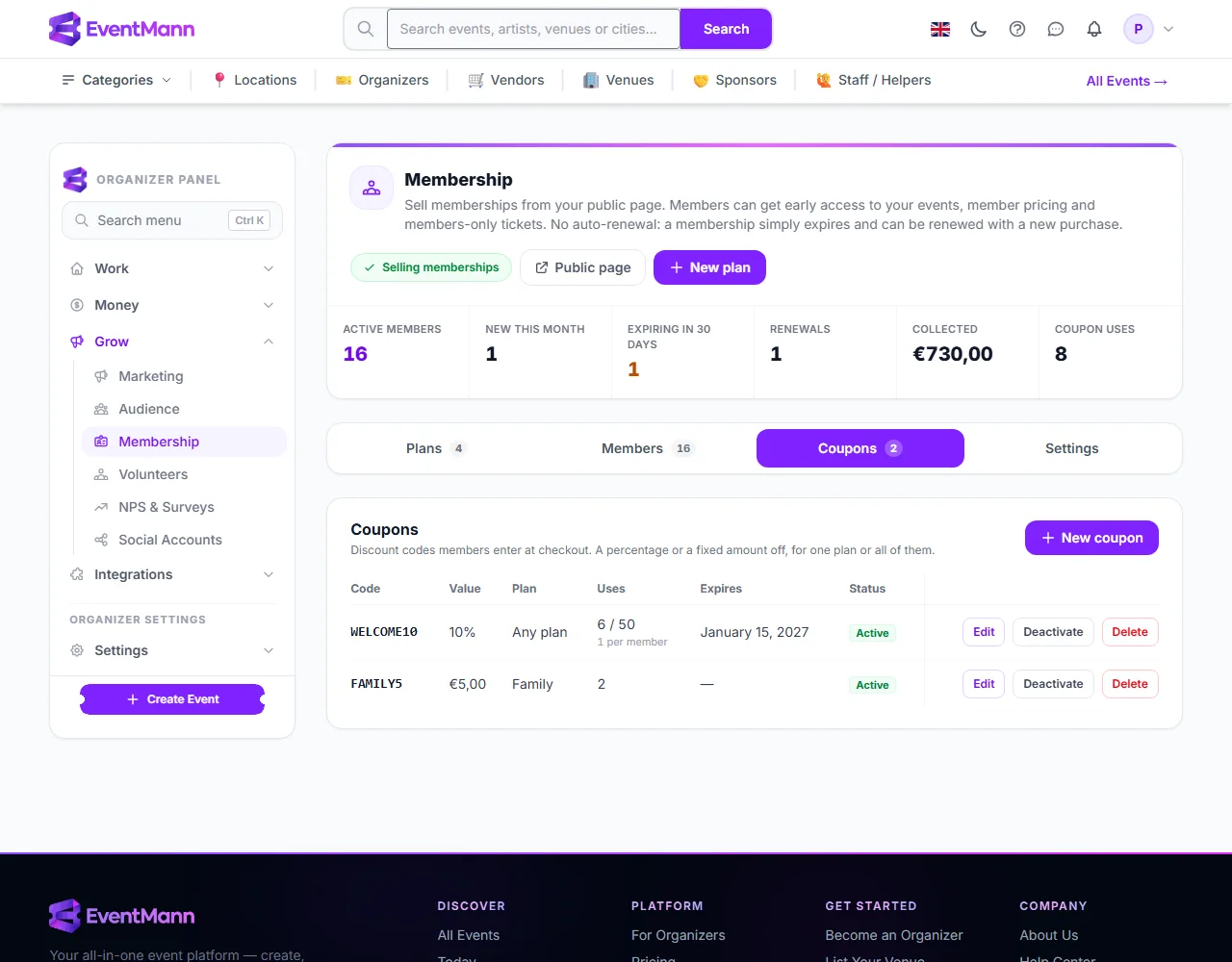
- New coupon ① opens the form.
- The Value column ② shows the discount, for example 10% or €5.00, and the next column shows which plan it is for (Any plan or one).
- Uses ③ counts redemptions against the limit (“6 / 50”), with the per-member limit underneath.
- Deactivate ④ stops the coupon working without deleting it; you can activate it again. Edit and Delete sit beside it.
How to create a coupon
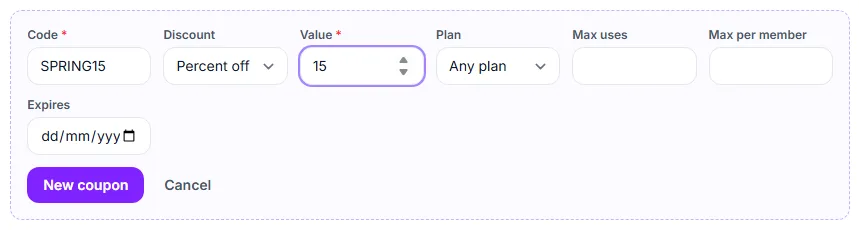
- Click New coupon.
- Type the Code ① — letters, digits, hyphens and underscores, up to 40 characters. Codes are not case-sensitive and are saved in capitals.
- Choose the Discount ② — Percent off or Amount off — and enter the Value ③. A percentage cannot be more than 100.
- Choose the Plan ④: Any plan or one plan.
- Optionally set Max uses ⑤ (total) and Max per member ⑥.
- Optionally set Expires ⑦, then click New coupon to save.
How a coupon behaves at checkout
- The member enters the code on the membership checkout page and presses Apply. The price shown after the discount is exactly what is charged.
- A coupon can never take the price below €0.50. A code that would do so (a 100% code, for instance) is refused, and no free memberships are created this way.
- A code is refused if it is switched off, expired, used up, used by that member as often as allowed, or meant for a different plan.
- A coupon is counted as used only when a purchase succeeds. Someone who applies a code and abandons the payment does not use it up.
- The member’s invoice shows the list price and the discount as separate lines, and the Members tab shows the code and the amount saved.
Good to know
- You can edit everything except the code, so a code printed on a flyer stays that code. To change it, create a new coupon and deactivate the old one.
- The expiry is a date and includes that whole day: a code that expires on 31 October can still be used on 31 October and stops working from 1 November.
- Deleting a coupon stops it working at once. Memberships already bought with it keep their price and the code on record.
- The Coupon uses figure at the top of the page adds up redemptions across all coupons.
Troubleshooting
- “You already have a coupon…”. Codes are unique per organizer, ignoring case.
- A member says the code is not valid. Check whether it is active, expired, used up, restricted to another plan, or already used by that member.
- “The price would fall below the minimum charge.” The discount takes the plan below €0.50. Lower the value.