




Marketing
Help articles may not be fully accurate — they can lag behind the app due to frequent updates and automated translation. If in doubt, please contact support.
On this page
Marketing is where you reach people who already know you: everyone who has bought a ticket to one of your events, and your active members. It lives under Grow in the organizer sidebar (Grow → Marketing), next to Audience, Membership, Volunteers, NPS & Surveys and Social Accounts. EventMann never gives you access to anyone else’s customers.
The Marketing page opens on an Overview with four tabs: Overview, Campaigns, Landing Pages and Push Notifications.
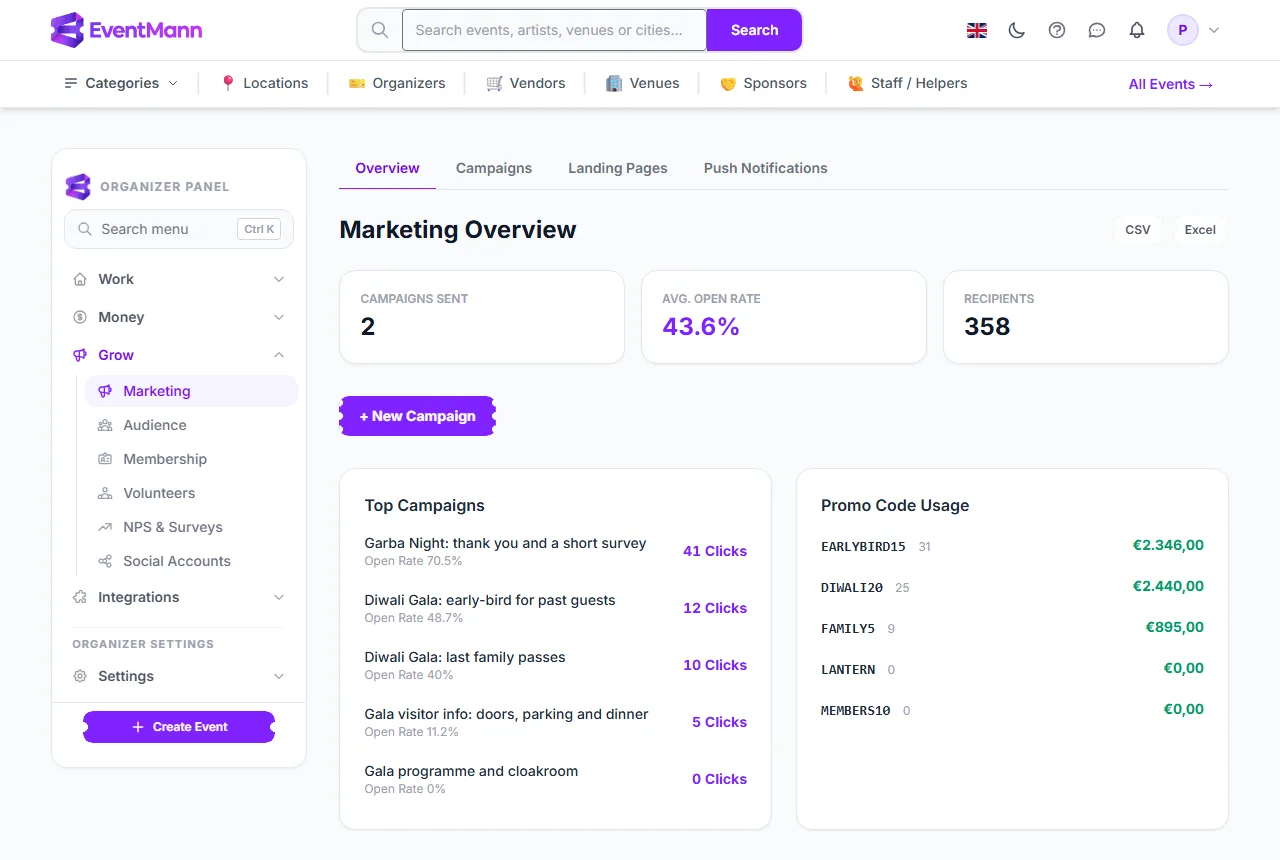
- Open Grow in the sidebar and click Marketing ①.
- Use the tabs ② to move between the overview, your email campaigns, landing pages and push notifications.
- Click + New Campaign ③ to write an email to your customers.
- Top Campaigns ④ ranks your campaigns by clicks and shows each one’s open rate.
- Promo Code Usage ⑤ lists your discount codes with the number of uses and the money from confirmed orders that used each code.
What you can do here
- Send email campaigns to a segment of your customers — see Email Campaigns and Sending, progress and unsubscribes.
- Publish a landing page for an event at
/lp/your-page— see Landing Pages. - Send a browser push notification to customers who switched push on — see Push Notifications.
- See who your customers are in Audience, the contact list built from your bookings.
- Post on social media from an event’s Promotion area — see Social Media Integration.
- Measure how guests felt with NPS & Surveys.
- Track ad conversions with Tracking Pixels (they sit under Integrations).
Marketing for one event
Inside an event (My Events → Manage) the Marketing group of the event sidebar holds the event-specific tools: Attendee comms (messages, announcements, reminders, after-event follow-ups, email templates), Promotion (SEO settings, social marketing and AI tools) and Campaigns. Discount codes live under Tickets & Pricing → Pricing & offers → Discounts — see Discount Codes.
The numbers on this page
- Campaigns Sent counts campaigns whose status is Sent. Recipients adds up the recipients of all your campaigns.
- Avg. Open Rate is every open divided by every recipient across all your campaigns. An open is recorded when the invisible tracking image in the email loads, or when the person clicks a link. A mail app that blocks images undercounts opens.
- The CSV and Excel buttons export the promo code usage table.
- Nothing here measures conversions per campaign. EventMann cannot tell which order came from which email, so it shows opens, clicks and unsubscribes only.
Good to know
- The Marketing area under Grow is for the account owner. A team member with the Marketing role works on one event at a time through Manage → Marketing → Campaigns.
- Every campaign passes a content filter before it is saved. If the subject or the text contains a blocked term, saving fails with an error and nothing is stored.
- People who switch off marketing email, and people who unsubscribe from one of your emails, are skipped automatically. Tickets, booking confirmations and other messages a person is waiting for are not marketing and are never held back by those choices.
- Replies to a campaign go to the email address of your EventMann account.
Troubleshooting
- The recipient count looks small — check the segment. “Customers not opted out of marketing” and the event-specific segments are narrower than “All Users”. See Email Campaigns for what each one means.
- Open rates are zero — tracking may be switched off under Settings → SMTP & Mail (Measure opens and clicks). Opens and clicks then stay at zero by design.
- I cannot see the Marketing page — it is only available to the account owner. Ask the owner, or use the event’s own Campaigns page if you hold the Marketing role.