




Getting Started as a Vendor
Vendor Guide
3 min read
Help articles may not be fully accurate — they can lag behind the app due to frequent updates and automated translation. If in doubt, please contact support.
On this page
- 1. How it works in one minute
- 2. Your first steps
- 3. The sidebar
- 4. Good to know
- 5. Related
The vendor portal is where caterers, sound and light companies, decorators, photographers and other suppliers present their services to organizers, answer event invitations, sign contracts, do the tasks they are given and send invoices. Everything lives under one sidebar headed Vendor; the first page is the Vendor Portal dashboard.
How it works in one minute
- You describe your company in Edit Profile and list what you offer in My Services.
- An administrator approves your profile. Only approved vendors appear in the public marketplace and in the list organizers pick from.
- An organizer invites you to an event — an assignment. You accept or decline on your dashboard.
- Around an accepted assignment you receive contracts to sign and tasks to complete, and you send an invoice when the work is done.
- The organizer rates you afterwards; the rating shows on your profile and under Performance.
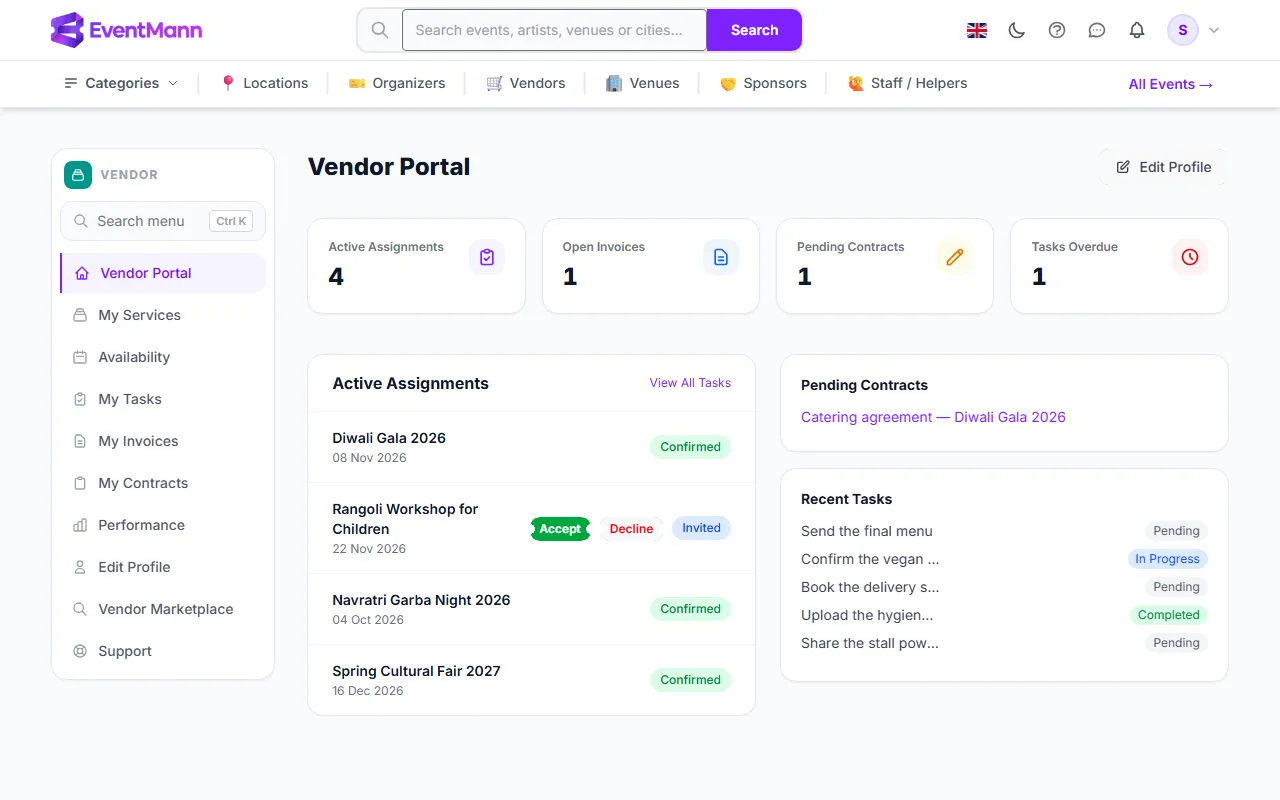
On the dashboard, Active Assignments ① counts your invitations and confirmed jobs; an invitation has Accept ② and Decline buttons; Pending Contracts ③ and Recent Tasks ④ are on the right.
Your first steps
- Open Edit Profile and complete it. See Vendor Profile.
- Open My Services and add every service you sell, with a price or “Quote”. See Service Catalog.
- Wait for approval. A line on the dashboard reads Your account is pending admin approval. Complete your profile while you wait. until an administrator has approved you. You are not sent a message when this happens — the line disappears.
- Watch for invitations. When an organizer assigns you, you receive a bell notification and an email; the assignment is on the dashboard. See Responding to Event Requests.
The sidebar
| Row | Use it to |
|---|---|
| Vendor Portal | See what needs you today. |
| My Services | Keep your catalogue. |
| Availability | Block the days you cannot work. See Managing Your Availability. |
| My Tasks | Open all your tasks. |
| My Invoices | Send and follow invoices. |
| My Contracts | Read and sign contracts. |
| Performance | Your figures and rating. |
| Edit Profile | Company details. |
| Vendor Marketplace | The public vendor listing, as organizers see it. |
| Support | Help from the EventMann team. |
Good to know
- EventMann does not pay vendors. You invoice the organizer; the organizer marks the invoice approved and paid. The payment itself happens between you and the organizer. See Invoices.
- Vendors are not hired by bidding. There is no pitch stage: organizers invite you directly, and sending a quote request is something an organizer does from your public profile.
- Contracts, tasks and invoice decisions do not trigger emails to you today. Check the dashboard counters.