




Payouts
Help articles may not be fully accurate — they can lag behind the app due to frequent updates and automated translation. If in doubt, please contact support.
On this page
EventMann does not pay you your ticket money, and it cannot hold, delay or release it. Each card payment is made to your Stripe account, and Stripe pays that balance to your bank on its own schedule. Money → Finance → Payouts shows you what Stripe has paid or is about to pay, so you do not have to leave EventMann to check.
What you can do here
- Read your Stripe Payout History: every payout Stripe has reported for your account, across all events.
- See the total still on its way (Pending Payout).
- Check whether EventMann is holding anything for you (it normally is not).
Read the Stripe payout history
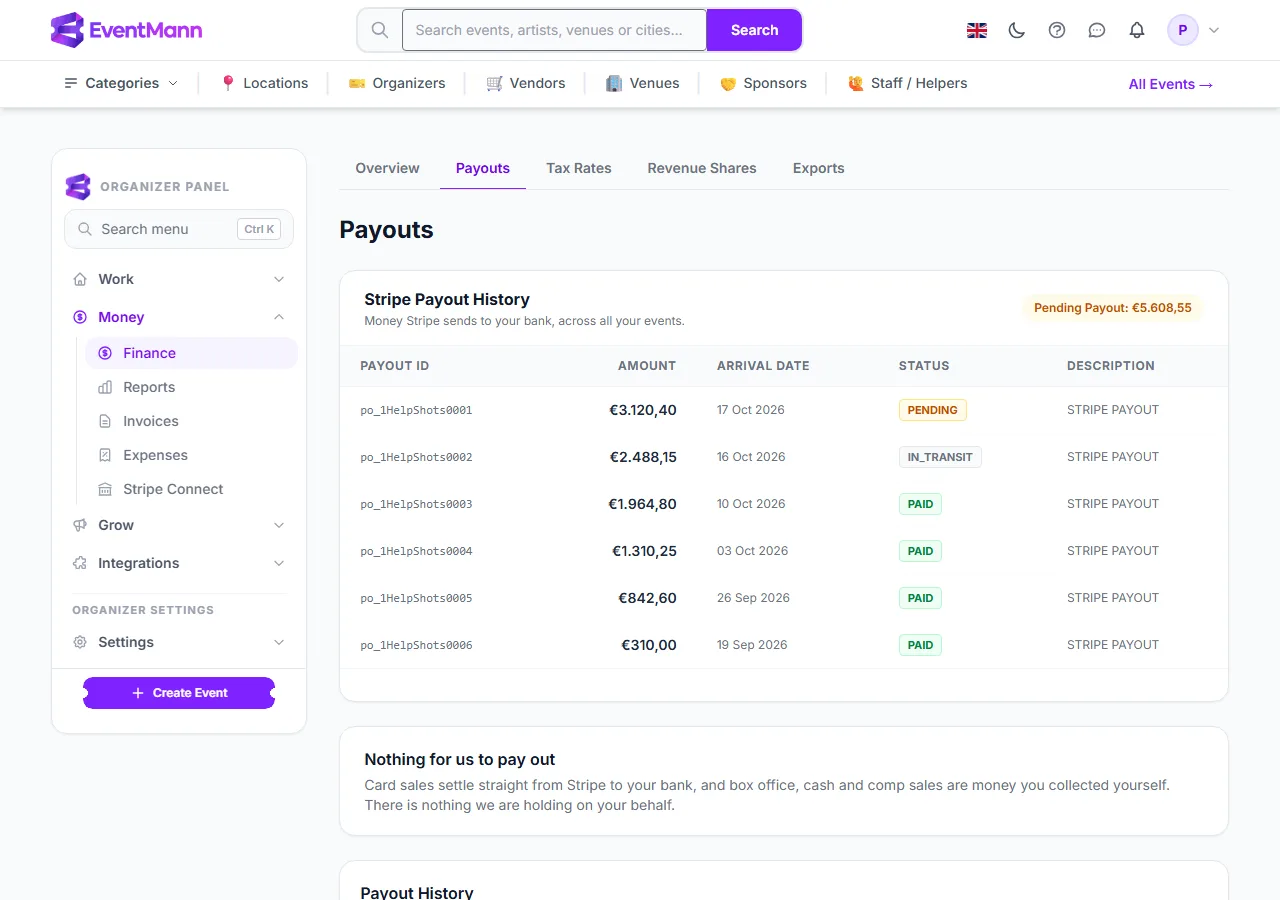
- The Stripe Payout History panel ① lists each payout with its Stripe ID, amount, arrival date, status and description.
- The Pending Payout pill ② adds up payouts that are pending or in transit.
- The Arrival date ③ is the day Stripe expects the money in your bank. Statuses are PENDING, IN_TRANSIT, PAID, FAILED or CANCELLED; a failed payout shows the reason Stripe gave.
- The card at the bottom ④ explains the second ledger: Nothing for us to pay out means EventMann holds no money for you. Card sales go from Stripe to your bank, and box office, cash and complimentary sales are money you took yourself.
When does the money arrive?
When Stripe decides. Your payout schedule, the first-payout waiting period and any holds are set by Stripe for your account, and you manage them in your Stripe dashboard (Money → Stripe Connect → Open Stripe Dashboard). EventMann has no control over it — which is why the Payouts page says “Stripe pays out on its own schedule for your account. We cannot set or change it.” when the list is still empty.
Good to know
- The history is filled in as Stripe reports payouts to EventMann. Payouts older than that connection may be missing; your Stripe dashboard always has the complete list.
- A sale reaches you as the ticket price minus EventMann’s fee and Stripe’s fee. To see what one event earned, open its Event revenue page.
- A Create Payout form appears here only if EventMann ever holds money on your behalf. Today no way of selling does, so the form is normally hidden. If a payout does exist, it is listed under Payout History with its period, bookings, amount and status (Pending, Processing, Paid, Failed or Rejected), and its detail page lists the bookings in it.
- If Stripe pauses payouts to your bank, the Stripe Connect page shows a banner. Selling carries on; the money waits in your Stripe balance until you resolve the requirement in Stripe.
Troubleshooting
- “No payouts recorded yet” although I have sold tickets. Stripe has not paid out yet, or has not reported it. Check your Stripe dashboard: Stripe may hold the first payout of a new account for a while.
- A payout shows FAILED. Stripe could not deposit it, usually because of the bank details. The reason is shown on the row; correct it in your Stripe dashboard.
- The amount in my bank is lower than I expected. A payout is a batch of your Stripe balance after fees, refunds and disputes, across several days of sales. Reconcile it in Stripe, or compare events on the Finance Overview.