




Membership Plans
Organizer Guide
5 min read
Help articles may not be fully accurate — they can lag behind the app due to frequent updates and automated translation. If in doubt, please contact support.
On this page
A plan is what a member actually buys: a price, a term and a list of benefits. Create and edit plans under Grow → Membership, on the Plans tab. You can run several at once, for example a cheap supporter pass and a family pass.
What you can do here
- Set the name, term (monthly or yearly), price and the VAT included in it.
- List benefits, add an intro price, give free tickets, limit the number of members and open the waitlist.
- Sell only during a window, or sell a fixed season everyone shares.
- Switch a plan off without losing its members.
How to create a plan
- On the Plans tab, click New plan. A form opens.
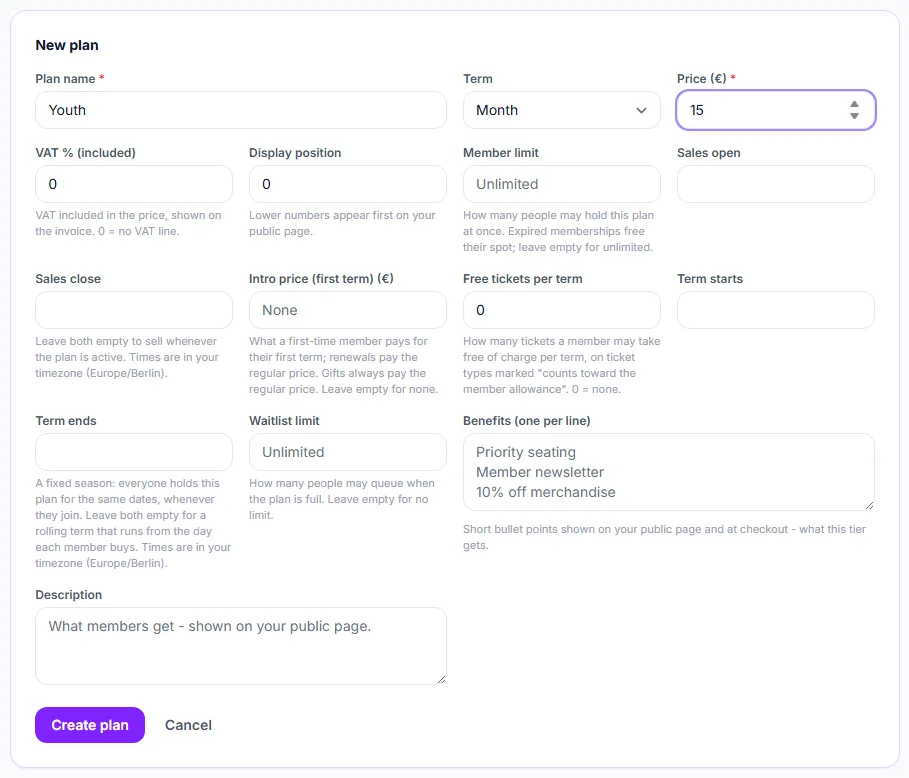
- Type the Plan name ①, choose the Term (Month or Year) and enter the Price ② in your payment currency. The minimum price is €0.50.
- If VAT is included in the price, enter the rate in VAT % (included) (0 to 50). The buyer pays the price you typed; the invoice shows the tax inside it.
- Optionally set the Member limit ③ and a Waitlist limit ⑧.
- Optionally set Sales open ④ and Sales close, an Intro price (first term) ⑤, Free tickets per term ⑥, and a season with Term starts ⑦ and Term ends.
- Write the Benefits ⑨, one per line; they appear as bullet points on your public page and at checkout. The Description is free text.
- Click Create plan ⑩. The plan is on sale as soon as it is active and your Stripe account can take payments.
Settings explained
- Display position — the order of your plan cards on the public page; lower numbers come first. It is not a quantity.
- Member limit — how many people may hold the plan at once. An expired membership frees its spot, and a current holder renewing never needs a free spot. The limit is checked when someone starts to pay. You cannot set it below the number of current holders; setting it equal to that number means “no new members until someone lapses”.
- Sales window — before it opens the plan shows “On sale from” and cannot be bought; once it closes it is no longer offered, renewals included. Times are in your own time zone, which the form names. Sales must close after they open.
- Intro price — a lower price for a member’s first term only, and it must be lower than the regular price. Anyone who has held or been given the plan pays the regular price afterwards, and a gift is always at the regular price.
- Free tickets per term — how many tickets a member can take free of charge each term, on ticket types you mark as counting toward the allowance. See Member benefits on your events.
- Season (Term starts / Term ends) — everybody who buys the plan holds it for the same dates, whenever they join, instead of a term that starts on their purchase day. Set both dates or neither; the end must be after the start. Someone who joins halfway is not backdated, a season that has already ended cannot be sold, and the same person cannot buy the same season twice.
- Waitlist limit — how many people may queue once the plan is full. When a spot frees up, the longest-waiting people are emailed an invitation. Nothing is reserved for them, so the spot still goes to whoever completes the purchase first.
Read a plan card
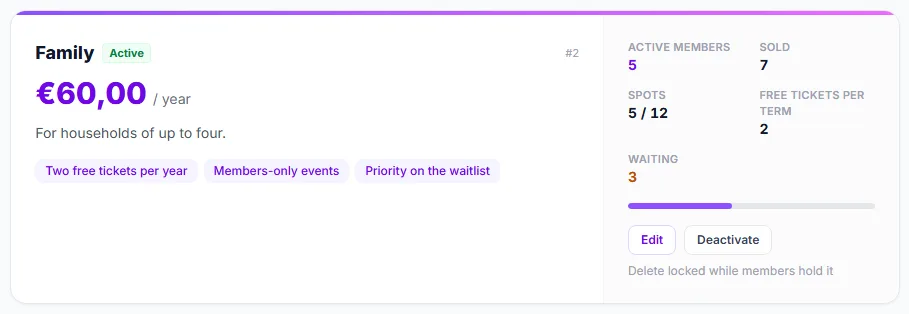
- The Spots figure ① shows current members against the limit (“5 / 12”), with a bar underneath.
- Waiting ② appears when people are on the waitlist.
- Edit ③ opens the same form as for a new plan.
- Deactivate ④ takes the plan off sale and hides it from your public page. Members keep their benefits; Activate brings it back.
- While anyone holds the plan, delete is locked ⑤ (“Delete locked while members hold it”); deactivate it instead.
Changing a plan that has members
- Once anyone holds a plan, its term (monthly or yearly) cannot be changed. Create a new plan instead.
- You can change the price at any time. People who already paid keep the price they bought at; the new price applies to new members and renewals.
- The state badges on a card — Sold out, Opens …, Sales closed, Closes … — show why a plan can or cannot be bought right now.
Good to know
- The member limit, sales window, season and intro price are all optional. A plan with none of them simply sells at its price, with a term from the day of purchase, until you deactivate it.
- Every figure a member bought under is saved with their membership, so editing or deleting a plan never changes what anyone already paid.
Troubleshooting
- My plan is not on my public page. Check, in this order: is it active; has its sales window opened; has it closed; is it full; has its season ended? Also check the status pill at the top of the page for Stripe problems.
- My member limit was refused. It was lower than the number of current members. Set it to that number or higher.
- Saving says the intro price must be lower. The intro price has to be below the regular price.
- A member sees a different price. You repriced the plan. The member keeps what they paid; the new price is for renewals.