




Audience
Help articles may not be fully accurate — they can lag behind the app due to frequent updates and automated translation. If in doubt, please contact support.
On this page
Audience (Grow → Audience) is a read-only list of everyone who has booked one of your events: one row per email address, with the events they came to, tickets, what they spent and when they last booked. It is built from your bookings. Nothing on this page sends anything.
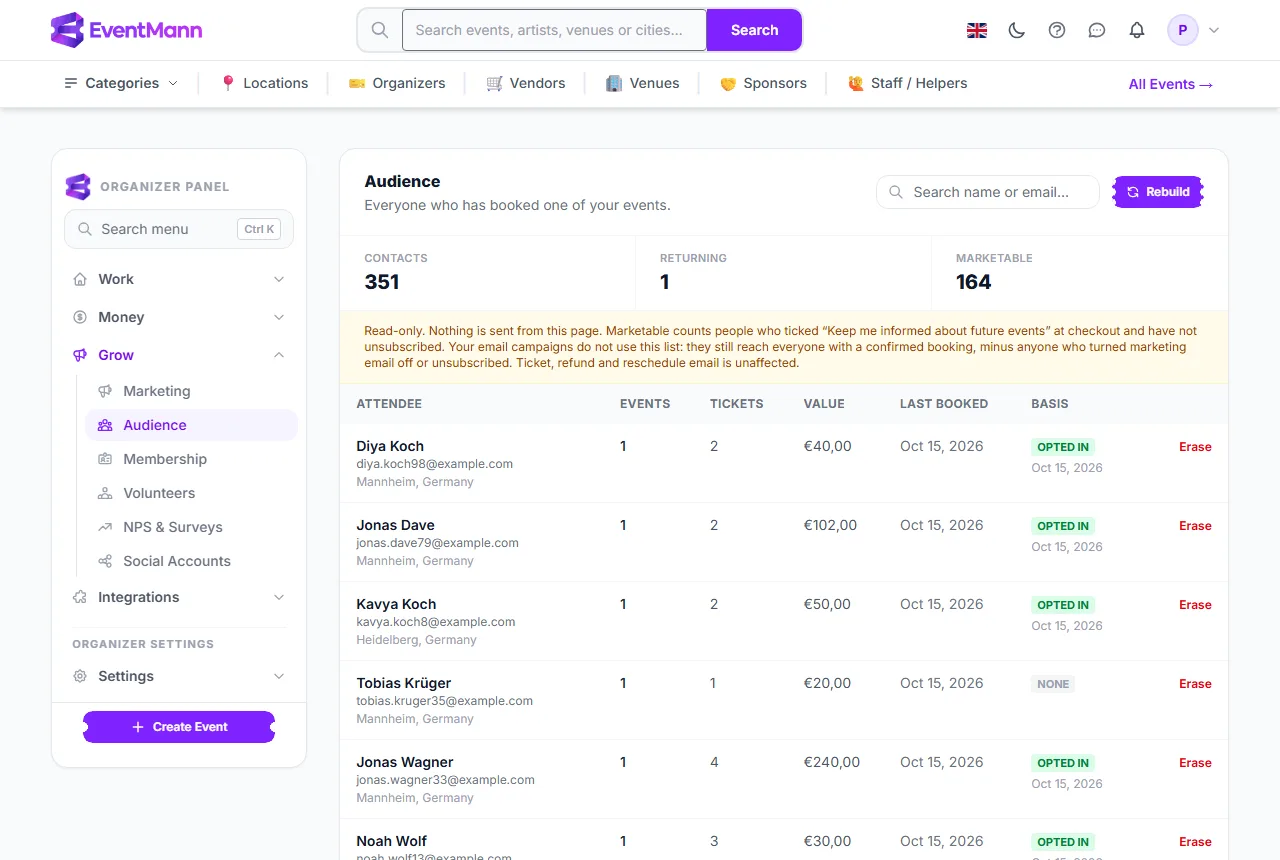
- Open Grow → Audience ①.
- Rebuild ② recomputes the list from your bookings right now. It is safe to press twice.
- The three counters ③ show Contacts (people on the list), Returning (people who came to more than one event) and Marketable.
- The note ④ reminds you the page is read-only.
- The Basis column ⑤ is the legal basis recorded for marketing email to that person: Opted in ⑥ with the date they gave it, Unsubscribed, or None.
- Erase ⑦ removes a person on request.
What is on the list
- People with a confirmed or approved booking at any of your events. An abandoned checkout, a cancelled or refunded order does not add anyone.
- Only the buyer of an order. The names printed on individual tickets are not added, because they are often children.
- One email address is one contact. A family that books under one address shows as one row, so the ticket and spending figures are per household, not per person.
- Search by name, email or city with the box above the table. The list is sorted by most recent booking and shows 50 per page.
How it stays up to date
The first time you open the page with an empty list and bookings behind it, the list is built for you. After that EventMann rebuilds it every night around 04:10. You can press Rebuild at any time to see today’s bookings immediately.
Erase a person
If someone asks you to delete their data, click Erase next to their name and confirm. Their name, phone, city, country and language are removed for good and a rebuild will not bring them back; only the address that marks the row as erased is kept, so the same person is not recreated. Erasing a contact does not delete their bookings or tickets.
Where consent comes from
Every checkout for your events, paid or free, guest or signed in, shows the buyer an unticked box: “Keep me informed about future events from your organizer name by email. You can unsubscribe at any time.” The name is your company name from Settings → Profile, or your own name when you have not set one. The box is optional and never ticked in advance, so a buyer can always order without it.
- When the buyer ticks it, the date is recorded on that order. The next rebuild shows them as Opted in in the Basis column with the date of their most recent opt-in, and counts them under Marketable.
- A later order without the box ticked takes nothing away; consent is withdrawn by unsubscribing.
- A person shows as Unsubscribed, and is not marketable, when they used the unsubscribe link in one of your campaign or after-the-event emails, or when their account has marketing email switched off. That wins over any box they ticked.
- Buying a ticket on its own is not consent. Buyers who never ticked the box show None, and so does everybody whose orders were placed before the box existed — nobody is opted in after the fact.
- A mailbox that bounced is not counted as an unsubscribe; such a person can still show as Opted in.
Audience is not your campaign list
This page and your email campaigns are separate. A campaign picks its recipients directly from your bookings and memberships when it is sent (Email Campaigns), and it removes people who switched off marketing email or unsubscribed. It does not look at the Basis column: Marketable tells you how many people have opted in, it does not limit who a campaign reaches.
Good to know
- Only the account owner sees this page.
- Do not use this list as a mailing list outside EventMann. A booking is not consent to marketing; only Opted in records one, and a campaign sent through EventMann respects each person’s own opt-out.
Troubleshooting
- The list is empty — you have no confirmed bookings yet. Press Rebuild after your first order.
- A recent buyer is missing — the list refreshes at night. Press Rebuild.
- Marketable is lower than I expected — only buyers who ticked the “Keep me informed” box at checkout count, minus anyone who unsubscribed. A buyer’s new opt-in appears after the nightly rebuild or when you press Rebuild.
- Returning shows a small number — returning means more than one event with you, matched on the buyer’s email address.