




Finances
Help articles may not be fully accurate — they can lag behind the app due to frequent updates and automated translation. If in doubt, please contact support.
On this page
- 1. What you can do here
- 2. The four cards
- 3. The charts and the table
- 4. Good to know
- 5. Troubleshooting
- 6. Related
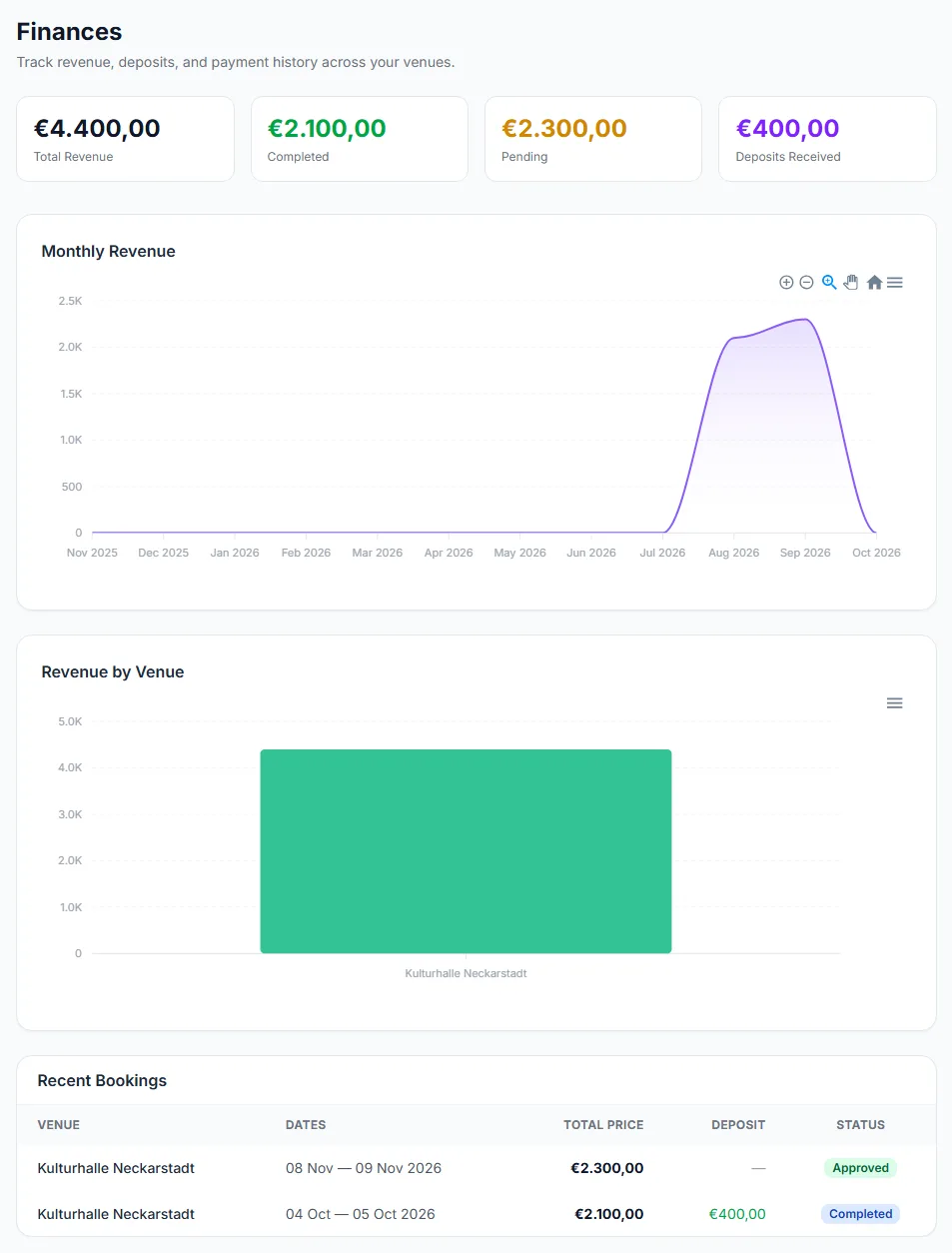
The Finances page (sidebar) is a record of what your bookings are worth: the total value of approved and completed bookings, how much of it is completed, what is still ahead, the deposits you have marked as received, and a month-by-month chart. It is a bookkeeping view of agreements. EventMann does not collect or pay out venue-hire money, so nothing on this page is a payment made through the platform.
What you can do here
- See the value of your bookings at a glance.
- Compare months and venues with two charts.
- Check each booking’s price, deposit and status in a table.
The four cards
| Card | What it adds up |
|---|---|
| Total Revenue ① | The total price of all requests that are Approved or Completed. |
| Completed | The part of it that belongs to requests you marked Completed. |
| Pending | The part that belongs to Approved requests that have not been completed yet — bookings still ahead. |
| Deposits Received ② | The deposit amounts of requests where you clicked Mark deposit received. |
The Pending card here means approved-but-not-yet-completed bookings. It is not the same as the pending requests on your dashboard, which are still waiting for your answer and are not counted in any of these figures.
The charts and the table
- Monthly Revenue — the last twelve months. A booking is counted in the month the request was made, not in the month of the event.
- Revenue by Venue — total price per venue, largest first.
- Recent Bookings ③ — one row per approved or completed request with the venue, the dates, the total price, the deposit and the status.
Each chart has a small menu to save it as an image or a CSV file.
Good to know
- The figures are the prices you agreed at approval (the Total Price you set, see Venue Pricing). If the real invoice differs, the page does not know.
- A deposit counts only after you mark it received on the request. A deposit that was paid but not marked shows as zero.
- Declined, cancelled and pending requests are not in any figure.
- Amounts are displayed in euros for a venue-owner account, without conversion. Prices carry no currency of their own.
- There is no export of the table and no tax or payout information. Use your own bookkeeping for invoices.
Troubleshooting
- The cards are zero — you have no approved or completed requests yet.
- Deposits Received is lower than the deposits you actually got — mark each one received on its request.
- The monthly chart puts a booking in the wrong month — it uses the month of the request, not of the event.
- A cancelled booking disappeared from the figures — cancelled requests are not counted.