




Vendor Dashboard
Vendor Guide
2 min read
Help articles may not be fully accurate — they can lag behind the app due to frequent updates and automated translation. If in doubt, please contact support.
On this page
- 1. The four counters
- 2. The panels
- 3. What you can do here
- 4. Good to know
- 5. Troubleshooting
- 6. Related
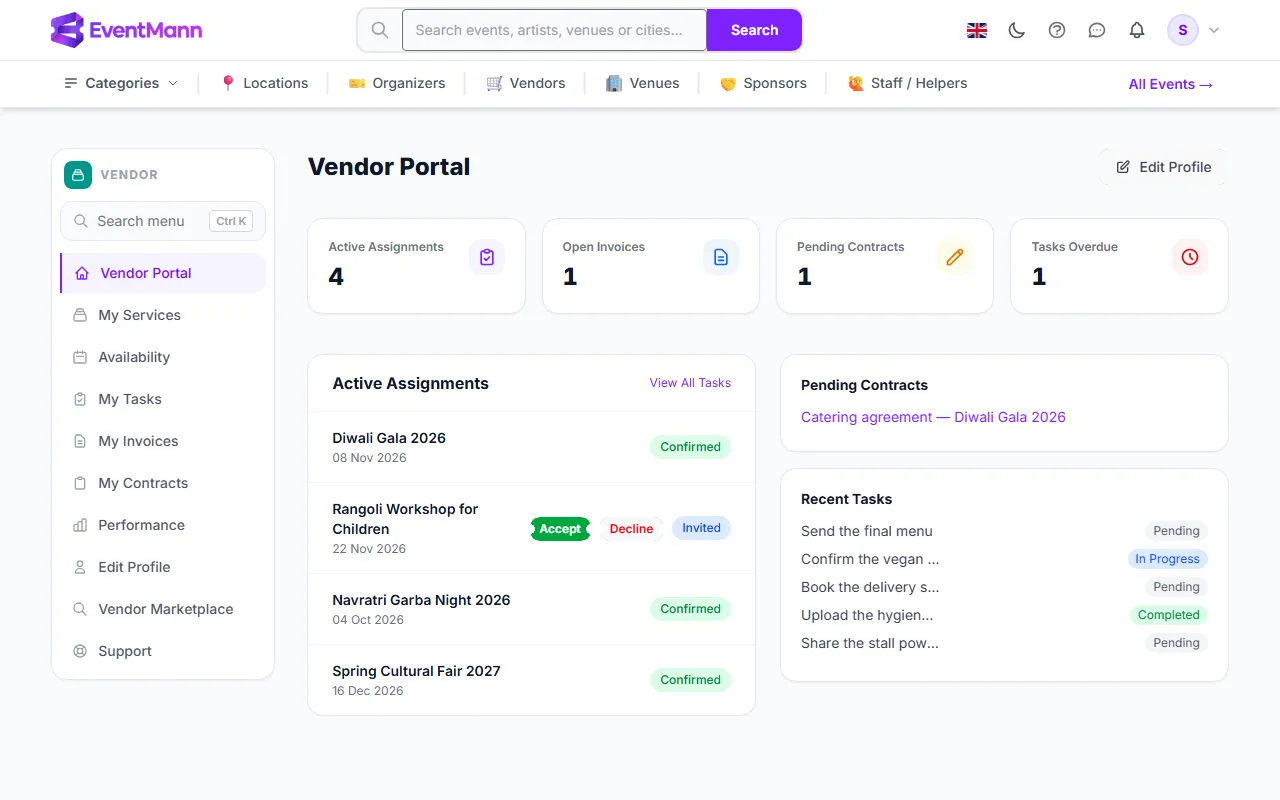
The Vendor Portal (sidebar → Vendor Portal) is your dashboard: four counters on top and three panels underneath. It is where you answer new invitations and see what is waiting for you.
The four counters
| Counter | What it counts |
|---|---|
| Active Assignments ① | Assignments that are Invited or Confirmed. Declined and cancelled ones are not counted. |
| Open Invoices | Invoices you sent that are Submitted or Approved — not yet paid. Click it to open My Invoices. |
| Pending Contracts | Contracts waiting for your signature. Click to open My Contracts. |
| Tasks Overdue | Tasks past their due date that are not completed. Click to open My Tasks. |
The panels
- Active Assignments — your six most recent assignments, with event title, date and a status badge (Invited, Confirmed, Declined or Cancelled). An Invited one shows Accept ② and Decline buttons. View All Tasks opens your task list.
- Pending Contracts ③ — up to three contracts to sign, each a link to the contract.
- Recent Tasks ④ — your five newest tasks with their status.
What you can do here
- Answer an invitation with Accept or Decline — see Responding to Event Requests.
- Open a pending contract and sign it — see Signing Contracts.
- Jump to your tasks and invoices through the counters.
- Use Edit Profile at the top right to change your company details.
Good to know
- The dashboard shows the event and its date, not the agreed fee or the organizer’s notes. Those are in the invitation email, and the fee also appears when you create an invoice.
- If your profile is waiting for approval, a yellow line says so at the top.
- The Tasks Overdue counter and the sidebar row My Tasks open the same page, with all your tasks.
Troubleshooting
- An assignment I expected is missing. The organizer has not assigned you yet, or the panel is showing only the six most recent — open My Tasks or My Invoices for the rest.
- The counter and the list disagree. The counter counts Invited and Confirmed only; the list also shows declined and cancelled ones.