




Event Analytics
Sponsor Guide
3 min read
Help articles may not be fully accurate — they can lag behind the app due to frequent updates and automated translation. If in doubt, please contact support.
On this page
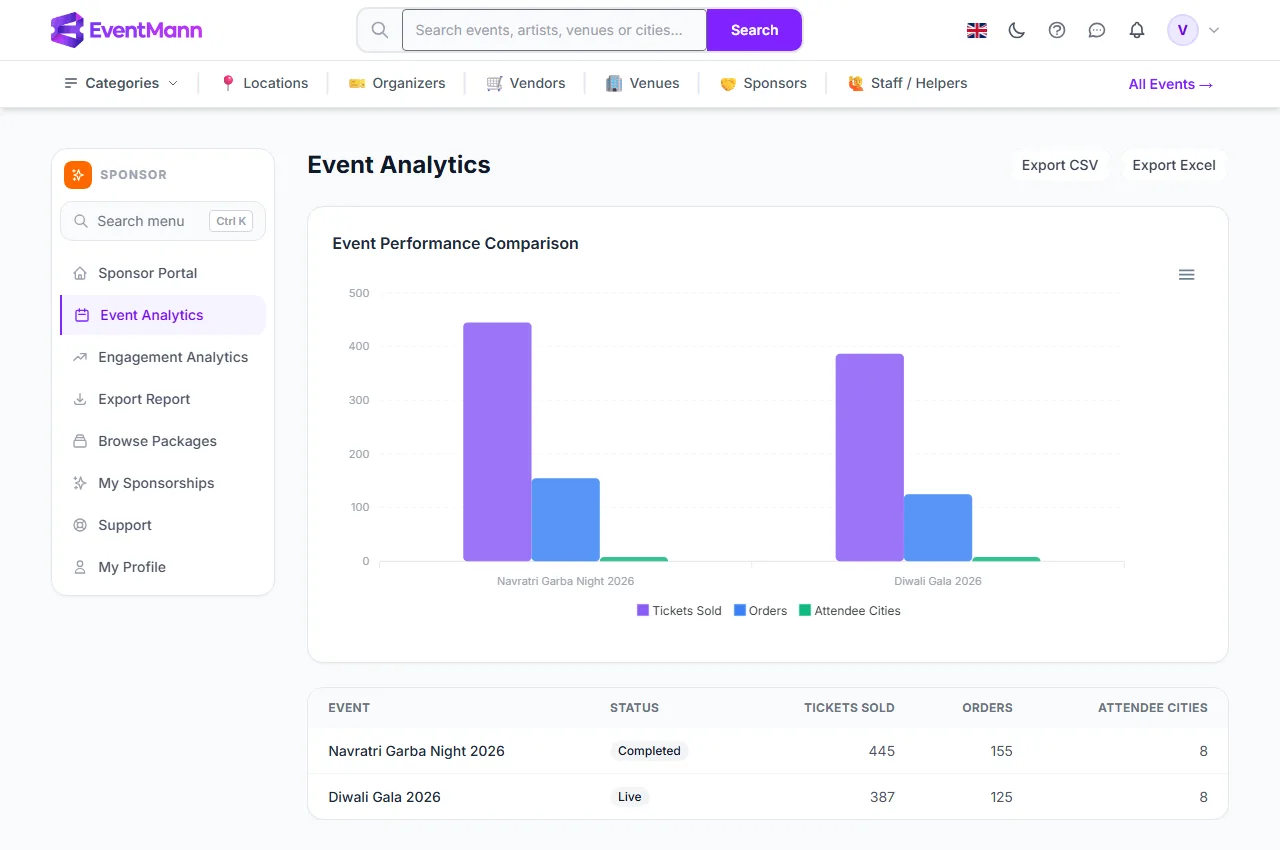
Event Analytics (sponsor sidebar) shows what EventMann actually measures about the events you sponsor: how many tickets were sold, how many orders that was, and how many different cities the buyers came from. It is a table of your events plus one comparison chart, with buttons to download the same rows.
What you can do here
- Compare your sponsored events side by side in one chart.
- Read the exact numbers per event in the table.
- Download the table as CSV or Excel ①.
What the page shows
- Export CSV / Export Excel ① at the top right — downloads the table. They appear only when there is data.
- Event Performance Comparison ② — a grouped bar chart with one group per event and three bars: Tickets Sold, Orders and Attendee Cities. The small menu on the chart saves it as SVG, PNG or CSV.
- The table — one row per event with the event name, the Status of the event (for example Live or Completed), Tickets Sold ③, Orders and Attendee Cities ④.
What each figure means
| Figure | Definition |
|---|---|
| Tickets Sold | Tickets on confirmed orders for the event. Pending, cancelled and refunded orders do not count. |
| Orders | Confirmed orders. One order can hold several tickets, so this is smaller than Tickets Sold. |
| Attendee Cities | The number of different cities that buyers entered at checkout on confirmed orders. It counts places, not people; a city with 200 buyers counts once. |
Good to know
- The page lists events where your sponsorship is Active or Completed, meaning approved and paid. Pending, approved-but-unpaid, rejected and cancelled sponsorships do not unlock another organizer’s sales figures.
- The figures are read live every time you open the page. The dashboard cards are refreshed about every ten minutes, so the two can differ briefly.
- The charts show one value per event. They are not a trend over time.
- EventMann does not measure impressions, logo views, clicks, booth visits or engagement. Nothing on this page is an estimate: every number is a count of tickets, orders or cities. See Measuring Sponsorship ROI for how to judge a sponsorship with these figures.
- If an event does not ask buyers for an address, Attendee Cities is zero for it.
Troubleshooting
- The page is empty — you have no Active or Completed sponsorship yet. See Engagement Analytics for the message you see, and Paying for a Sponsorship if yours is still unpaid.
- An event you sponsor is missing — its sponsorship is probably still Approved (unpaid) or was recorded without your account.
- Tickets Sold is lower than the organizer’s own number — only orders with the status confirmed are counted here, so cancelled, refunded and unpaid orders are left out. The organizer’s own screens may include other statuses.