




Bring a Cancelled Order Back
Help articles may not be fully accurate — they can lag behind the app due to frequent updates and automated translation. If in doubt, please contact support.
On this page
Cancelled the wrong order, or the buyer changed their mind and can come after all? Reinstate brings a cancelled order — or tickets cancelled on their own — back to life. It is the only way back from a cancellation, and it appears on the order page of Attendees → Orders.
What you can do here
- Make a whole cancelled or refunded order valid again.
- Make tickets that were cancelled on their own valid again (a Reinstate link sits beside each cancelled ticket).
- When the buyer has already been refunded, choose between giving the tickets back free of charge or sending a payment link so they pay again.
Not refunded: one click
If no money went back (a free order, or an order cancelled without a refund), a Reinstate order button appears on the cancelled order.
- Open the cancelled order.
- Click Reinstate order and confirm.
The order becomes Confirmed again, the places are counted again, and the buyer is emailed their tickets. The original QR codes scan again — cancelling never changed them.
Refunded: you choose
A refund cannot be undone, so when the buyer was refunded EventMann asks you what to do instead of deciding for you.
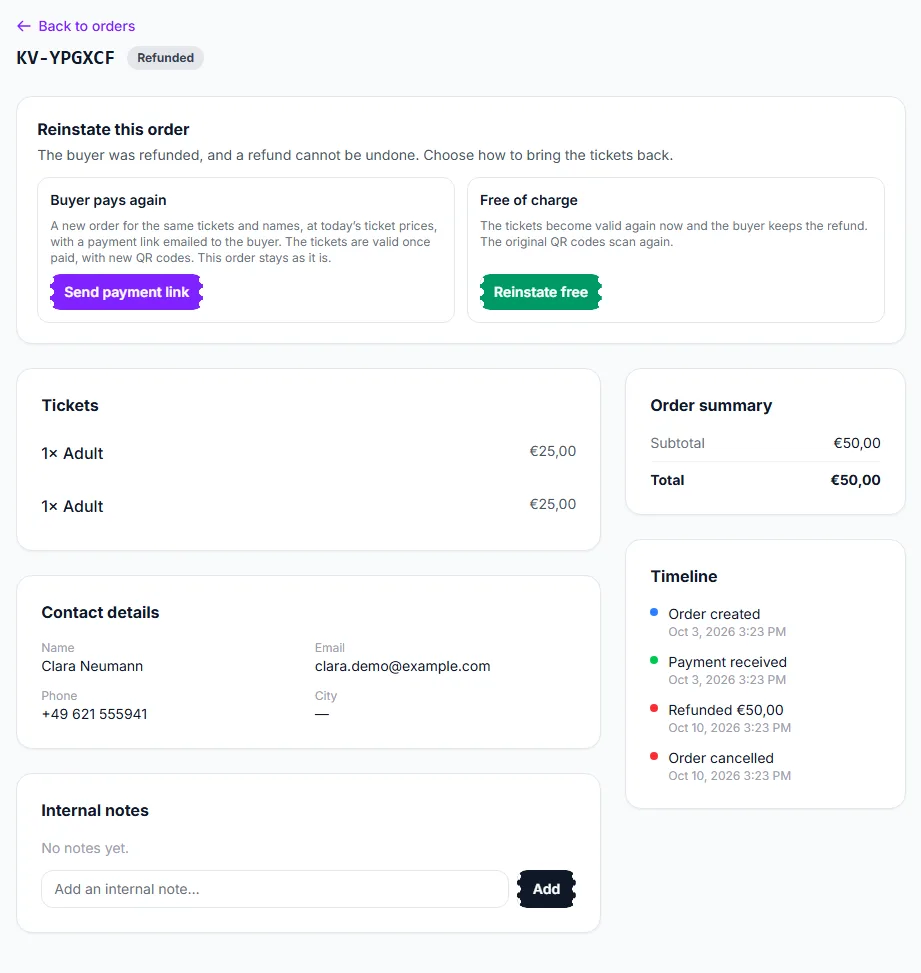
The panel at the top of the order ① offers two ways:
- Buyer pays again — click Send payment link. A new order is raised for the same tickets and names, at today’s ticket prices, and the buyer is emailed a link to pay. The tickets become valid once they pay, with new QR codes. The old order stays as it is, and the two orders link to each other.
- Free of charge — click Reinstate free. The tickets are valid again at once and the buyer keeps the refund. The original QR codes work again. The refund stays recorded on the order, so your revenue figures remain true.
Money is never taken a second time on the old order: its payment, refund and invoice already balance, which is why paying again always creates a new one.
Rules and limits
- There must be room. The places were released when the order was cancelled and may have been sold, or offered to the waitlist, since. EventMann checks again at the moment you click.
- Refused for: an event that is cancelled or already over; orders from a bundle or multi-event pass (raise a new order instead); orders with an open dispute; orders whose refund is still on its way; orders that were never paid; and events with a seat map, because the seat was released and may be someone else’s now.
- Permissions. Undoing a cancellation needs the permission to cancel bookings. Free reinstatement of refunded tickets needs both cancel and create. Sending a payment link needs the permission to create bookings.
- Every cancellation and reinstatement is listed on the order’s timeline, so an order that was cancelled, reinstated and cancelled again reads correctly.
Troubleshooting
- “The event is over” — reinstating is only possible before the event has ended.
- “A refund is still on its way” — wait until the refund has gone through, then try again.
- The seats are gone — somebody else bought them. Free up room (raise the quantity of the ticket type or cancel another order) or raise a manual order.
- No Reinstate button on a refunded order — check the rules above, especially seated events and bundles.