




AI-Powered Tools
Help articles may not be fully accurate — they can lag behind the app due to frequent updates and automated translation. If in doubt, please contact support.
On this page
- 1. Switch AI on
- 2. The AI tools page
- 3. What is on the page
- 4. Good to know
- 5. Troubleshooting
- 6. Related
AI tools help you write copy, forecast sales and answer questions about your event. They draft text for you to read, edit and use; nothing is published, sent or changed by itself. You switch AI on once for your account (Integrations → AI), then use the tools on each event under Manage → Marketing → Promotion → AI tools.
Switch AI on
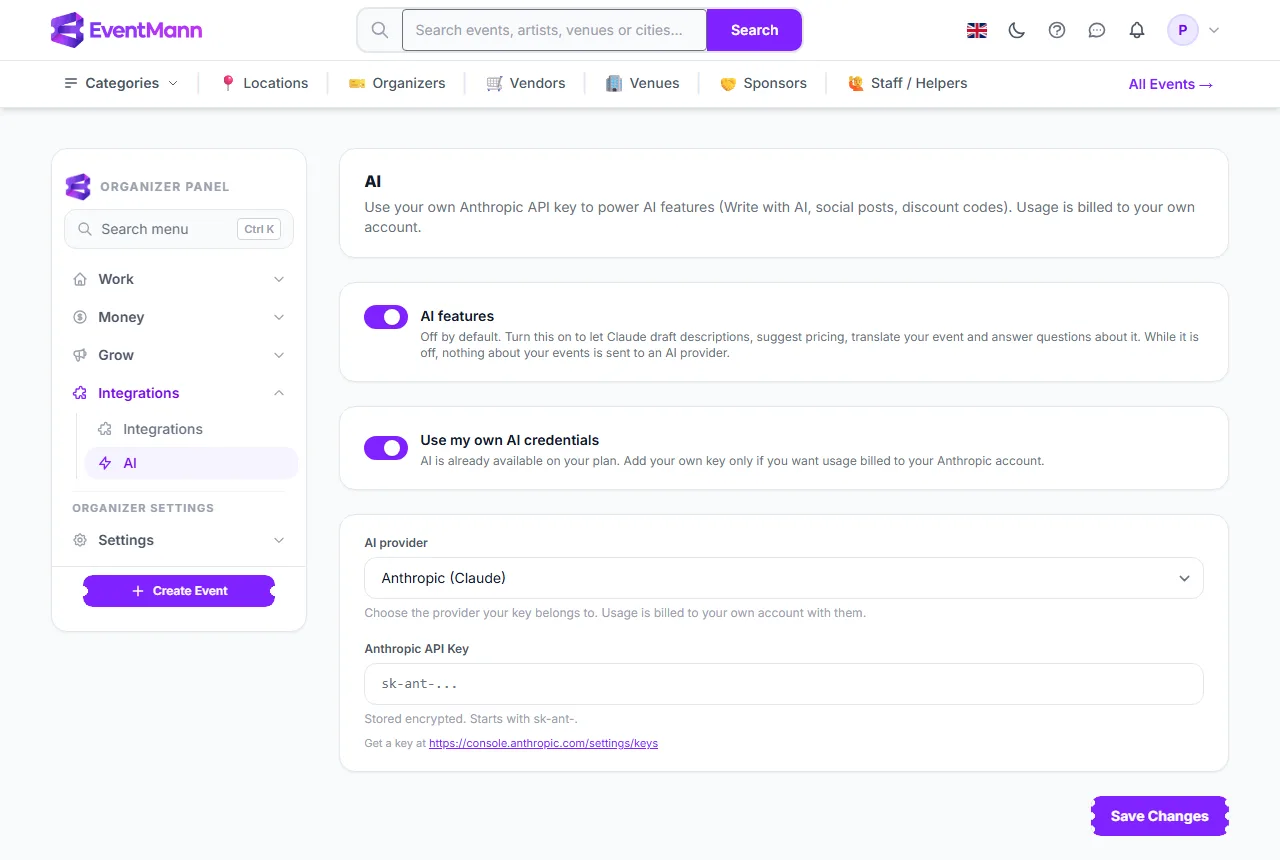
- Open Integrations → AI in the sidebar and turn on AI features ①. It is off by default; while it is off nothing about your events is sent to an AI provider and no AI button appears.
- If your plan already includes AI you are done. Otherwise, or if you want usage billed to your own account, turn on Use my own AI credentials, choose the AI provider ② your key belongs to and paste your API key ③. The key is stored encrypted and never shown again; leave the field blank when you save to keep the one on file.
- Click Save Changes.
If your platform administrator has switched AI off for everyone, the page says so and your own key cannot be used until they switch it back on.
The AI tools page
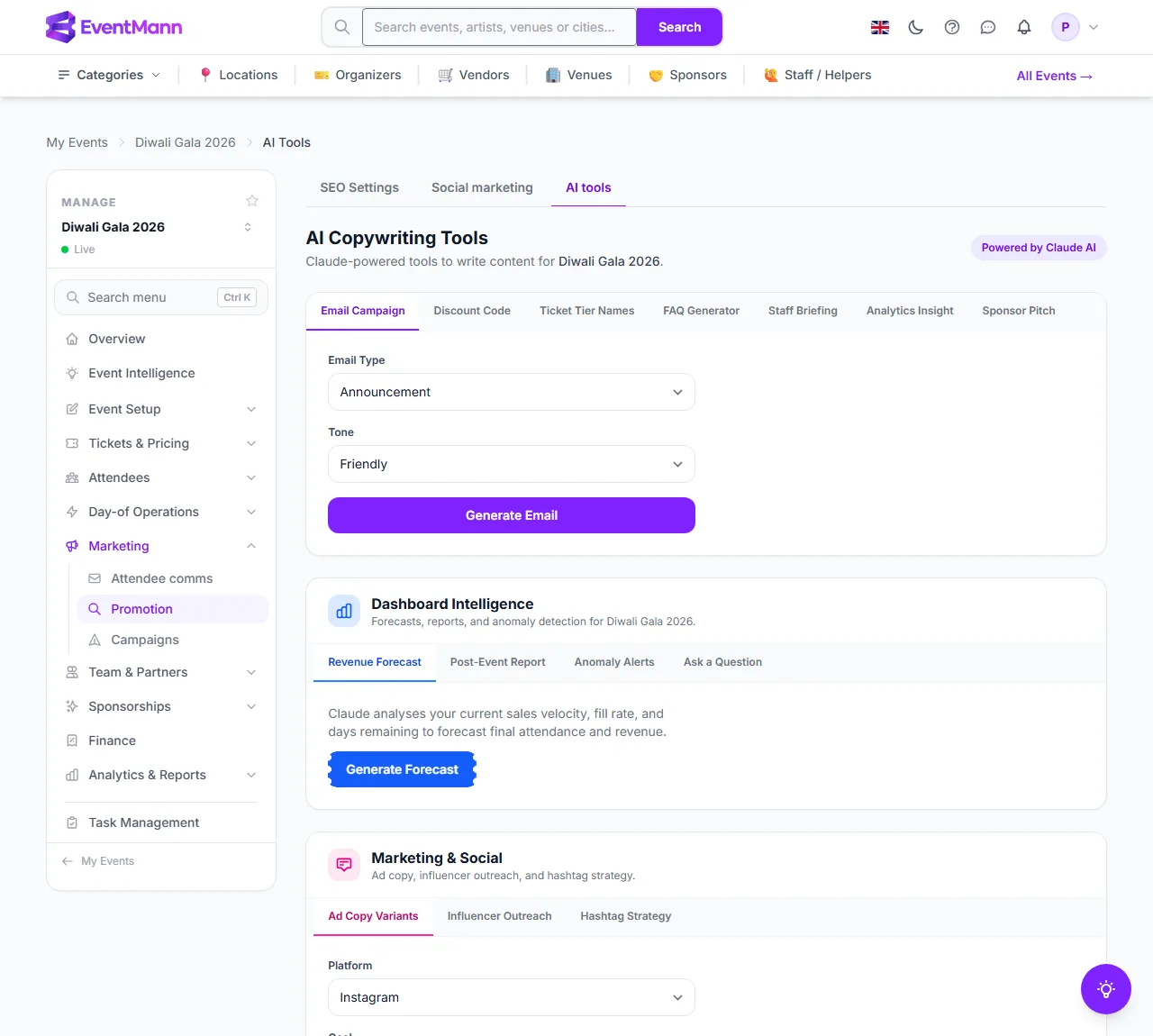
- Open the event, then Marketing → Promotion ① and choose the AI tools tab. The tab only appears when AI is available for you.
- Pick a tool from a group’s tabs, for example Email Campaign ② or Discount Code ③.
- Fill in the short brief the tool asks for, click its button (for example Generate Email) and wait a few seconds. The result appears in place with a button to copy it.
- Copy it, edit it and paste it where you need it.
What is on the page
- AI Copywriting Tools — Email Campaign (announcement, confirmation, reminder, last call or post-event, in a tone you choose), Discount Code (a name for a code), Ticket Tier Names, FAQ Generator, Staff Briefing, Analytics Insight and Sponsor Pitch.
- Dashboard Intelligence ④ — Revenue Forecast (from your sales pace, fill rate and days left), Post-Event Report, Anomaly Alerts and Ask a Question, a free-text box about this event’s data.
- Marketing & Social ⑤ — Ad Copy Variants for a platform and goal, Influencer Outreach and Hashtag Strategy.
- Operations & Logistics — Vendor Email, Run-of-Show, Risk Checklist and Contract Summariser.
- Support & Moderation — Support Response, Refund Decision (an assessment, not a decision) and Review Reply.
AI also appears inside other screens: Generate with AI on SEO settings, on discount codes and in the social composer; the briefing on Event Intelligence; and a floating assistant button at the bottom right of the event management pages that answers questions about the event.
Good to know
- Every result is a suggestion. Read it before you publish a post, send an email or act on a forecast.
- The tools use the event’s real name, date, venue and link, but only know what is on the event. A thin event page gives a vaguer draft.
- The Event Intelligence readiness score and recommendations are not AI: they are a fixed checklist computed from your data. Only the optional written briefing uses AI.
- With your own key, usage is billed by your provider, not by EventMann.
Troubleshooting
- There is no AI tools tab — AI features are off for your account, no key is available, or the administrator has disabled AI. Check Integrations → AI.
- A tool returns an error — usually a temporary problem reaching the AI service, or a rejected key. Try again; if it persists, re-enter your key.
- Ad copy is too long for a platform — the drafts aim at each platform’s limit but cannot guarantee it. Trim before posting.